User instructions
14
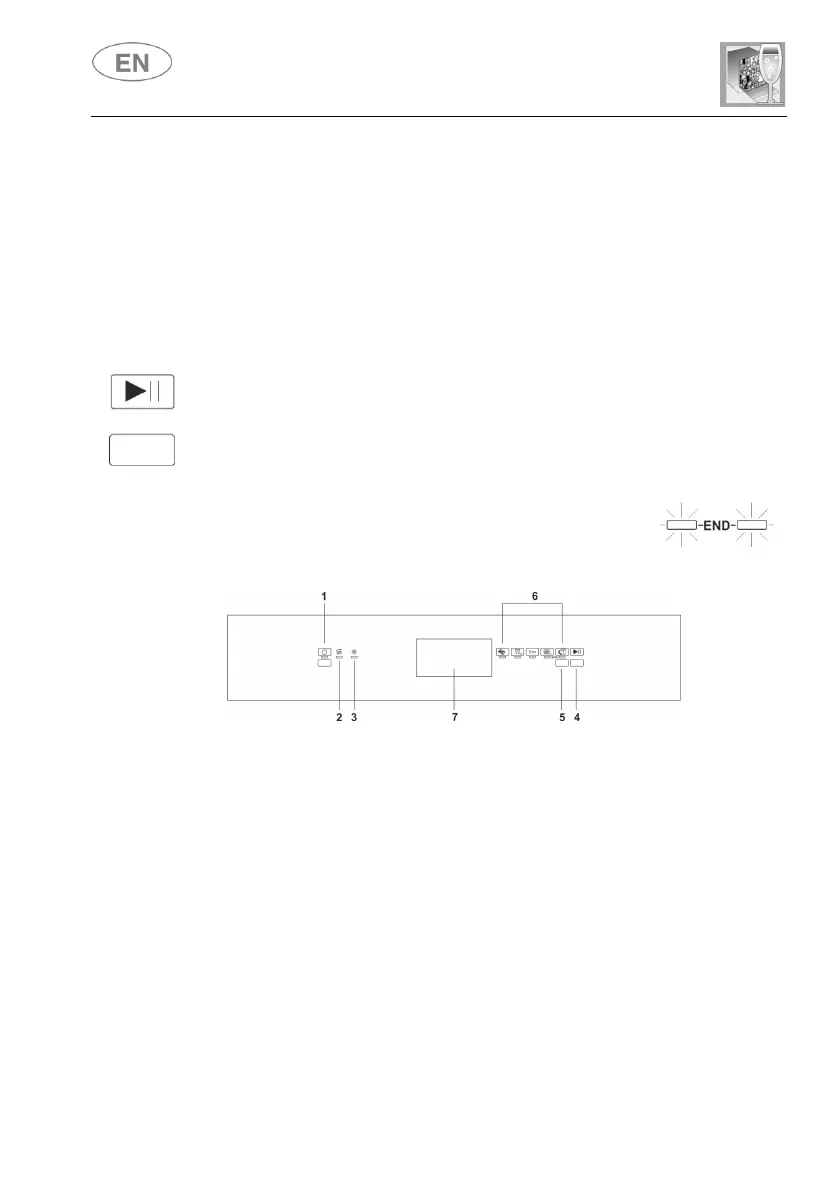
When the ON/OFF button (1) is pressed, the dishwasher switches on.
The indicator lights will display the dishwasher's "status".
Programming operations are only possible with the door closed.
As long as the door is open, the
Press the PROGRAM SELECTION button (5) several times until the light of
the program required comes on.
To start the dishwasher, press the START/PAUSE button (4) for a few
seconds, until the light of the selected program starts to flash (confirmation
beep).
The light will flash as long as the program is in progress, to indicate that it
At the end of the program the beeper sounds briefly and
To interrupt a program in progress:
press the START/PAUSE button (4); the light of the program in
progress remains on (confirmation beep);
you may now restart the program by pressing button (4) again until it
restarts, or change or annul the program (see "CHANGING A PROGRAM",
NNULLING A PROGRAM
To change the running program it is necessary:
to interrupt the running program (see “INTERRUPTION A PROGRAM”);
select the new program;
TARTING THE PROGRAM


 To Next Page