User instructions
ADDITIONAL FUNCTIONS (Customizing the consumer parameters)
(available in all programs except the soak program)
The electronic control system allows personalizing the machine use
directly through a programming procedure not directly accessible that
allows: regulate water hardness level.
To access the programming environment, the
appliance
must
be turned
on with the
door closed
. Then proceed as follows:
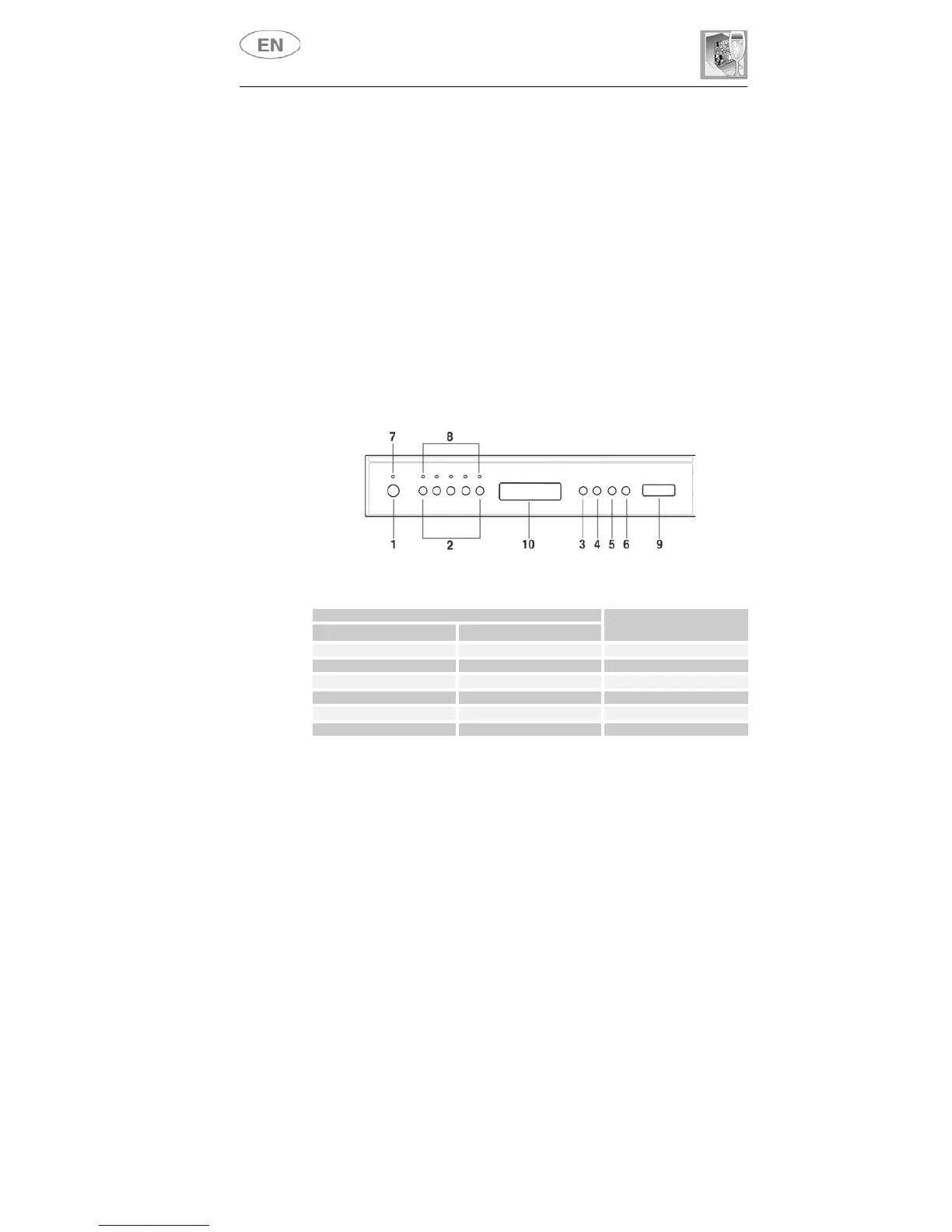
• press the
PROGRAM DELAY (5)
button until the
H
symbol appears
on the display, followed by the number 3, >
H3
;
• press the
PROGRAM DELAY (5)
button the number of times
needed to select the right setting level for the hardness of the water
(
H0, H1, H2, H3, H4, H5
);
• press the
START/STOP (6)
button to confirm the setting and return
to the program setting menu.
N.B.:
after 2 minutes, the appliance exits the parameter setting menu
automatically.
WATER HARDNESS TABLE
WATER HARDNESS
German Degrees (°dH) French Degrees (°dF)
SETTING
0 - 4 0 - 7 .h 0
5 - 15 8 - 25 .h 1
16 - 23 26 - 40 .h 2
24 - 31 41 - 60 .h 3
32 - 47 61 - 80 .h 4
48 - 58 81 - 100 .h 5
Contact your local water board for information on the hardness of your
water supply.



 To Next Page