EN - 8 -
USAGE INFORMATION
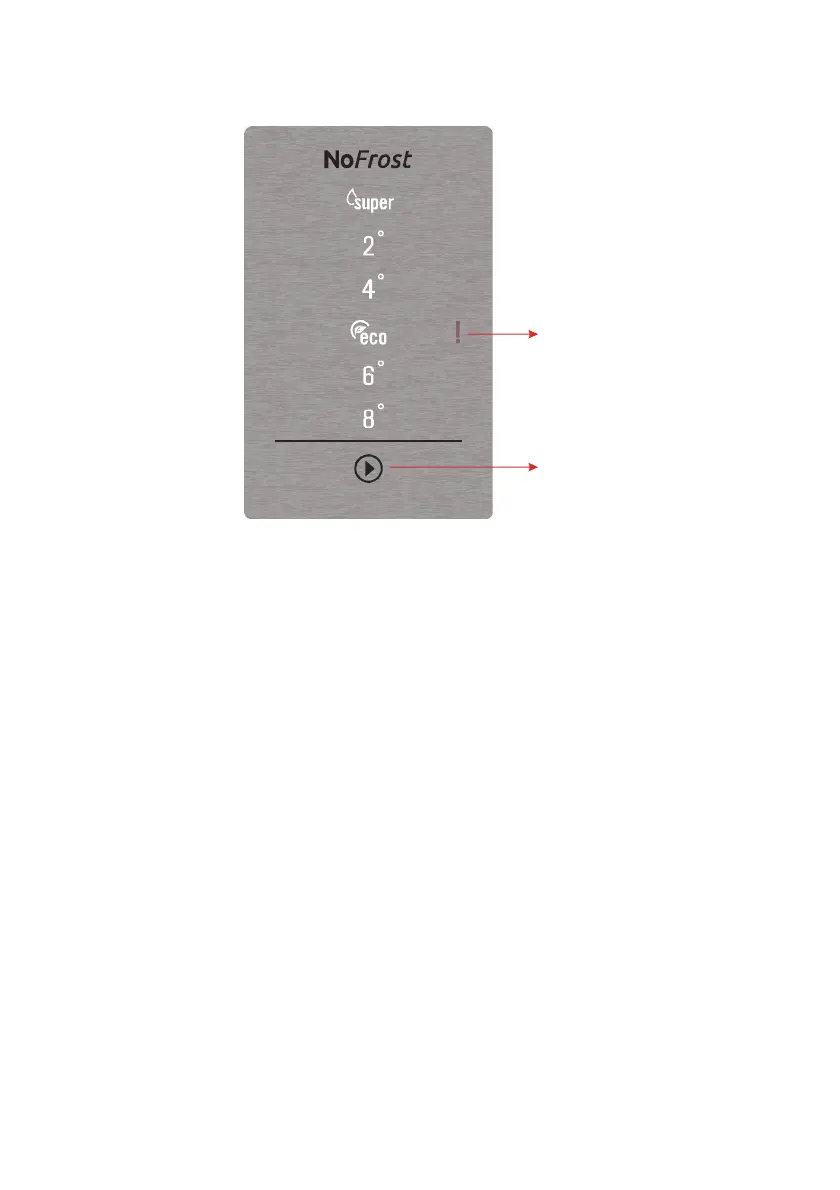
Display and control panel
Sr Alarm Indicator
Cooler Set Button
Cooler Set Button
The cooler set button allows changes to be made to the temperature of the cooler
compartment. Super cool and economy mode can also be activated using this button.
Sr Alarm
Sr alarm will change to red and an alarm will sound if any problems occur.
Super cool mode
Activating Super Cool Mode
• Push the cooler set button until the super cool symbol illuminates. The buzzer will
sound twice and the mode will be set.
During Super Cool Mode
• Super cool mode can be cancelled in the same way it is selected.
Note: Super cool mode will automatically cancel after 5 hours, depending on the environ-
mental temperature or when the refrigerator sensor reaches a sufficiently low tempera-
ture.
Economy mode
Activating Economy Mode
• Press the cooler set button until the economy symbol illumintes.
• If no button is pressed for 1 second the mode will be set and the buzzer will sound
twice as confirmaiton.


 To Next Page