19
4 / USING YOUR APPLIANCE
EN
•Delayed cooking with
programmed cooking end
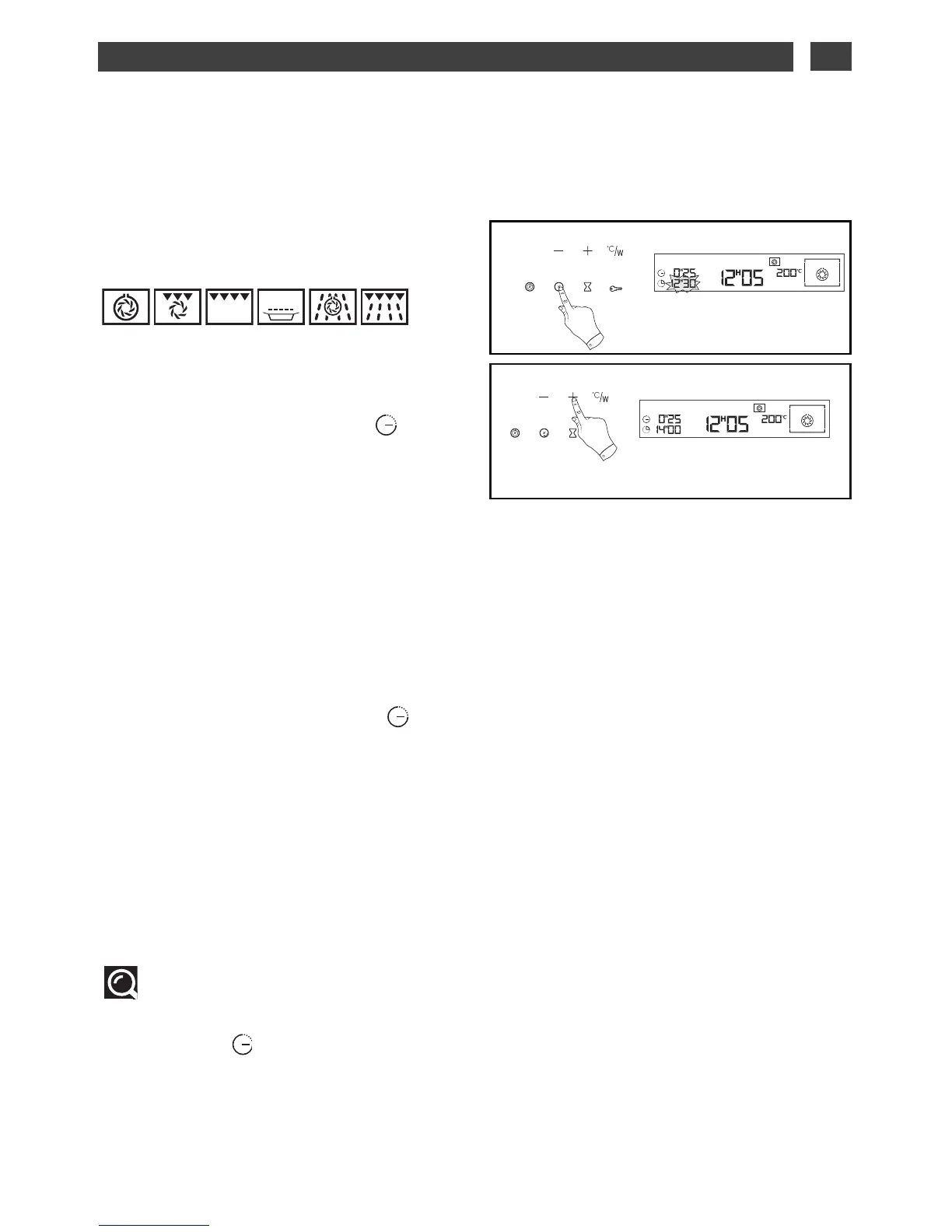
This function is only possible for the following
functions:
- Proceed as for an immediate cooking
programme, then after entering the cooking
time,
- Press the “end of cooking” touch
control, the end of cooking time appears and
flashes, to indicate that it is now possible to
set the time.
Example: It is 12:05 (fig.1).
You programmed a cooking time of
25 minutes.
The displayed end of cooking time is 12:30.
- Adjust the end of cooking time by pressing
the + or - touch controls.
Example: End of cooking 14:00 (fig.2).
- Confirm with the “End of cooking” .
Once the cooking end time has been
programmed, the time comes back on the
display.
After these steps, the oven heating is delayed
so that cooking ends at 14:00.
When the cooking cycle is finished, a series of
beeps is emitted for several minutes You can
stop the beeps by pressing START/STOP for
one second.
Tip:
You can view or change the end of cooking
by pressing the touch control. To cancel
your programme, press the START/STOP
touch control.
DELAYED COOKING
••


 To Next Page