< 25 >
FREQUENTLY ASKED QUESTIONS
Please refer to the Instructions Guide if have any detail questions for these FAQs.
If n ecessary, please contact our customer service.
INSTALLATION FAQ
Q1. Why does the latch is stuck?
A1. The locking tongue is stuck with IC line. Please chec k and place the IC
line inside mounting plate corr ectly by viewing manual or install video.
A2. (if only work w ith mechanical key)
1.Please make sure the spindle part is works properly after passing
through t
he deadbolt. If you can't use the APP or keypad to control
unless insert a key(lock is stuck), please help to check: re-install after
rotate the spindle by 90 degree.
2.Then check the direction of the knob. Make sure that it is in
horizontal for Left han dle and in vertical for right handle when in
unlock status.
Q2. How to lock/unlock via keypad?
A2. Long press “#” and hold for 2s to lock the door, and enter the
passcode and press “#” to unlock the door.
Q3. Operates backwards. Smart l
ock will unlock when yo u locked it,
and will lock when you unlocked it.
A3. Please find the toggle button inside the back panel, then switch it to
another side. (If it is right handle door, please set to R. If it is left
handle door, please set to L.)
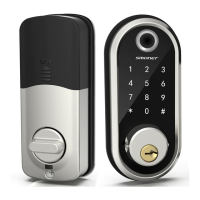
Q4. How to open the keyhole cover?
A4. Find the dots on both side of the k eyhole cover, and use 2 pins to
press them at the same time. The keyhole cover will pop up.
Q5. How to unlock if battery power runs out?
A5. A micro USB can directly power the
lock and activ ate the keyboard.
Charging it via the ports under the lock.


 To Next Page