
 Need help?
Do you have a question about the SMONET Y001 and is the answer not in the manual?
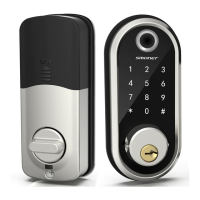
Details the technical specifications of the smart lock, including item number, material, weight, and communication modes.
Lists all components included in the smart lock package with their respective quantities.
Highlights the smart lock's features like enhanced security, real-time records, convenient sharing, and easy installation.
Lists the required tools for installing the smart lock, including screwdriver and measuring tools.
Details the process for adjusting the latch length to fit the door properly.
Guides on measuring door backset, hole diameters, and door thickness for compatibility.
Provides instructions on how to install the latch mechanism into the door.
Details the steps for installing the mounting plate onto the door jamb.
Guides on connecting the keypad, IC wire, and securing the assembly with screws.
Explains how to determine if the door is left-handle or right-handle for correct setup.
Instructs on orienting the thumb turn piece for left or right-handle doors in unlock status.
Details how to set the toggle button on the back cover for left or right-side installation.
Provides steps for removing the battery cover and installing the receiver module.
Guides on connecting the IC wire to the port and securing the receiver module.
Explains how to insert batteries and attach the back battery cover to complete the installation.
Instructions on downloading the TTLock app, registering an account, and logging in.
Guides on pairing the smart lock with the TTLock application following on-screen prompts.
Details account setup, password management, and adding multiple smart device locks.
Explains how to lock and unlock the smart lock using the app, keypad, or keys.
Describes how to send temporary or permanent digital keys to family and guests.
Guides on creating and managing permanent, one-time, or time-limited passcodes.
Covers managing authorized accounts (eKeys) and viewing/resetting stored passcodes.
Explains how to match permanent or timed IC cards with the smart lock.
Details the process for registering and using fingerprint unlock on the smart lock.
Shows how to check the time and method of lock operation for security monitoring.
Outlines various settings like auto-off time, lock sound, and remote unlocking configuration.
Covers checking battery status, setting admin passcodes, and configuring automatic locking.
Explains the requirement of a Wi-Fi Gateway for enabling remote lock control.
Step-by-step guide to connect the Wi-Fi Gateway to the TTLock application for remote features.
Instructions for authorizing the TTLock app in Alexa to enable voice control and remote unlock.
Details how to enable 'unlock by app' and 'unlock by voice' features within the Alexa app.
Explains how to connect and use a smart watch (Apple/Android) for lock/unlock operations.
Guides on setting the primary admin passcode via the app or directly on the keypad.
Details methods for locking/unlocking using keys, keypad, and the app, including remote control notes.
Explains how to manually engage the dead lock from inside, preventing access via code or app.
Provides steps to perform a factory reset on the smart lock, including initialization password.
Informs about low battery alerts and how to use a micro USB for temporary power.
 General
| Connectivity Technology | Bluetooth |
|---|---|
| Power Source | Battery Powered |
| Material | Zinc Alloy |
| Controller Type | App Control |
| Compatibility | iOS, Android |
| Power Supply | 4 AA Batteries |
| Weather Resistance | IP65 |
| Unlock Methods | Fingerprint, Key |

 To Next Page