EasyManua.ls Logo

Snap-On BATTERY CHARGER PLUS - User Manual

Snap-On BATTERY CHARGER PLUS
51 pages
Print Icon
To Next Page IconTo Next Page
Loading...
00-99-000963/1109
INTRODUCTION
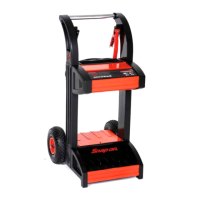
BATTERY CHARGER PLUS
Thank you for purchasing your new Snap-on Battery
Charger plus.
The EEBC500-INT is an advanced, full featured battery
charger with additional functions that make it a battery
service system.
The charger utilizes a microprocessor, controlling both the
voltage and current going to the battery, providing maximum
power and the precise control needed to charge the various
types of 6 (3 cell), 12 (6 cell) and 24 (12 cell) volt batteries
on the market today; including AGM, GEL, Sealed Lead
Acid, Deep Cycle, Spiral-Cell and Standard Automotive
batteries up to 155 Ah capacity, reducing charge times while
maximizing battery life.
Engine Starting Power
The microprocessor is the heart of the multistage charging
algorithm built into the EEBC500-INT. Microprocessor
based charging technology achieves an extremely versatile
charging algorithm, and provides a user friendly set of
controls and an easy to read digital display (voltage, % of
charge, alternator % of performance). The versatility allows
many different battery types to be charged.
Flash Reprogramming Power Supply
Provides a consistent power at the OEM specied
voltage (user entered) to allow for uninterrupted ash
reprogramming of vehicle’s computers or to retain vehicle
system settings.
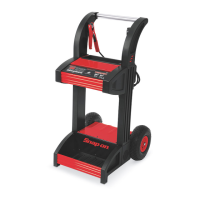
BATTERY CHARGER PLUS
EEBC500-INT
EEBC500-INT-Z

Questions and Answers

  • W
    William SpenceJul 27, 2025
    Why is there no reading on the Snap-On PLUS display or the “Connected” LED is not on?
    • S
      Susan NelsonJul 28, 2025
      If your Snap-On Battery Charger display shows no reading or the “Connected” LED is off, begin by checking the clamps for a secure connection at both the battery and frame, ensuring these points are clean. Next, verify that the AC cord and any extension cords are properly connected. Check the power receptacle for an open fuse or tripped circuit breaker. Finally, confirm that the battery clamps are connected with the correct polarity.
  • B
    bennettpatriciaAug 2, 2025
    What to do if Snap-On PLUS is connected correctly but charging is not taking place?
    • E
      Emma PerezAug 2, 2025
      If your Snap-On Battery Charger is connected correctly but not charging, the battery may be severely discharged. If the battery voltage is very low (one volt or less), switch to the Manual mode for a few minutes until charging begins, then switch back to Automatic mode at the desired charge rate.
  • F
    fwaltonAug 6, 2025
    Why is the “Charging” LED flashing on my Snap-On PLUS?
    • M
      Martin LarsonAug 6, 2025
      If the “Charging” LED is flashing on your Snap-On Battery Charger, the battery may be sulfated. A sulfated battery should eventually accept a normal charge if left connected. The charger will continue to charge with a low current for up to 10 hours to recover the battery. If the battery does not charge after 10 hours, have it checked.
  • T
    Tara EdwardsAug 11, 2025
    What to do if the Snap-On PLUS has a short or no start cycle when cranking engine?
    • K
      Kevin GomezAug 11, 2025
      If you experience a short or no start cycle when cranking the engine with your Snap-On Battery Charger, several factors could be at play. Ensure you wait three minutes between cranks, or until the display reads ??? and the Charging LED is on. Check for poor connections at the battery and frame, ensuring connecting points are clean. Also, verify that the power cord and extension cord are securely plugged in and that the receptacle has power by checking the fuse or circuit breaker. If the charger has overheated, allow time for the internal thermal protector to reset. For a severely discharged battery, charge for 10 to 15 minutes in the 15 amp manual rate to help assist in cranking.
  • K
    Kenneth JohnsonAug 16, 2025
    Why is my Snap-On PLUS making a clicking noise?
    • M
      Megan Mooney MDAug 16, 2025
      A clicking noise from your Snap-On Battery Charger can indicate several issues. In manual mode, it could mean the circuit breaker is cycling, suggesting incorrect settings. The battery might be defective and should be checked. Also, inspect the battery clamps for shorts and replace if necessary. If the battery is severely discharged but otherwise good, allow charging to continue. Finally, verify and correct the lead connections if they are reversed.
  • M
    Martin GordonAug 22, 2025
    Why does the display reading stay high on my Snap-On Battery Charger?
    • M
      Ms. Bridget WilsonAug 22, 2025
      If the display reading on your Snap-On Battery Charger remains high, it could be due to a severely discharged battery; in this case, continue charging the battery for an additional two hours. Alternatively, ensure that the BATTERY VOLTAGE switch is correctly set for the appropriate voltage (6V, 12V, or 24V).

Summary

INTRODUCTION & PRODUCT OVERVIEW

Battery Charger Plus Features

Product overview and its function as a battery service system.

Engine Starting Power

Describes the microprocessor's role in charging and user interface features.

Flash Reprogramming Power Supply

Provides consistent power for vehicle computer reprogramming.

SAFETY INFORMATION & PRECAUTIONS

Safety Notice and Hazard Definitions

Emphasizes reading manual, technician responsibility, and defines hazard signal words.

Battery Gases and Charging Preparation

Discusses precautions for explosive gases and preparation for charging.

Charger Location and Ventilation

Guidelines for placing the charger and ensuring adequate ventilation.

Battery Acid and Electrical Safety

Covers battery acid hazards, grounding, and AC power cord safety.

TECHNICAL SPECIFICATIONS

EEBC500-INT Specifications

Lists technical details like power supply, frequency, voltage, current, dimensions, and weight.

ASSEMBLING YOUR CHARGER

Assembly Tools and Steps

Lists required tools and provides steps for assembling axle, wheels, and handles.

CHARGER CONTROLS AND OPERATION

Controls and Indicators Overview

Explains the function of each control button and indicator light on the charger.

Charging Modes: Automatic & Manual

Steps for setting up and performing automatic or manual charging of batteries.

Special Functions: Engine Start & Reprogramming

Instructions for using engine start and flash reprogramming features.

Diagnostic Checks

Procedures for checking battery percentage and alternator performance.

CONNECTING THE CHARGER

Connecting to Battery In;Out of Vehicle

Detailed steps for connecting the charger to a battery installed in or removed from a vehicle.

CALCULATING CHARGE TIMES

Charge Time Estimation Methods

Methods for estimating charge time using charts or hydrometer/electronic testers.

MAINTENANCE, CARE, AND STORAGE

Routine Care and Storage Guidelines

Steps for cleaning, cable management, and storing the charger properly.

TROUBLESHOOTING

Common Issues and Solutions

A guide to diagnosing and resolving common operational problems with the charger.

REPLACEMENT PARTS & CABLE REPLACEMENT

Replacement Parts Diagram

Illustrates parts with their corresponding stock numbers for identification.

Clamp Cable Replacement Procedure

Step-by-step instructions for removing and installing new clamp cables.

WARRANTY INFORMATION

Limited Two (2) Year Warranty Details

Details the terms, conditions, and coverage of the product's limited two-year warranty.

Snap-On BATTERY CHARGER PLUS Specifications

General IconGeneral
BrandSnap-On
ModelBATTERY CHARGER PLUS
CategoryBattery Charger
LanguageEnglish

Related product manuals