EasyManua.ls Logo

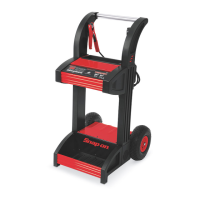
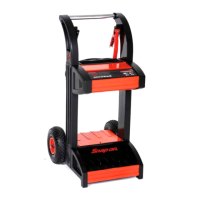
Snap-On BATTERY CHARGER PLUS EEBC500B-INT - User Manual

Snap-On BATTERY CHARGER PLUS EEBC500B-INT
55 pages
Print Icon
To Next Page IconTo Next Page
Loading...
BATTERY CHARGER PLUS
EEBC500B-INT
0099002255-00
EEBC500B-INT-Z

Questions and Answers

  • N
    Nicole ThomasAug 12, 2025
    Why is the charging LED flashing on my Snap-On Battery Charger?
    • B
      Benjamin EdwardsAug 12, 2025
      If the charging LED on your Snap-On Battery Charger is flashing, it indicates that the charger has stopped in one of the charge modes or that the battery is bad. The charger cannot complete the charge. It is recommended to have the battery checked and replaced if necessary. Disconnect the charger from the AC outlet and remove the clamps. Do not continue trying to charge the battery.
  • C
    Christopher RamirezAug 16, 2025
    Why does my Snap-On Battery Charger engine start not work?
    • B
      brianwattsAug 16, 2025
      If the engine start function on your Snap-On Battery Charger isn't working, consider these potential causes: * **Excessive Current Draw:** If the vehicle is drawing more than 300 amps (6V/12V) or 250 amps (24V), the crank time may be reduced. * **Insufficient Rest Time:** Ensure you wait 3 minutes between cranks. When the Engine Start LED blinks, wait the full rest time before attempting the next crank. * **Overheated Charger:** The thermal protector may have tripped. Ensure the charger vents are not blocked. Wait for it to reset and try again. * **Severely Discharged Battery:** For a severely discharged battery, use the 60A Rapid rate for 10 to 15 minutes to assist in cranking.
  • C
    Cory WallsAug 19, 2025
    Why does the battery percentage stay low during charging with my Snap-On Battery Charger?
    • T
      toddhernandezAug 20, 2025
      If the battery percentage remains low while charging with your Snap-On Battery Charger: * **Severely Discharged Battery:** Continue charging the battery for two more hours. If the problem persists, contact your Snap-on representative. * **Incorrect Voltage Setting:** Ensure the BATTERY VOLTAGE switch is correctly set for the appropriate voltage (6V, 12V, or 24V).
  • S
    Stacy BlankenshipAug 23, 2025
    Why don't the “Trickle” and “Fast Charge” rates work on the 24V setting of my Snap-On Battery Charger?
    • M
      Marcia DixonAug 25, 2025
      The Snap-On Battery Charger does not fully charge 24V batteries. It boosts the voltage to 27.2V and holds the voltage at this level.
  • P
    Philip MitchellAug 27, 2025
    What to do if the Snap-On Battery Charger shows no reading or 0.0V on the display?
    • C
      christopher47Aug 27, 2025
      If your Snap-On Battery Charger display shows no reading or 0.0V, there are several possible causes and solutions: * **Poor Connection:** Check the clamps for a secure connection at both the battery and the frame. Ensure the connecting points are clean. * **Loose AC Cord:** Verify that the power cord and any extension cords are firmly plugged in. * **No Power:** Check the AC outlet for an open fuse or a tripped circuit breaker. * **Reversed Polarity:** Ensure the battery clamps are connected with the correct polarity. Verify and reverse if necessary.
  • M
    Michelle MoyerAug 31, 2025
    What to do if the Snap-On Battery Charger is making a clicking noise?
    • N
      Natalie BryantAug 31, 2025
      If your Snap-On Battery Charger is making a clicking noise, here are some possible causes: * **Circuit Breaker Cycling:** The circuit breaker may be cycling due to high capacity operation. Stop the operation by pressing the START/STOP button and allow the unit to cool down before resuming. * **Defective Battery:** Have the battery checked. * **Shorted Battery Clamps:** Inspect the cables for shorts and replace them if needed. * **Severely Discharged Battery:** Allow charging to continue, so the battery has a chance to recover. If the clicking continues for more than 20 minutes, stop charging and have the battery checked. * **Reversed Connections:** Ensure the lead connections are correctly placed on the battery.
  • K
    Kevin GillespieSep 3, 2025
    What to do if I get short or no start cycle when cranking engine with Snap-On Battery Charger?
    • S
      salasmichaelSep 3, 2025
      If you experience a short or no start cycle when cranking the engine with your Snap-On Battery Charger, consider the following: * **Insufficient Rest Time:** Wait three minutes between cranks, or until the display reads ??? and the LED is on. * **Poor Connection:** Check for poor connection at the battery and frame. Ensure connecting points are clean. * **Loose AC Cord:** Verify the power cord and extension cord are securely plugged in. * **No Power:** Check the AC outlet for an open fuse or circuit breaker. * **Overheated Charger:** The internal thermal protector may have tripped. Wait until it automatically resets and try again. * **Severely Discharged Battery:** If the battery is severely discharged, wait for 10 to 15 minutes in Engine Start mode to help assist in cranking.
  • I
    ibennettSep 7, 2025
    What does “SUL” mean on my Snap-On Battery Charger display?
    • K
      Kylie GambleSep 7, 2025
      If your Snap-On Battery Charger displays “SUL”, it indicates that the battery is sulfated. A sulfated battery may eventually recover if left connected. The charger will continue to charge with a low current for up to 10 hours to recover the battery. If the battery does not take a charge after 10 hours, have it checked.

Summary

Introduction to Battery Charger Plus

EEBC500 B-INT Features Overview

Details the advanced features of the EEBC500B-INT battery charger.

Flash Reprogramming Power Supply

Provides consistent power for vehicle computer reprogramming.

Key Features Overview

Lists key features like wheels, digital display, and storage.

Safety Information and Precautions

General Safety Notice and User Responsibility

Emphasizes reading manual and user's responsibility for safe operation.

Understanding Safety Signal Words

Explains hazard levels indicated by DANGER, WARNING, CAUTION, and IMPORTANT.

Important Safety Instructions

Electric Shock and Fire Safety Precautions

Details precautions to avoid electric shock and fire risks.

Battery Explosive Gas Safety

Warns about battery gases and necessary safety measures.

Personal Safety Precautions

Advises on personal protective measures when working with batteries.

Preparing to Charge

Battery Acid Safety and Handling

Warns about corrosive battery acid and safe handling procedures.

Charger Location

Charger Location Safety Guidelines

Provides instructions for locating the charger safely away from batteries.

DC Connection Precautions

Safe Connection and Disconnection

Outlines procedures for safely connecting and disconnecting DC output clips.

Vehicle Battery Installation Steps

Spark Prevention During Battery Connection

Advises on preventing sparks near batteries during connection.

Vehicle Battery Connection Procedure

Step-by-step guide for connecting/disconnecting the charger to a vehicle battery.

Grounding and AC Power Cord

Grounding and AC Power Cord Safety

Stresses the importance of proper grounding and AC cord safety.

Extension Cord Usage Guidelines

Provides recommendations for using extension cords with the charger.

Charger Features Overview

Charger Components Identification

Illustrates and labels the various parts and features of the charger.

Assembling the Battery Charger

Charger Assembly Tools

Lists the tools needed for assembling the charger.

Axle and Wheel Assembly

Step-by-step guide for attaching the axle and wheels.

Handle Assembly Instructions

Instructions for assembling the charger's handle.

Battery Charger Controls and Indicators

Control Panel Layout and Functions

Explains the digital display, status LEDs, and control buttons.

Reprogramming Default Settings

Details how to change and save charger startup default settings.

Operating the Battery Charger

Automatic Charging Operation

Step-by-step guide for standard automatic charging.

Battery Voltage Boosting

Instructions for using the rapid charge function for voltage boosting.

Engine Start Operation

How to use the charger to start a vehicle engine.

Operating the Battery Charger

Engine Start Mode Warnings

Critical warnings and steps before using the engine start feature.

Flash Reprogramming Guide

Steps and guidelines for flash reprogramming vehicle ECUs.

Battery Status and Alternator Check

How to check battery charge percentage and alternator performance.

Calculating Charge Times

Charge Time Calculation: Chart Method

Using a chart to determine charging time based on battery type and rating.

Charge Time Calculation: Tool Method

Using hydrometer or electronic tester to calculate charge time.

Maintenance, Care, and Storage

Maintenance, Care, and Storage

Provides advice on maintaining and storing the charger for longevity.

Error Code Reference

Error Codes and Solutions

Lists common error codes and their corresponding reasons and solutions.

Troubleshooting Guide

Troubleshooting Common Issues

A table detailing common issues, causes, and fixes for the charger.

Troubleshooting Guide

Troubleshooting Complex Issues

Addresses more complex issues like buzzing, low battery percentage, and engine start failures.

Replacement Parts List

Replacement Parts Diagram and List

Shows a diagram and lists replacement parts with stock numbers.

Replacing Clamp Cables

Replacing Clamp Cables

Step-by-step instructions for replacing the clamp cables on the charger.

Warranty Information

Two-Year Limited Warranty

Outlines the terms, conditions, and exclusions of the Snap-on warranty.

Snap-On BATTERY CHARGER PLUS EEBC500B-INT Specifications

General IconGeneral
BrandSnap-On
ModelBATTERY CHARGER PLUS EEBC500B-INT
CategoryBattery Charger
LanguageEnglish

Related product manuals