snapnrack.com
8
Required Tools
ò
Socket Wrench/Impact Driver
ò
Torque Wrench
ò
1/2” Socket
TopSpeed™ Mount to Module Frame Installation
Materials Included - TopSpeed™ System with SpeedSeal™ Technology
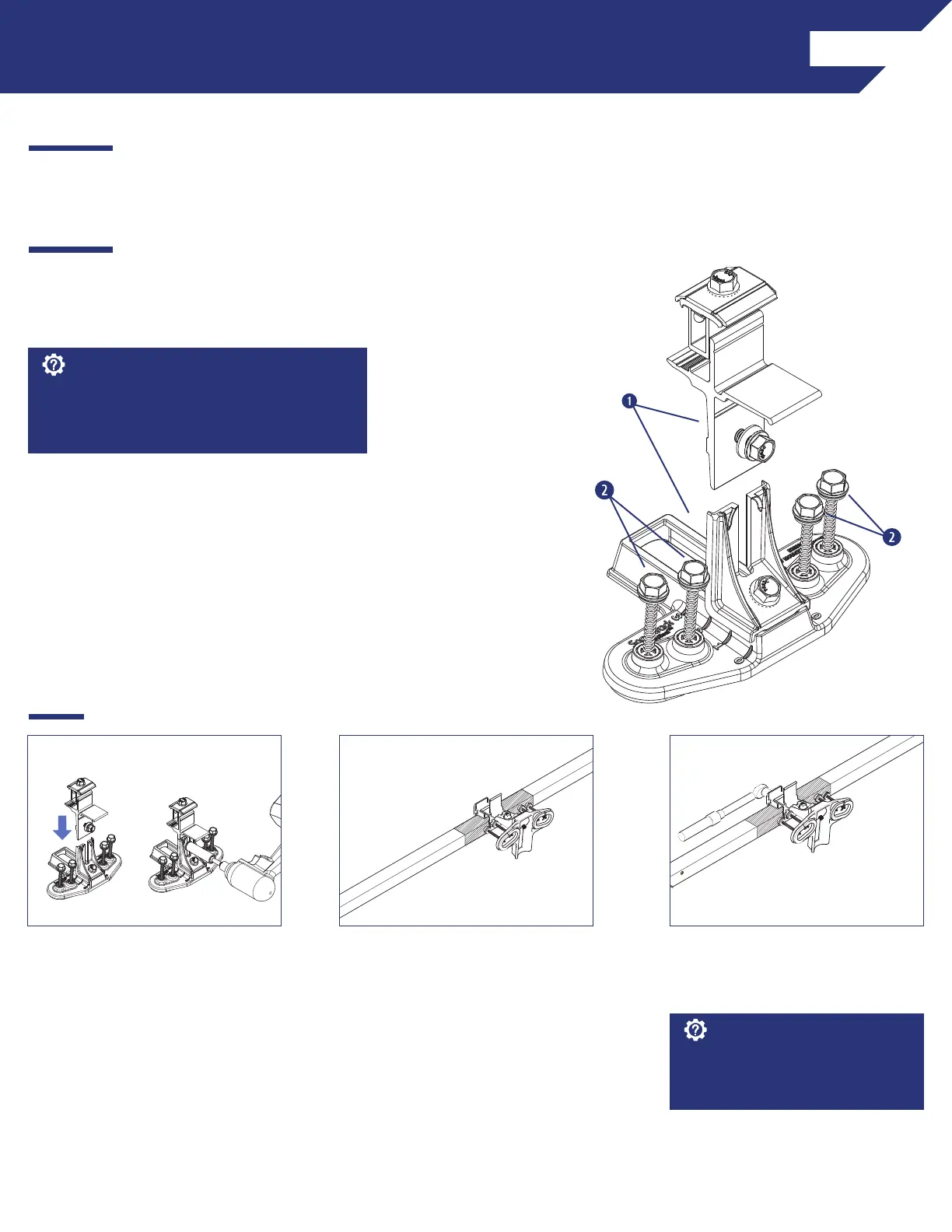
(1) SnapNrack TopSpeed™ Mount
(4) SnapNrack #14 Wood Screw with 1/2" Hex Head & sealing washer
q
INSTALLATION INSTRUCTIONS
Attach all TopSpeed
TM
mounts as the modules are
being prepped with MLPEs on the ground. Attach
Mounts before attaching MLPEs to simplify wire
management.
Best Practice:
2) Position TopSpeed™ Mount clamp
on the module frame within the
module manufacturers required
clamping zone.
3) Tighten 1/2" clamping bolt to 16
ft-lb. Only two Mounts are required
per module on one side.
For high load conditions add a third
attachment in the middle of the
module frame.
Install Note:
1) Assemble all TopSpeed™ Mounts
required for the installation. Slide
the clamp tower assembly into the
angle bracket riser and tighten the
leveling bolt to 16 ft-lbs.



 To Next Page