14
Operating the Tractor
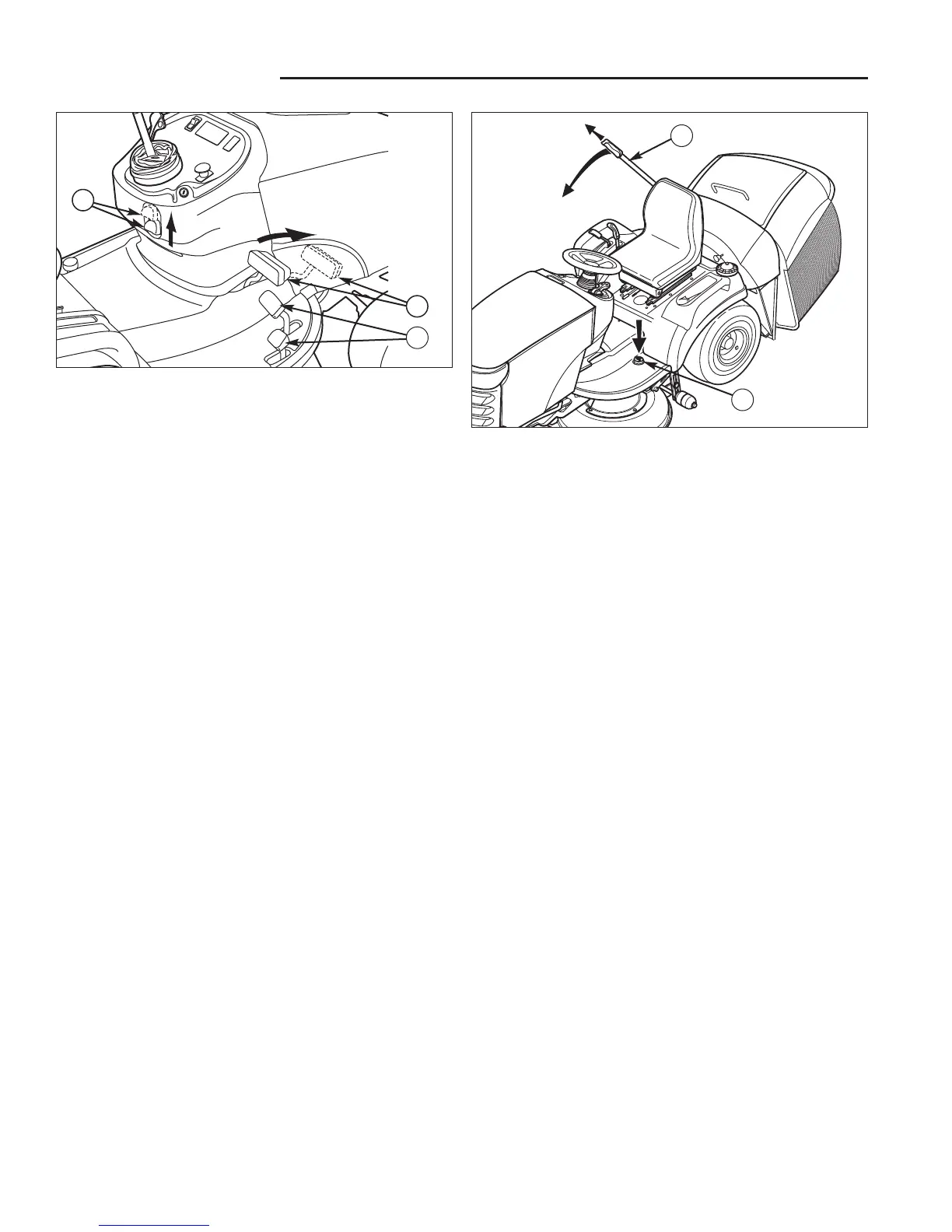
Figure 3. Engaging the Parking Brake
A. Ground Speed Pedals
B. Brake Pedal
C. Parking Brake Knob
Figure 4. Emptying the Hopper
A. Catcher Dump Pedal
B. Catcher Lever
PARKING BRAKE FUNCTION
Applying the Parking Brake - See Figure 3. To lock
the parking brake, release the ground speed pedals (A),
fully depress the brake pedal (B), pull UP on the parking
brake knob (C), and then release brake pedal.
Releasing the Parking Brake - See Figure 3. To
release the parking brake, fully depress the brake pedal
(B) and push the parking brake knob (C) DOWN.
EMPTYING THE CATCHER
To empty the catcher:
1. Depress the catcher dump pedal (A, Figure 4).
2. Extend the catcher lever (B) and use it to empty the
catcher.
3. Use the lever (B) to close the catcher, and slide it
back into the catcher.
A
B
C
A
B



 To Next Page