EasyManua.ls Logo

Snapper 7800842-01 - User Manual

Snapper 7800842-01
64 pages
Print Icon
To Next Page IconTo Next Page
Loading...
7105342
Rev. D
Model No.
7800841-01
7800842-01
7800845-01
Operator’s Manual
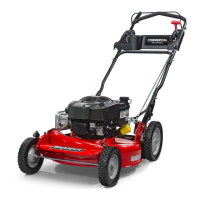
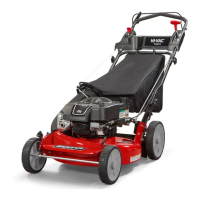
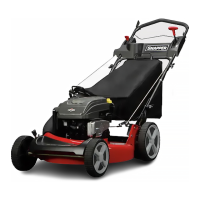
21” Steel Deck Walk Mowers
Series 20
!
en fr
Not for
Reproduction

Questions and Answers

  • J
    Jeffrey TurnerJul 31, 2025
    Why does my Snapper Lawn Mower engine stall after starting?
    • E
      eblakeJul 31, 2025
      Your Snapper Lawn Mower engine might stall or stop due to several reasons. Ensure the blade control is held securely against the handle during operation. Refill the fuel tank to the proper level if it's empty. Also, a dirty engine air pre-cleaner or air cleaner can cause this, so clean them of debris. A defective spark plug or improperly set gap can also be the culprit, so service the spark plug. Finally, drain and clean the fuel system to remove any water, debris, or stale fuel.
  • R
    robert32Aug 4, 2025
    Why is my Snapper 7800842-01 Lawn Mower losing power?
    • M
      Mr. Jeremy SmithAug 4, 2025
      If your Snapper Lawn Mower engine loses power, start by checking the engine air pre-cleaner or air cleaner; clean or replace the filters if they are dirty. A faulty spark plug can also cause this issue, so service it. Additionally, water, debris, or stale fuel in the fuel system can lead to power loss; drain and clean the fuel system to resolve this.
  • G
    gonzalezjulieAug 10, 2025
    How to fix Snapper 7800842-01 Lawn Mower cutting grass unevenly?
    • K
      khernandezAug 10, 2025
      If your Snapper Lawn Mower is cutting grass improperly, adjust the cutting height if it's too low or high. Ensure the engine speed control is in the ‘Fast’ position if the engine speed is too slow. If the forward ground speed is too fast, move the ground speed control to a slower speed. For a terraced cut from side to side or excessive deck pitch from front to rear, adjust the height of cut with the height adjust levers. Finally, sharpen the cutting edges or replace the blade if it's dull or damaged.
  • J
    Joshua ColemanAug 14, 2025
    Why Snapper Lawn Mower Will Not Move Loss Of Traction?
    • P
      pottermeganAug 15, 2025
      If your Snapper Lawn Mower won't move due to loss of traction, begin by cleaning any debris on or around the wheel drive components. If the driven disc is slipping, clean or replace it. A drive belt that requires replacement should be replaced. If the transmission is damaged, contact an authorized dealer.
  • L
    Leslie RiggsAug 20, 2025
    Why does my Snapper Lawn Mower have poor grass discharge?
    • T
      tammyyangAug 20, 2025
      For poor grass discharge with your Snapper Lawn Mower, ensure the engine speed control is set to the ‘Fast’ position. If the forward speed is too fast, reduce it using the ground speed control. Avoid mowing when the grass is wet. Service the mower blade if it's excessively worn or damaged. Clean any buildup of grass clippings and debris under the deck. Finally, ensure the proper blade is installed correctly on the deck.
  • R
    Ryan DownsAug 25, 2025
    What causes excessive vibration in my Snapper 7800842-01 Lawn Mower?
    • M
      Mary BriggsAug 26, 2025
      Excessive vibration in your Snapper Lawn Mower can stem from a damaged, out-of-balance, or bent mower blade, which requires servicing. Loose blade components should be serviced and tightened. If equipped, replace any loose or missing air lifts and tighten them to the proper torque. A lumpy or frayed belt also leads to vibration, so replace the belt.

Summary

Operator Safety

General Operating Safety

Emphasizes operator responsibility, common sense, reading the manual, and awareness of hazards.

Children and Slope Safety

Safety precautions for children and guidelines for operating the mower on slopes.

Hazard Awareness

Details risks from moving parts, thrown objects, debris, and safe fuel handling practices.

Preparation and Decals

Guidelines for child safety, slope operation, preparation, and understanding safety decals.

Operation

Before Starting Checks and Recommendations

Pre-operation checks, oil, and fuel recommendations for the mower.

Starting, Propelling, and Stopping

Steps for starting, self-propelling, and safely stopping the mower.

Adjustments and Attachments

Procedures for adjusting handle/cutting height and installing attachments like bags/deflectors.

Maintenance

Maintenance Chart and Emissions Control

Schedule of routine maintenance tasks and info on emissions control system service.

Engine Oil and Air Filter Service

Instructions for changing engine oil and servicing the air filter.

System Checks, Storage, and Blade Service

Procedures for checking safety systems, storage, and servicing the mower blade.

Drive System and Belt Maintenance

Procedures for checking, adjusting, and replacing drive system components and belts.

Troubleshooting and Warranties

Troubleshooting Common Problems

Table of common mower issues, probable causes, and corrective actions.

Product Warranty Policy

The official warranty policy statement from Briggs & Stratton for their products.

Emissions Control Warranty

Warranty specific to emissions control systems in California and the US.

Slope Guide and Specifications

Slope Guide

Visual guide and instructions for safely operating the mower on slopes.

Mower Specifications

Technical specifications for the Snapper 21" Steel Deck Walk Mowers Series 20.

Snapper 7800842-01 Specifications

General IconGeneral
EngineBriggs & Stratton
Drive SystemRear-Wheel Drive
Drive TypeSelf-Propelled
Mulching CapabilityYes
Bagging CapabilityYes
Side DischargeYes
Deck MaterialSteel
Starter TypeRecoil
Cutting Width21 inches
Wheel Size (Front)8 inches
Wheel Size (Rear)11 inches
Cutting Height1.25 - 3.75 in
Start TypePull Start

Related product manuals