S150X 21HP, 23HP, 25HP & 27HP - 48” & 52” Mower Deck
10/2007 13
TP 300-7343-A-M1-SP
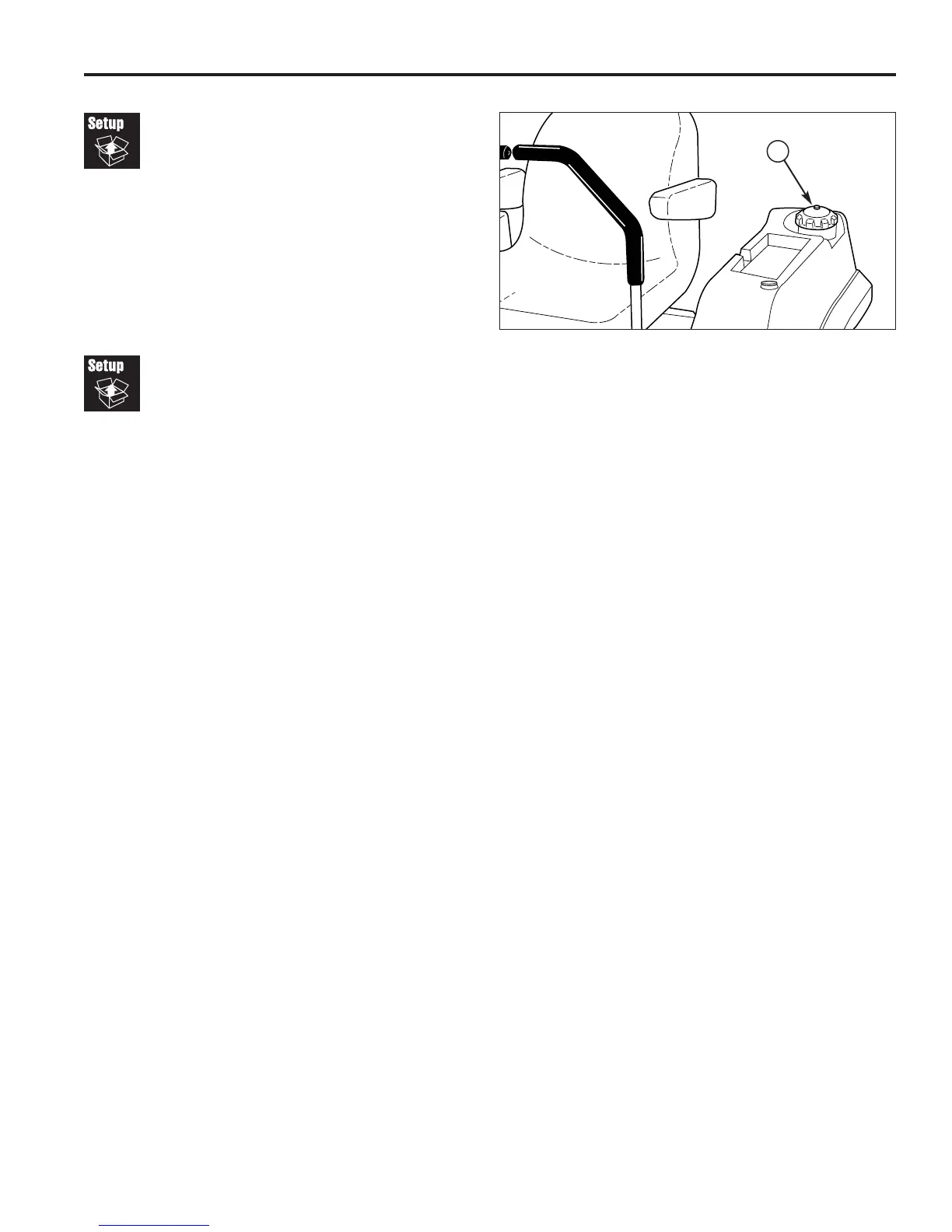
Figure 26. Adding Fuel
A. Fuel Cap
A
Adding Fuel
To add fuel:
1. Remove the fuel cap (see A, Figure 26).
2. Fill the tank to about 1-1/2” (3,81 cm) of the bottom of
the filler neck. This will allow for fuel expansion.
NOTE: Do not overfill. Refer to your engine manual for
specific fuel recommendations.
3. Install and hand tighten the fuel cap.
Starting The Engine
1. While sitting in the operator’s seat, engage the
parking brake and make sure the PTO switch is
disengaged and the motion control handles are
locked in the NEUTRAL position.
2. Set the engine throttle control to FULL throttle
position. Then fully close the choke by pulling the
knob OUT fully.
3. Insert the key into the ignition switch and turn it to
START.
4. After the engine starts, gradually open the choke
(push knob down fully). Reduce to half throttle speed
and allow to warm up.
Warm up the engine by running it for at least a minute
before engaging the PTO switch or driving the rider.
5. After warming the engine, ALWAYS operate the unit
at FULL THROTTLE when mowing.



 To Next Page