4 (4) Getting started Desktop phone PRO – 36334, rev.1.0, 2015-09-29
Recording calls
With the option CallGuide Recording you initiate all recording of calls in CallGuide Agent. It is also
possible to have automatic recording of calls.
If the option CallGuide Recording (recording button in CallGuide Agent) is not activated, the
recording function in CallGuide Voice can be used instead. In that case, recordings are initiated
manually from your desktop phone.
The calls you record via your desktop phone end up in your Inbox at CallGuide Voice User Web.
Settings for notification of recorded calls are found at CallGuide Voice User Web under Services >
Call recording.
To record a call in progress, press the recording button beneath the telephone’s display (only
active during calls). Depending on phone model you may have to configure one on the phone’s
programmable keys for recording, check with your administrator.
Handle your voicemail
To access your voicemail, press .
Settings for notification as well as other settings for your voicemail are found at CallGuide Voice
User Web under Services > Voicemail settings.
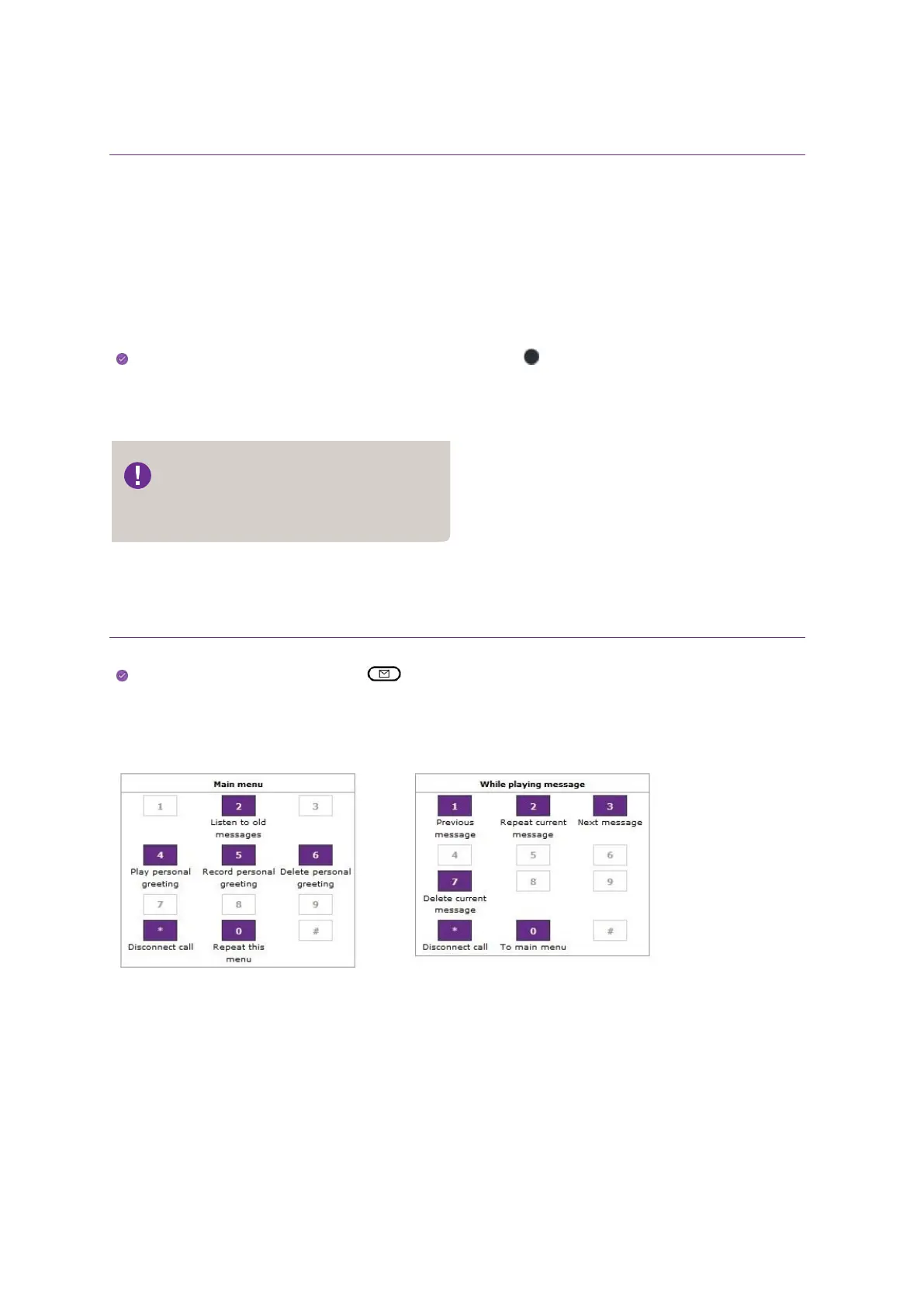
Below you see the options available when you call your voicemail.
The recording function in CallGuide
Voice can also be initiated from
CallGuide Softphone.



 To Previous Page