V: 12/19/2024 - 1 ©2024 Snom Technology GmbH 17/19
Short User Manual
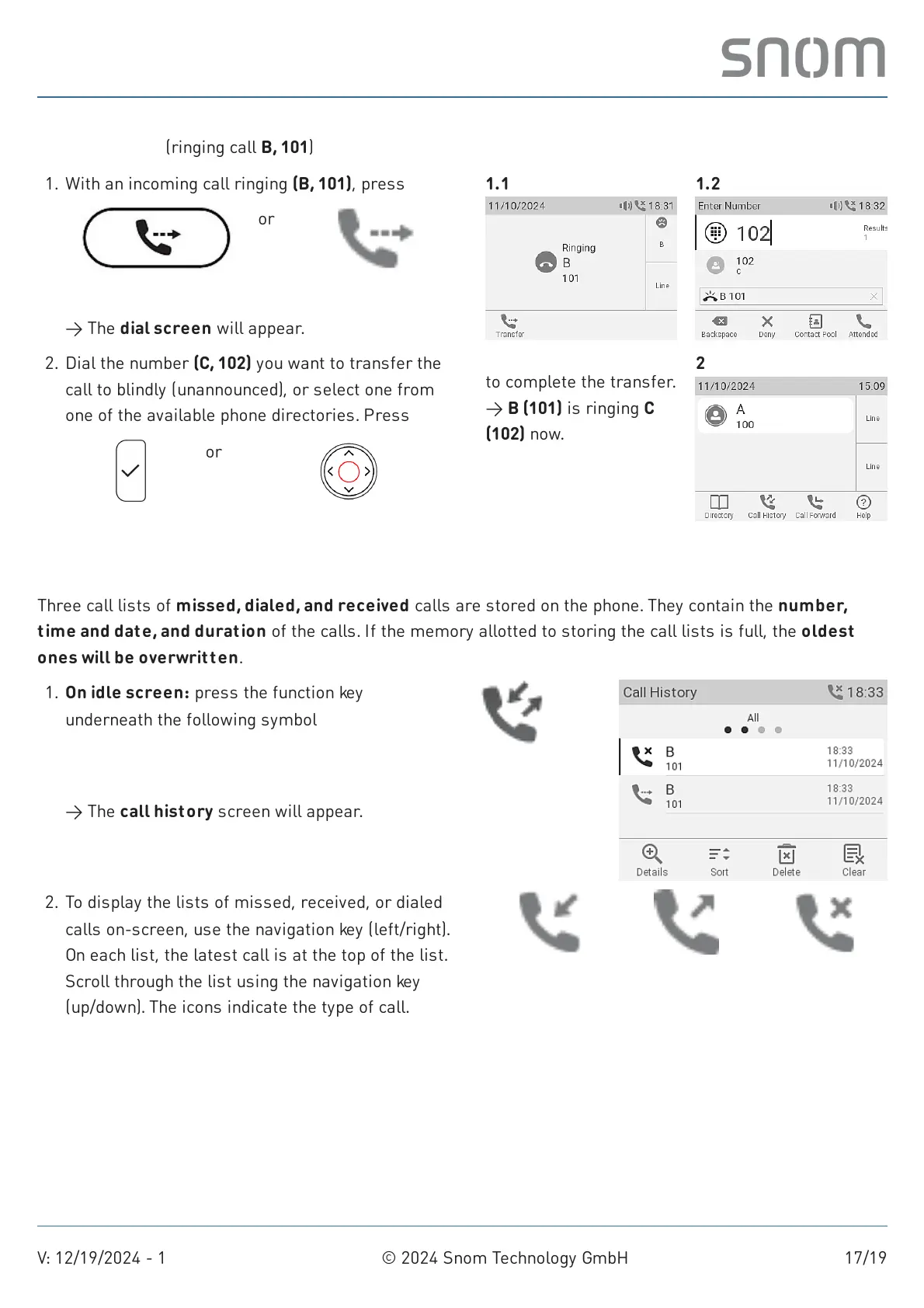
Call def lection (ringing call B, 101)
Call lists
Three call lists of missed, dialed, and received calls are stored on the phone. They contain the number,
time and date, and duration of the calls. If the memory allotted to storing the call lists is full, the oldest
ones will be overwritten.
1. With an incoming call ringing (B, 101), press
Transfer
or
Transfer
→ The dial screen will appear.
1.1 1.2
2. Dial the number (C, 102) you want to transfer the
call to blindly (unannounced), or select one from
one of the available phone directories. Press
Ok
or
Navigation key: center
to complete the transfer.
→ B (101) is ringing C
(102) now.
2
On idle screen: press the function key
underneath the following symbol
Call history
→ The call history screen will appear.
1.
2. To display the lists of missed, received, or dialed
calls on-screen, use the navigation key (left/right).
On each list, the latest call is at the top of the list.
Scroll through the list using the navigation key
(up/down). The icons indicate the type of call.
Received calls Dialled calls Missed calls



 To Next Page