V: 12/19/2024 - 1 ©2024 Snom Technology GmbH 5/19
Short User Manual
Getting to know the display and controls
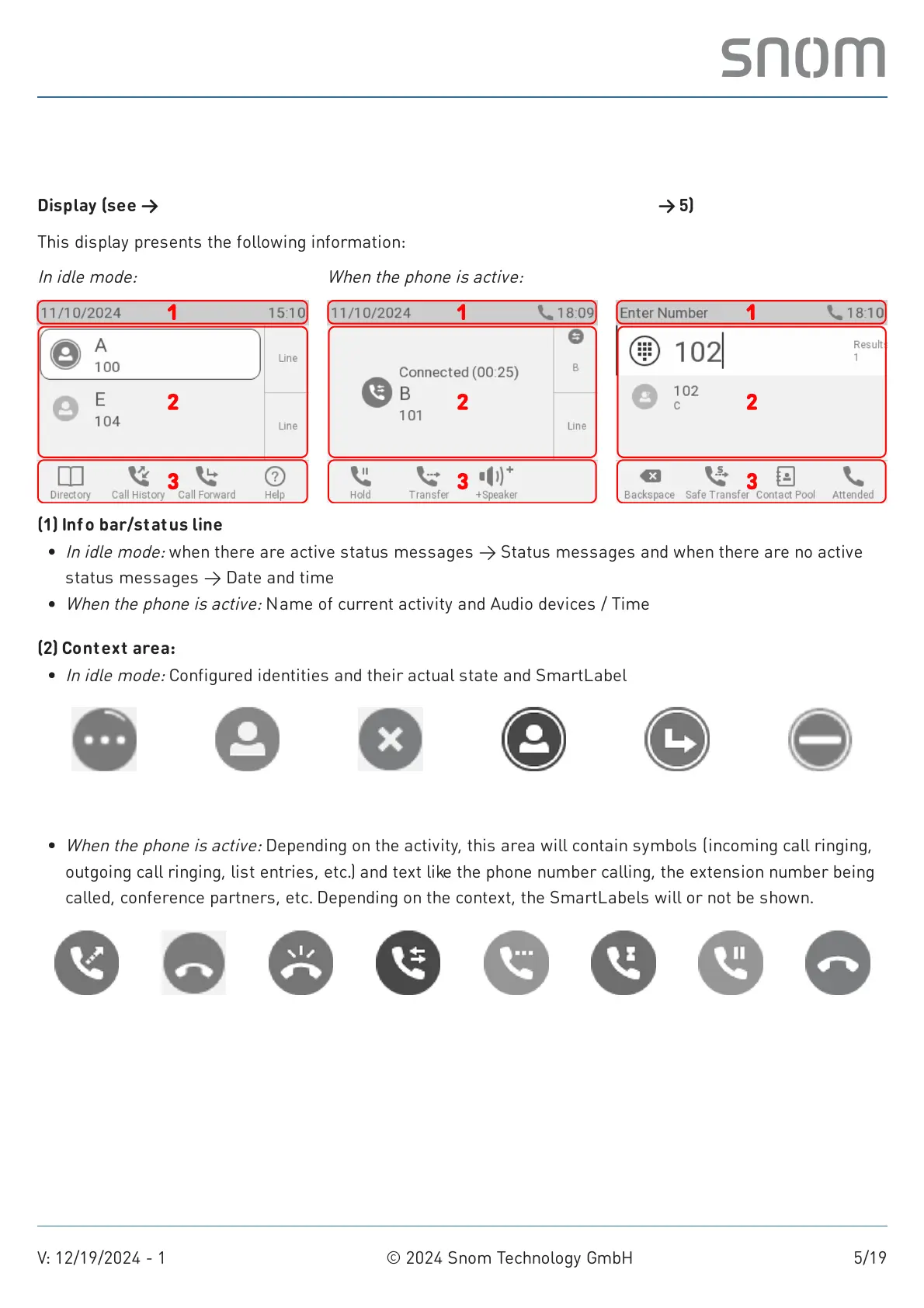
Display (see →
Getting started
→
Getting to know the D140 / D150 components
→ 5)
This display presents the following information:
In idle mode: When the phone is active:
(1) Inf o bar/status line
(2) Context area:
Registering
Registered
(active)
Not registered Outgoing Forwarding Do Not Disturb
Outgoing
ringing
Incoming
ringing
Call waiting Connected
Held by other
party
Busy Holding Disconnected
In idle mode:
when there are active status messages → Status messages and when there are no active
status messages → Date and time
When the phone is active:
Name of current activity and Audio devices / Time
In idle mode:
Configured identities and their actual state and SmartLabel
When the phone is active:
Depending on the activity, this area will contain symbols (incoming call ringing,
outgoing call ringing, list entries, etc.) and text like the phone number calling, the extension number being
called, conference partners, etc. Depending on the context, the SmartLabels will or not be shown.



 To Next Page