V: 12/19/2024 - 1 ©2024 Snom Technology GmbH 9/19
Short User Manual
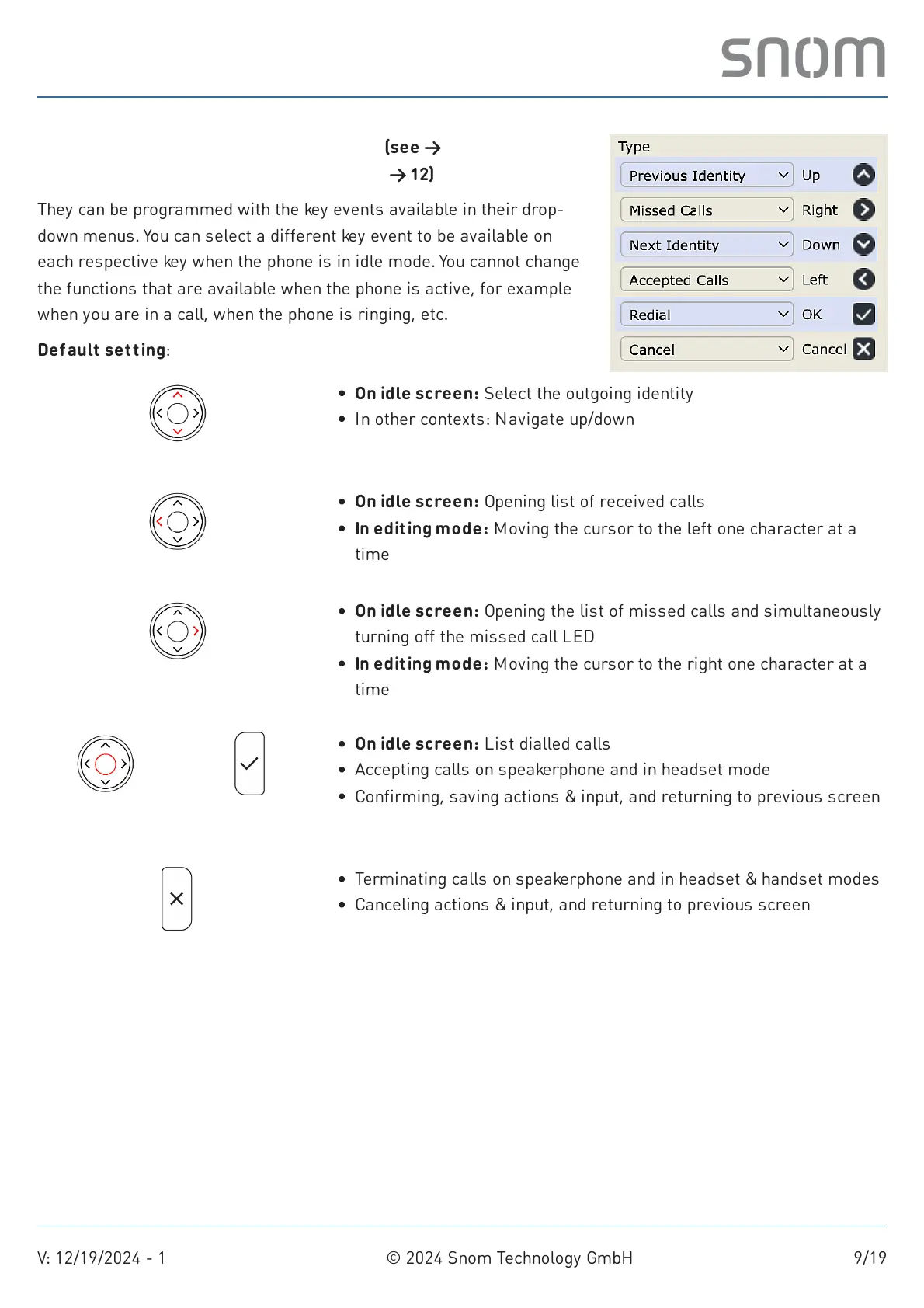
Navigation, conf irmation, and cancel keys (see →
Getting started
→
Getting to know the D140 / D150 components
→ 12)
They can be programmed with the key events available in their drop-
down menus. You can select a different key event to be available on
each respective key when the phone is in idle mode. You cannot change
the functions that are available when the phone is active, for example
when you are in a call, when the phone is ringing, etc.
Default setting:
Navigation key: up/down
Navigation key: left
Navigation key: right
Navigation key:
center
Ok
Cancel
On idle screen: Select the outgoing identity
In other contexts: Navigate up/down
On idle screen: Opening list of received calls
In editing mode: Moving the cursor to the left one character at a
time
On idle screen: Opening the list of missed calls and simultaneously
turning off the missed call LED
In editing mode: Moving the cursor to the right one character at a
time
On idle screen: List dialled calls
Accepting calls on speakerphone and in headset mode
Confirming, saving actions & input, and returning to previous screen
Terminating calls on speakerphone and in headset & handset modes
Canceling actions & input, and returning to previous screen



 To Next Page