V: 12/19/2024 - 1 ©2024 Snom Technology GmbH 10/19
Short User Manual
Putting the D140 / D150 into operation
(1) Initializing and registering the phone
Note: You will need the registration information received from your Internet service provider or your
network administrator - normally the phone or extension number, the password, and the registrar (SIP
domain).
Normally the initialization is completely automatic, using DHCP. If your network does not support DHCP,
press the Cancel key and enter the IP address, netmask, IP gateway, and DNS server manually.
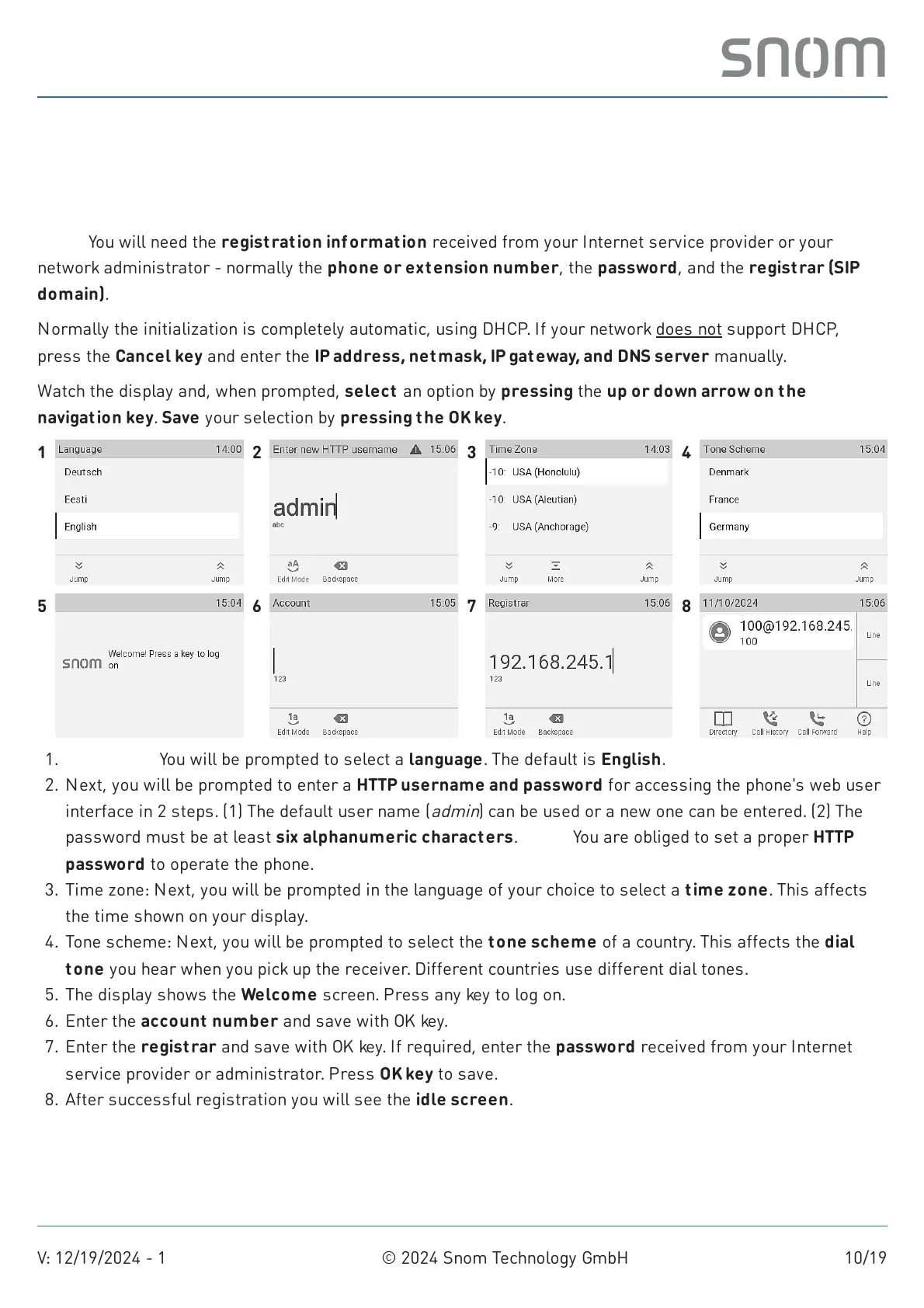
Watch the display and, when prompted, select an option by pressing the up or down arrow on the
navigation key. Save your selection by pressing the OK key.
1 2 3 4
5 6 7 8
Languages: You will be prompted to select a language. The default is English.1.
Next, you will be prompted to enter a HTTP username and password for accessing the phone's web user
interface in 2 steps. (1) The default user name (
admin
) can be used or a new one can be entered. (2) The
password must be at least six alphanumeric characters. Note: You are obliged to set a proper HTTP
password to operate the phone.
2.
Time zone: Next, you will be prompted in the language of your choice to select a time zone. This affects
the time shown on your display.
3.
Tone scheme: Next, you will be prompted to select the tone scheme of a country. This affects the dial
tone you hear when you pick up the receiver. Different countries use different dial tones.
4.
The display shows the Welcome screen. Press any key to log on.5.
Enter the account number and save with OK key.6.
Enter the registrar and save with OK key. If required, enter the password received from your Internet
service provider or administrator. Press OK key to save.
7.
After successful registration you will see the idle screen.8.



 To Next Page