V: 10/13/2024 - 1 ©2024 Snom Technology GmbH 16/22
Short User Manual
(5) Conf erence
The maximum number of participants in phone-based conferences is 3 (you and 2 others). For the number of
participants in server-based conferences and how to set up and join them, please check with your network
administrator or your VoIP provider.
You can now:
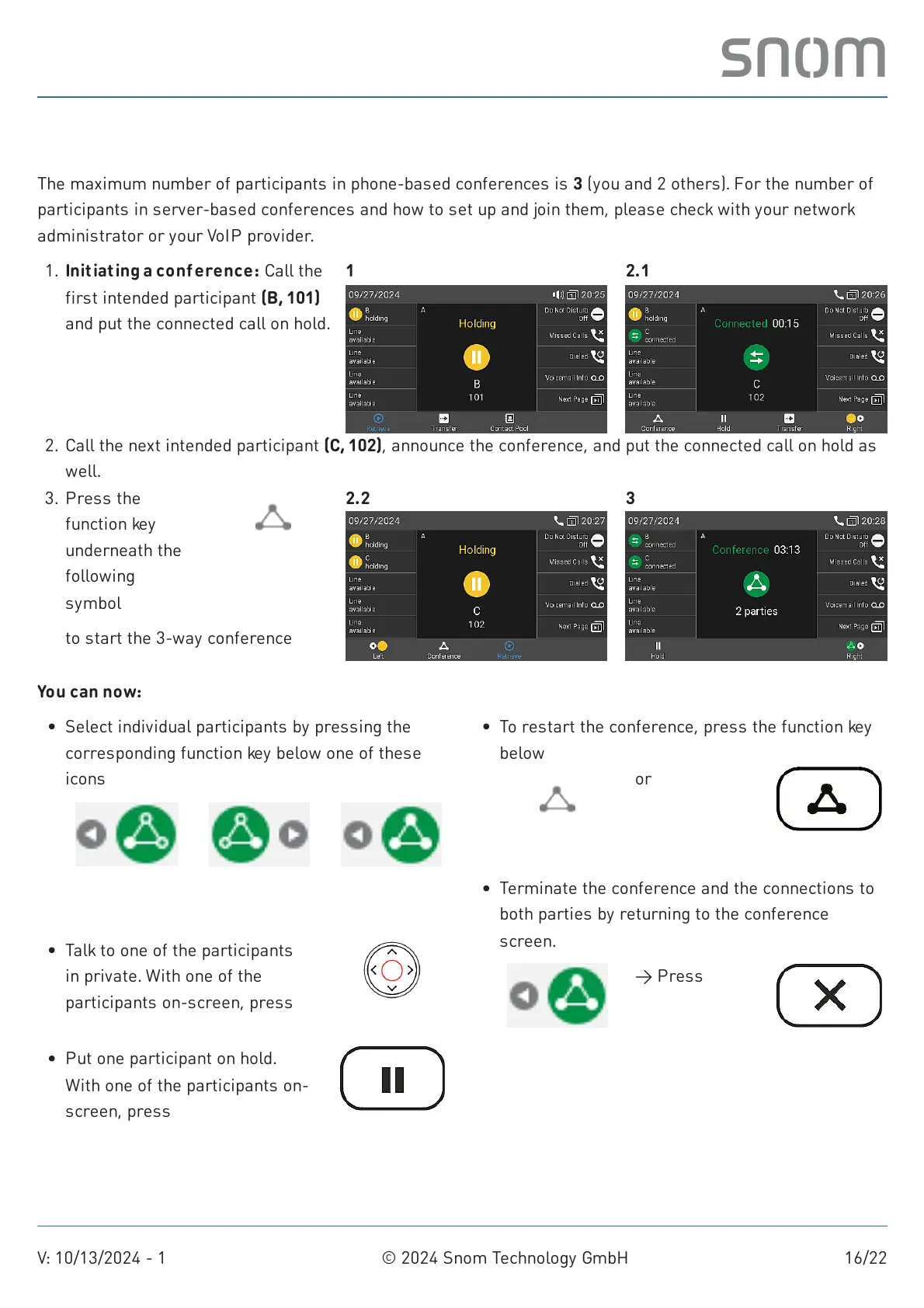
Initiating a conference: Call the
first intended participant (B,101)
and put the connected call on hold.
1. 1 2.1
Call the next intended participant (C, 102), announce the conference, and put the connected call on hold as
well.
2.
to start the 3-way conference
3. Press the
function key
underneath the
following
symbol
Conference
2.2 3
Select individual participants by pressing the
corresponding function key below one of these
icons
Previous
participant
Next
participant
Back to
conference
Talk to one of the participants
in private. With one of the
participants on-screen, press
Confirm
Put one participant on hold.
With one of the participants on-
screen, press
Hold
To restart the conference, press the function key
below
Conference
or
Conference
Terminate the conference and the connections to
both parties by returning to the conference
screen.
Back to
conference
→ Press
Cancel



 To Next Page