V: 10/13/2024 - 1 ©2024 Snom Technology GmbH 19/22
Short User Manual
Blind call transfer: active call
Call def lection (call waiting)
With an active call (B, 101) on the
line, press
Transfer
or
Transfer
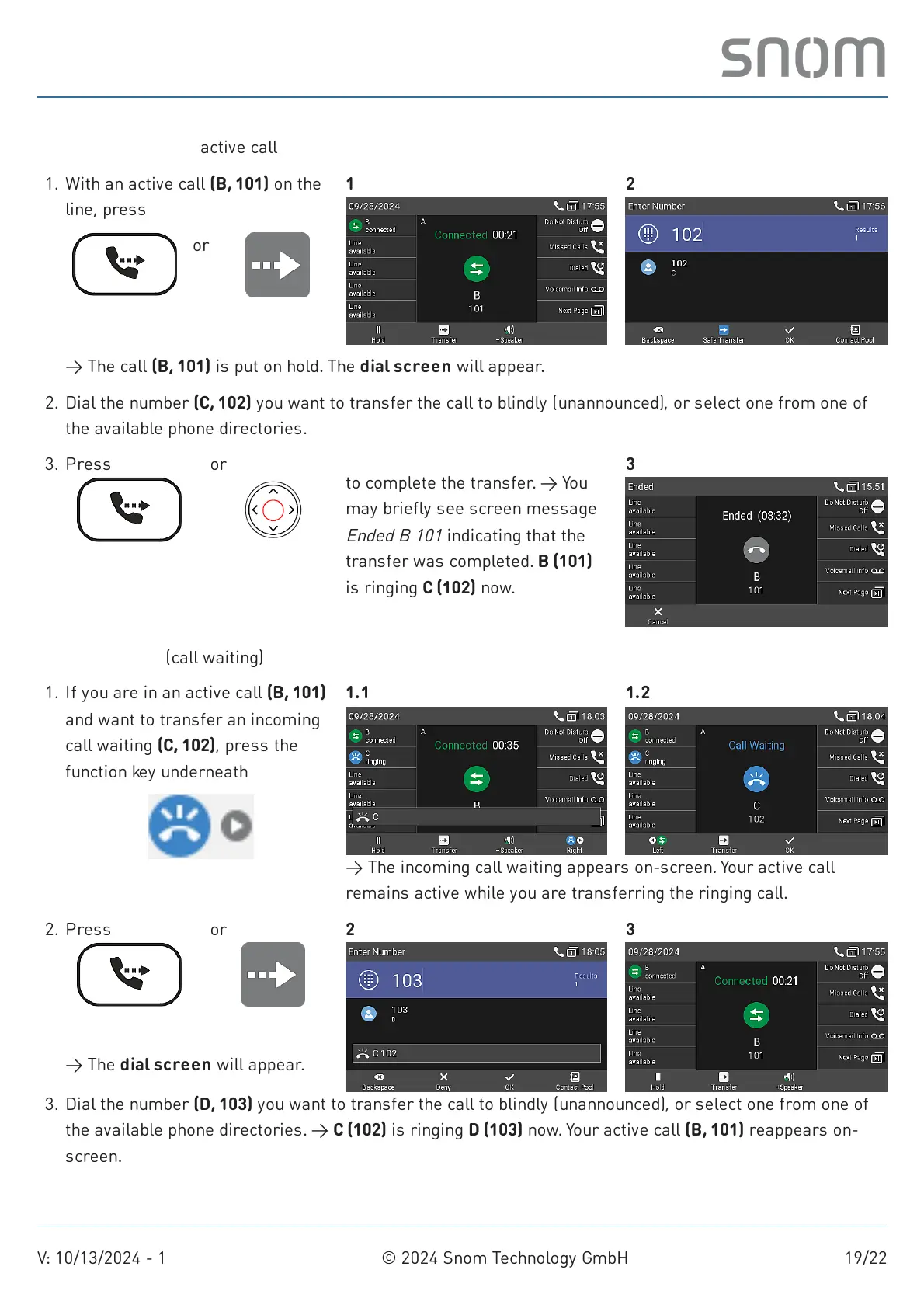
→ The call (B, 101) is put on hold. The dial screen will appear.
1. 1 2
Dial the number (C, 102) you want to transfer the call to blindly (unannounced), or select one from one of
the available phone directories.
2.
3. Press
Transfer
or
Confirm
to complete the transfer. → You
may briefly see screen message
Ended B 101
indicating that the
transfer was completed. B (101)
is ringing C (102) now.
3
If you are in an active call (B, 101)
and want to transfer an incoming
call waiting (C, 102), press the
function key underneath
Next call waiting
→ The incoming call waiting appears on-screen. Your active call
remains active while you are transferring the ringing call.
1. 1.1 1.2
→ The dial screen will appear.
2. Press
Transfer
or
Transfer
2 3
Dial the number (D, 103) you want to transfer the call to blindly (unannounced), or select one from one of
the available phone directories. → C (102) is ringing D (103) now. Your active call (B, 101) reappears on-
screen.
3.



 To Next Page