V: 10/13/2024 - 1 ©2024 Snom Technology GmbH 18/22
Short User Manual
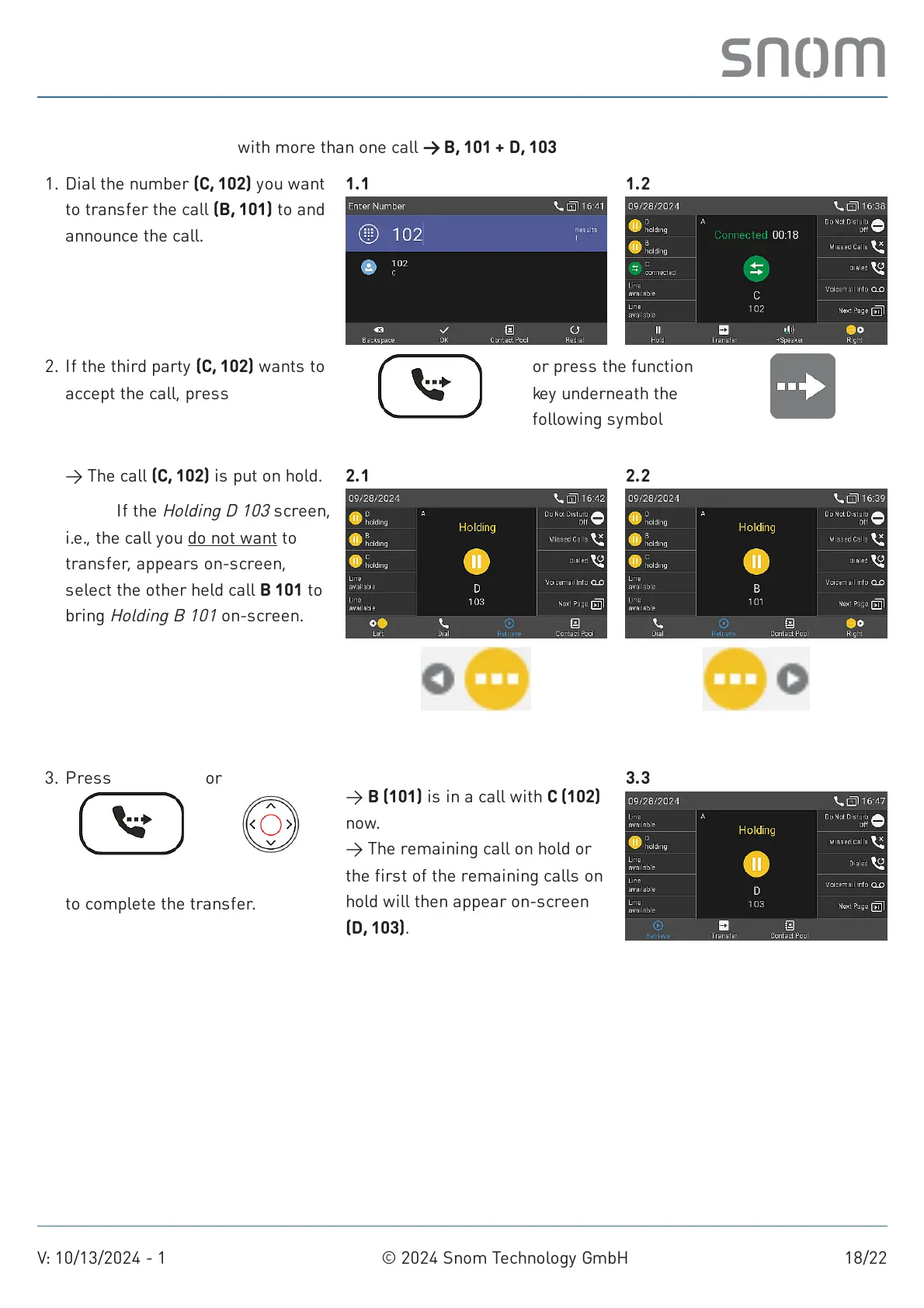
Attended call transfer: with more than one call → B, 101 + D, 103
Dial the number (C, 102) you want
to transfer the call (B, 101) to and
announce the call.
1. 1.1 1.2
If the third party (C, 102) wants to
accept the call, press
→ The call (C, 102) is put on hold.
Note: If the
Holding D 103
screen,
i.e., the call you do not want to
transfer, appears on-screen,
select the other held call B 101 to
bring
Holding B 101
on-screen.
2.
Transfer
or press the function
key underneath the
following symbol
Transfer
2.1
Previous held call
2.2
Next held call
to complete the transfer.
3. Press
Transfer
or
Confirm
→ B (101) is in a call with C (102)
now.
→ The remaining call on hold or
the first of the remaining calls on
hold will then appear on-screen
(D, 103).
3.3



 To Next Page