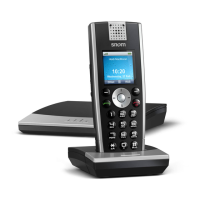
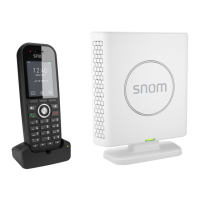
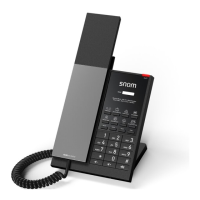
The Snom M30 DECT Phone is a cordless communication device designed for business environments, offering a comprehensive suite of telephony features to enhance productivity and connectivity. This phone is built to facilitate various call handling scenarios, from basic call initiation and reception to more advanced functions like call transfers, conferencing, and voicemail management. Its user-friendly interface and intuitive controls make it accessible for everyday use, ensuring efficient communication within an organization.
Function Description
The Snom M30 DECT Phone primarily functions as a cordless telephone, allowing users to make and receive calls wirelessly within a specified range. It supports both internal and external calls, providing flexibility for communication with colleagues and external contacts. The device integrates essential call management features, enabling users to control their conversations effectively.
Call Initiation and Reception:
- Making Calls: Users can initiate external calls by pressing the '9' key, followed by the desired phone number. For internal communication, calls can be made by directly dialing the extension number.
- Answering Calls: Incoming calls are answered by simply pressing the designated talk button, ensuring quick and easy connection.
- Redial: The phone includes a redial function, allowing users to quickly call the last dialed number by pressing the talk button twice.
Call Management Features:
- Holding a Call: During an active conversation, a call can be placed on hold by pressing the 'Hold' button. This feature is useful for temporarily suspending a conversation to attend to another task or consult with a colleague. Calls can be retrieved by pressing the 'Retrieve' button.
- Transferring a Call: The Snom M30 supports two types of call transfers:
- Blind/Unattended Transfer: This allows a user to transfer an active call to another extension without first speaking to the recipient. The process involves pressing 'Transfer', dialing the extension number, and then pressing 'Transfer' again.
- Supervised/Attended Transfer: This method enables the user to speak with the recipient before transferring the call. During a conversation, the user presses 'Hold', dials the extension, and can optionally talk to the recipient to inform them about the incoming call before pressing 'Transfer'.
- Making a Conference (Conference Call): The phone facilitates multi-party conversations. To establish a conference, a user first places the current call on hold, dials a third party, and then presses 'Conf.' to merge the calls. This allows for collaborative discussions with multiple participants. Users can leave a conference by pressing the designated button during the conference.
- Adjusting Volume: The volume of the call can be adjusted during a conversation, allowing users to customize the audio level for optimal clarity. Users can press the volume down button to lower the volume or the volume up button to increase it.
- Mute: The mute function allows users to temporarily silence their microphone during a conversation, preventing background noise or private discussions from being heard by the other party. Pressing the mute button again unmutes the microphone.
- Speakerphone: The speakerphone feature enables hands-free communication, allowing users to talk and listen without holding the handset. This is activated by pressing the speakerphone button during a call.
Voicemail and Call History:
- Checking Voice Mail: The phone provides access to voicemail messages. When the message LED light is flashing, users can dial '*97' and enter their password to access their voicemail. Options include repeating messages, playing the next message, and deleting/undeleting messages.
- Voice Mail Setup: Users can set up their voicemail by dialing '*97' and entering their password. This allows for recording unavailable messages, busy messages, personal names, temporary greetings, and changing the voicemail password.
- Checking Call History: The phone maintains a call history, displaying a list of all calls. This list includes received calls, dialed calls, and missed calls, each indicated by a specific icon. Users can view this history to track their communication.
Call Forwarding:
- To Set Up All Call Forward Mode: Users can configure call forwarding to redirect incoming calls to another extension. This involves navigating through the settings menu to 'Call Forward', selecting 'Forward Unconditionally', and inputting the target extension number. The forwarding can then be activated.
- To Cancel Call Forward: Call forwarding can be deactivated by navigating to the 'Call Forward' settings and selecting 'Off'.
Usage Features
The Snom M30 DECT Phone is designed for ease of use, with a focus on intuitive navigation and quick access to essential functions. The physical buttons are clearly labeled, and the on-screen prompts guide users through various operations.
- Intuitive Interface: The phone's display provides clear information, such as caller ID, connection status, and menu options, making it easy for users to understand the current state of their calls and navigate through settings.
- Quick Access Buttons: Dedicated buttons for common functions like 'Hold', 'Conf.', 'Transfer', and 'Retrieve' allow for rapid execution of these actions without delving into complex menus.
- Visual Cues: The message LED light serves as a visual indicator for new voicemail messages, ensuring users are promptly aware of important communications.
- Menu-Driven Settings: For more advanced configurations, such as call forwarding and voicemail setup, the phone utilizes a menu-driven system that is easy to follow, with options like 'Select Settings' and 'Scroll to Call Forward' guiding the user.
- Cordless Mobility: As a DECT phone, it offers the freedom to move around within the coverage area while on a call, enhancing flexibility and productivity in a dynamic work environment.
Maintenance Features
While the manual primarily focuses on operational features, the design of the Snom M30 DECT Phone implicitly supports ease of maintenance through its robust build and straightforward software interface.
- Software-Based Configuration: Most of the phone's features and settings are managed through its software interface, which simplifies configuration and troubleshooting. This reduces the need for physical adjustments and allows for remote management in some cases.
- Clear Error Indicators: Although not explicitly detailed, a well-designed phone system typically provides clear error messages or indicators for issues like out-of-range signals or low battery, aiding in quick diagnosis and resolution.
- Standardized Operation: The adherence to standard telephony protocols ensures compatibility and simplifies integration into existing communication infrastructures, potentially reducing maintenance complexity.
- Durable Design (Implied): DECT phones are generally built for daily use in office environments, implying a certain level of durability to withstand regular handling and minor impacts, thus reducing the frequency of physical maintenance.
- User-Friendly Troubleshooting: The clear instructions for various functions enable users to perform basic troubleshooting themselves, such as verifying call forwarding settings or checking voicemail, before escalating to technical support.
In summary, the Snom M30 DECT Phone is a versatile and user-friendly communication tool designed to meet the demands of a modern business environment. Its comprehensive set of call handling features, intuitive interface, and support for essential communication functions make it an effective device for enhancing connectivity and operational efficiency.

 Need help?
 General

 To Next Page