14 • EN
Return to contents
Charging the internal battery
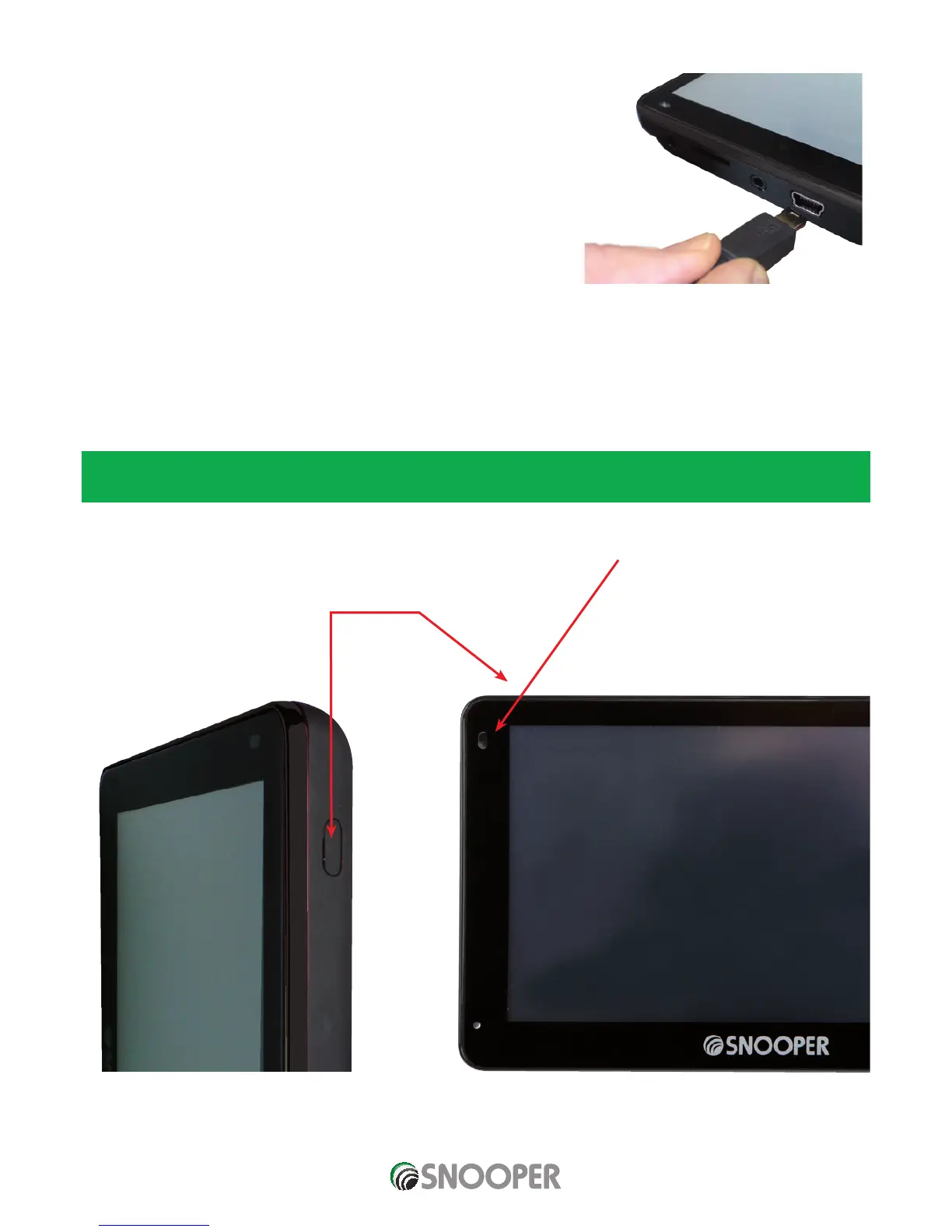
Although Snooper can be charged using the cigarette lighter in your vehicle, an
alternative method of charging via a USB socket of a PC, or USB Mains charger
(output of 5v 1000mA) - not supplied.
The battery light on Snooper will illuminate and will take approximately 3 hours to
charge. When the internal battery is fully charged, the red LED will turn blue.
Note: The new battery’s full performance is only achieved after two or three
complete charges and discharges.
Powering Snooper using the built-in battery
Once Snooper is fully charged, it is ready for use. Press and hold the power switch on the top of the unit for 2 seconds to switch on
the device.
Note: the battery is designed to be a back up and Snooper recommends that the the navigation device is powered from the
vehicle charger.
On Battery – No LED
On Charge – RED
Fully Charged – Blue
SC5700 ONLY:
Powered by internal battery – flashes Blue.
Charging and switched On – flashes RED.
Charging and switched Off – solid Red.
Fully charged and switched Off – solid Blue.
ON/OFF
switch
Plug the
charger cable into
the USB socket on the
side of the Snooper












 To Next Page