EasyManua.ls Logo

Soca ST-320 - SETTING MODES AND FUNCTIONS; REGISTRATION OF CARD (ADD ONE CARD)

Soca ST-320
19 pages
Print Icon
To Next Page IconTo Next Page
To Previous Page IconTo Previous Page
Loading...
IV. SETTING
MoDES AND FUNCTIoNS
:
To enter into
the system setting mode, fiBt
press
* #,
then enter
system
password
and
press
#
subsequently to enter into
system
sefting mode.
When entered into
system setting mode,
the
STATUS light
(green
)
on
the
panel
will be on with
a beep sound.
Usere should enter
any
functional
selections
within 20 seconds.
The reader
will automatically
terminate the system
setting mode
function after
20 seconds.
I
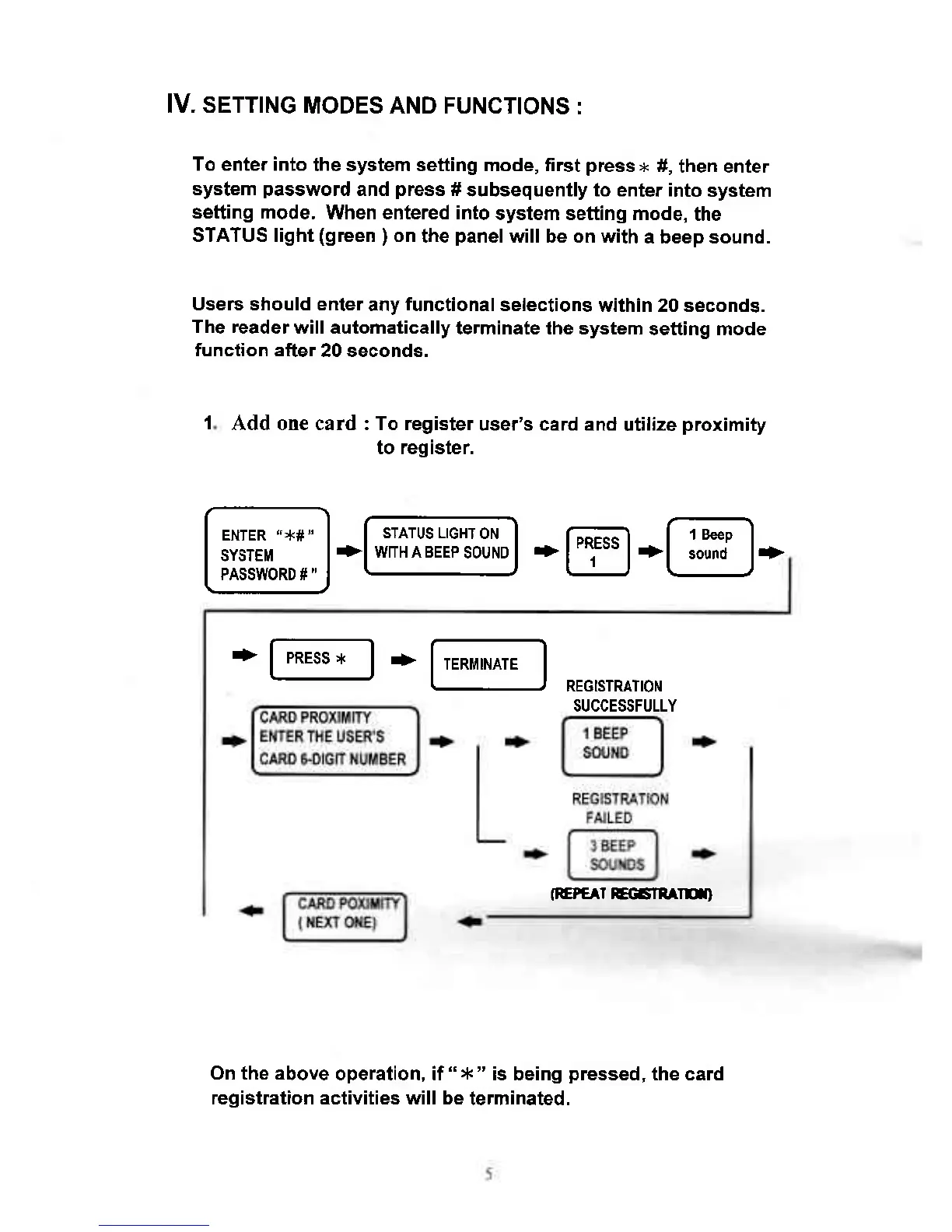
Add one card : To register
user's card and
utilize
proximity
to register
SUCCESSFULLY
fiEPc^r
EGanAru)
+
F-.ss--l
*
lT,^Fl
REGISTRATION
On the above
operation, if
"
*
"
is being
pressed,
the card
registration activities will be
terminated.