EasyManua.ls Logo

Socket 1D - Page 104

Socket 1D
126 pages
Print Icon
To Next Page IconTo Next Page
To Previous Page IconTo Previous Page
Loading...
104
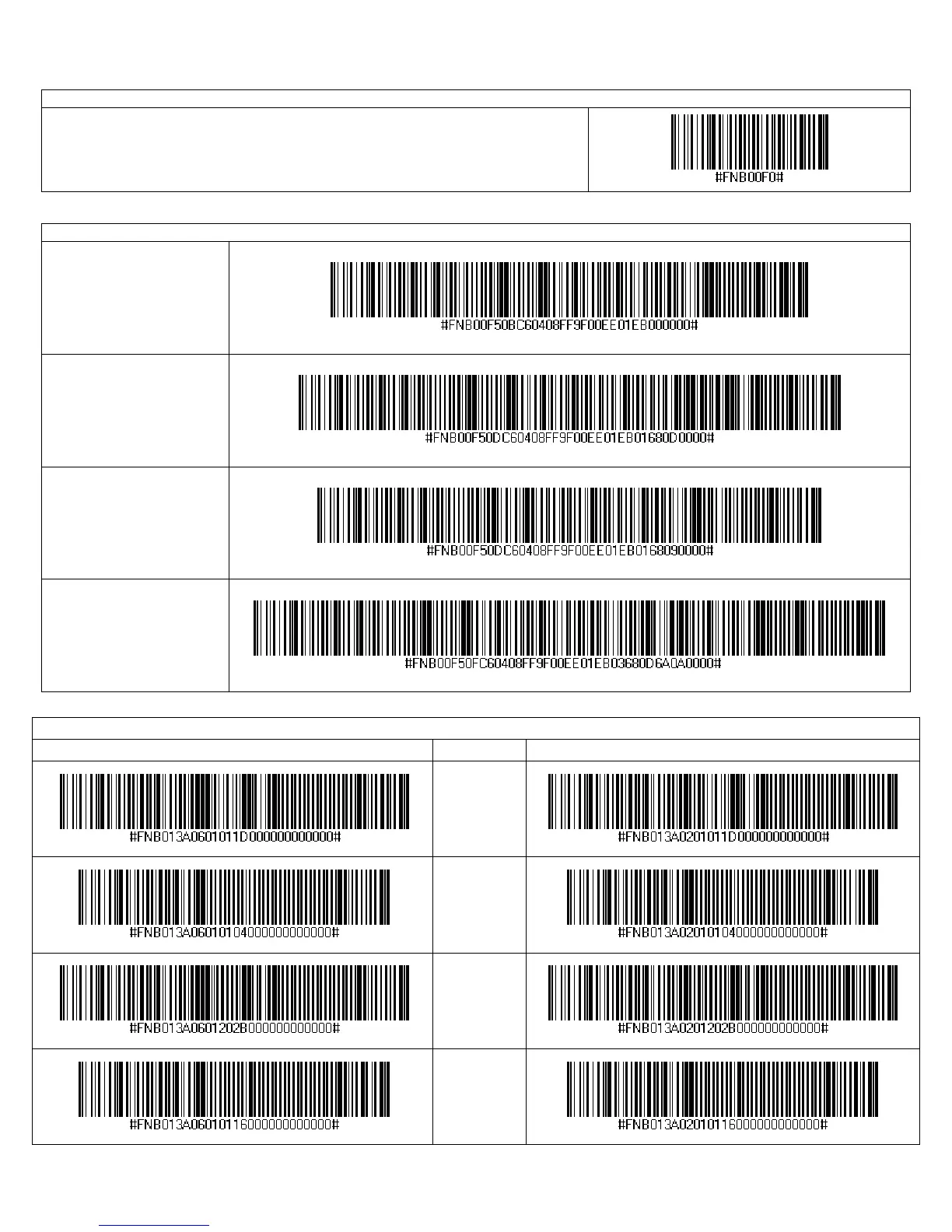
Factory Defaults
Factory Reset
Configures the CHS to revert all settings to factory defaults. The CHS will power
off after scanning this barcode.
Data Editing – Suffix
Data As Is
Configures the CHS to
return only the decoded
data (i.e., prefix and
suffix are not sent).
Suffix – Carriage
Return (default)
Configures the CHS to
add a carriage return at
the end of decoded data.
Suffix – Tab
Configures the CHS to
add a tab at the end of
decoded data.
Suffix – Carriage
Return & Line Feed
Configures the CHS to
add a carriage return and
line feed at the end of
decoded data.
Power Button Double Press Key Combination
Scan to Enable WITH BEEP Description Scan to Enable WITHOUT BEEP
CTRL + Z
CTRL + A
SHIFT + TAB
CTRL + S