6 | SETUP FOR WINDOWS MOBILE 63
OPTION 2: USING THE CHS IN SPP MODE
To install SocketScan 10 software:
Advanced Users: See Appendix H for CAB file installation instructions.
If you have the Socket SoMo
®
655 or SoMo 650 running Windows Mobile 6 Service
Pack 8 or later, SocketScan 10 is pre-loaded. To install, in the Today screen, tap
Getting Started.
1. Make an active connection between your PDA and a host PC. Use a USB / serial connection
cable or cradle and Windows Mobile Device Center, free from the Microsoft website.
http://www.microsoft.com/windowsphone/en-us/howto/wp6/sync/installing-wmdc.aspx
2. Make sure Bluetooth is enabled on your PDA.
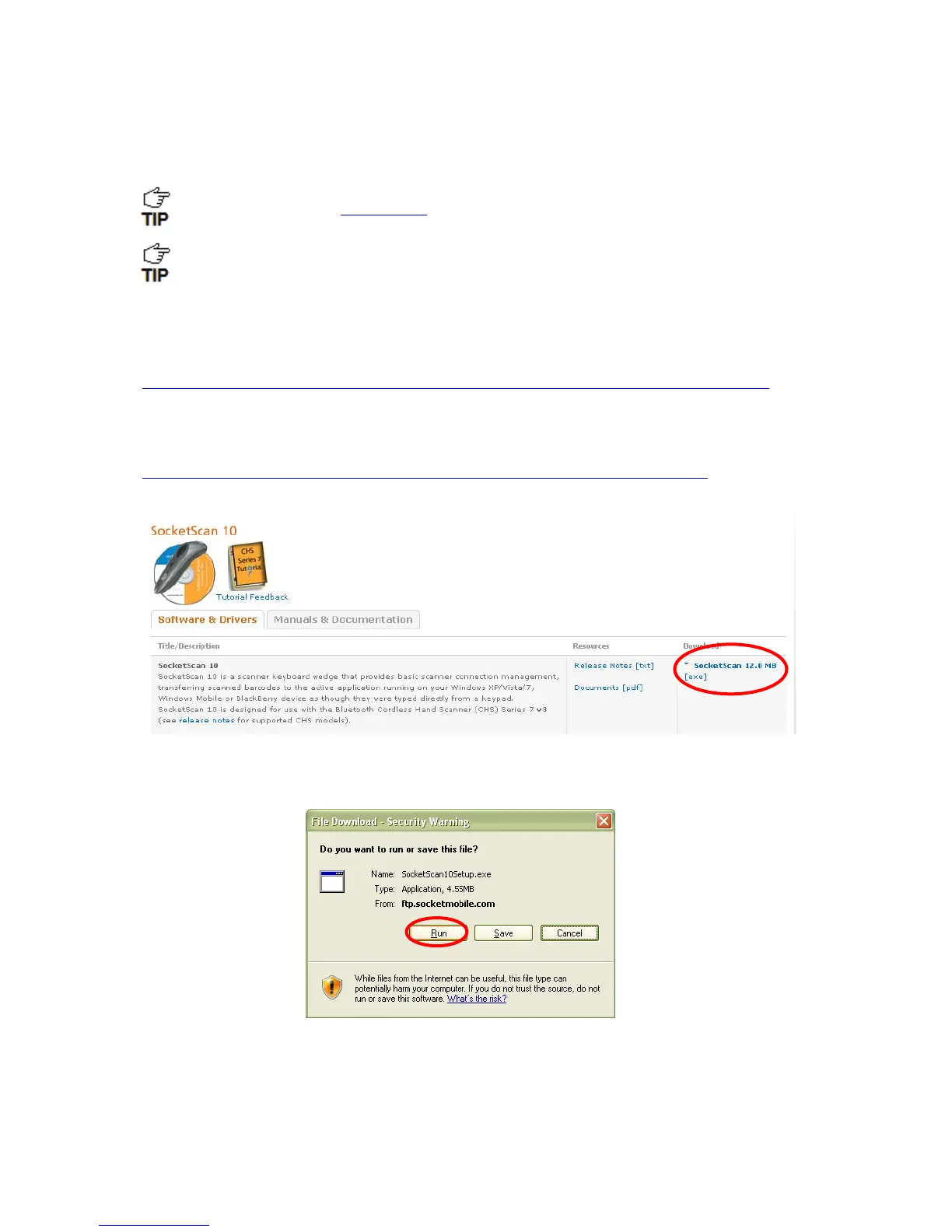
3. Download SocketScan 10 software:
http://www.socketmobile.com/support/downloads/data-collection/series7/ss10/
Click on the link for the exe file.
4. Download and run the installation file.
For Internet Explorer, in the Security Warning screens, click Run.
For Firefox, click Save File. In the Downloads list, double-click on the
SocketScan10Setup.exe file. In the Open Executable File? screen, click OK.















 To Next Page