COMMAND BARCODES (CONTINUED)
Important! Make sure the scanner is not connected to a host computer or
device before scanning a command barcode!
44
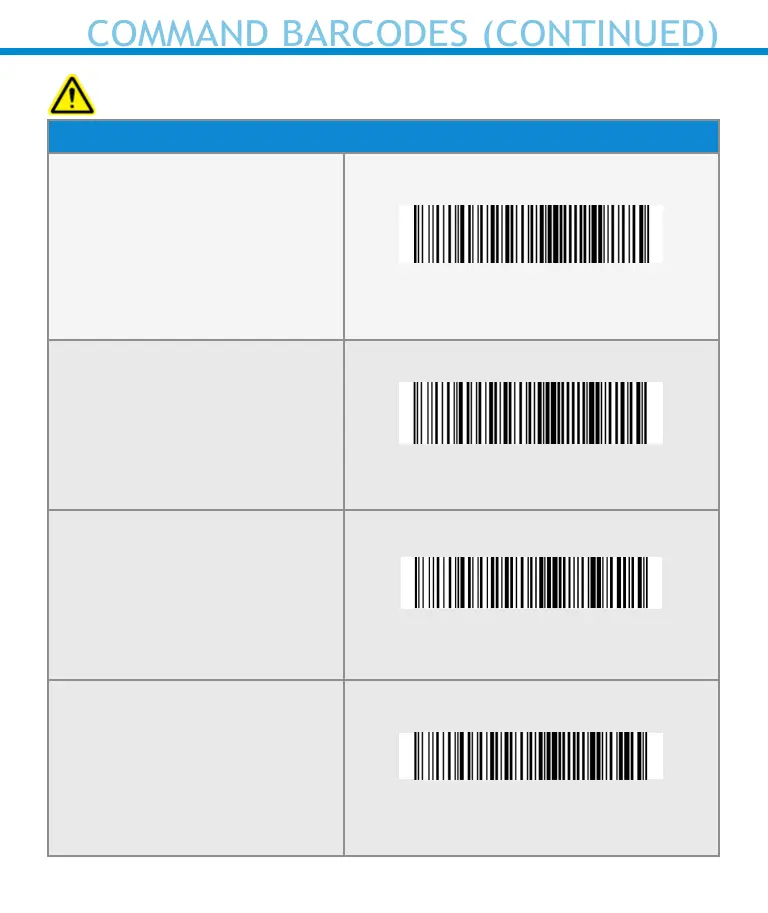
Bluetooth Connection Modes
Basic Mode (HID) (default)
Congures the Scanner to
Human Interface Device (HID)
mode as a Keyboard class
device
#FNB00F40001#
Application Mode (MFi-SPP)
for Apple iOS devices
Congures scanner to work
with an application.
#FNB00F40002#
Application Mode (SPP) for
Windows or Android 8.0
and later (Auto Connect - No
conguration required for Ap-
plication pairing)
#FNB00F40003#
Application Mode (SPP) for
Windows or Android version
7.0 and lower
Congures scanner to Serial
Port Prole.
#FNB00F40000#















 To Next Page