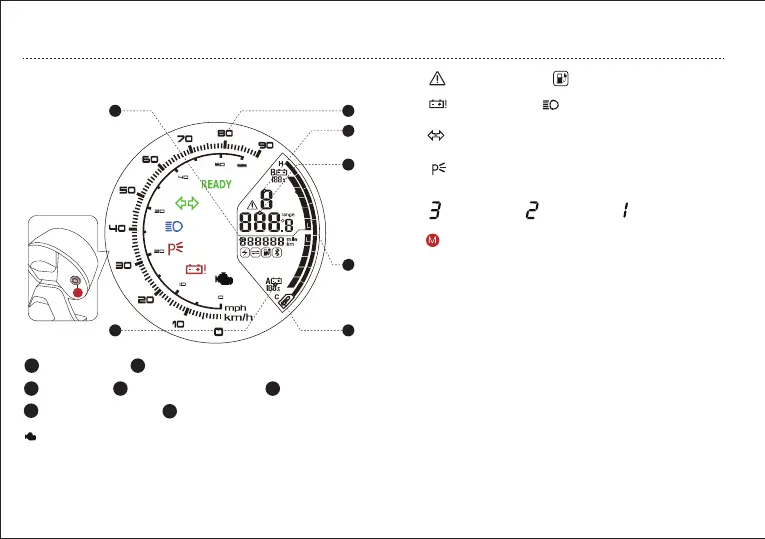
c. Dashboard Overview
DESCRIPTION OF COMPONENTS AND PARTS
High Beam Indicator Indicate
high beam is on
Turn Signal Indicator Flashing when left or right
turn signal is on.
Battery Error
Indicator
Parking Indicator The indicator displays P when
the vehicle is in Parking state.
Error Indicator
Charging
READY Start Indicator
See Page 29 TROUBLESHOOTING for reference.
The vehicle is ready to go when the READY Indicator illuminates.
Sport Mode Normal Mode Eco Mode
OBD Checking Error Codes
1
5
4
2
3
6
Button Description
7
M
1
Speedometer
2
Range, ambient temperture conditions.
7
Gear indicator
4
Controller temperature
5
Battery Indicator
3
Odometer
6
Battery Percentage
Display Switch ——Range/Ambient Tempreture
In normal mode, short press the button to switch and
save the status.
Manually turn on dashboard backlight in front
( text backlight +LCD backlight) )
In normal mode, moderately press the button to turn on
the speedometer backlight and headlight .
Display Unit Switch (km or mile,km/h or mph)
In normal mode, long press the button to switch the
unit and save the status.
Short press the button for less than 2 seconds, then
release. Moderately press the button for less than 8
seconds and more than 2 seconds, then release.
Long press the button for more than 8 seconds, then
release.
Remark:
13


 To Next Page