Wire EDM Machine Operation Chapter 8
Copyright November, 98 Page 8-4 Sodick Inc.
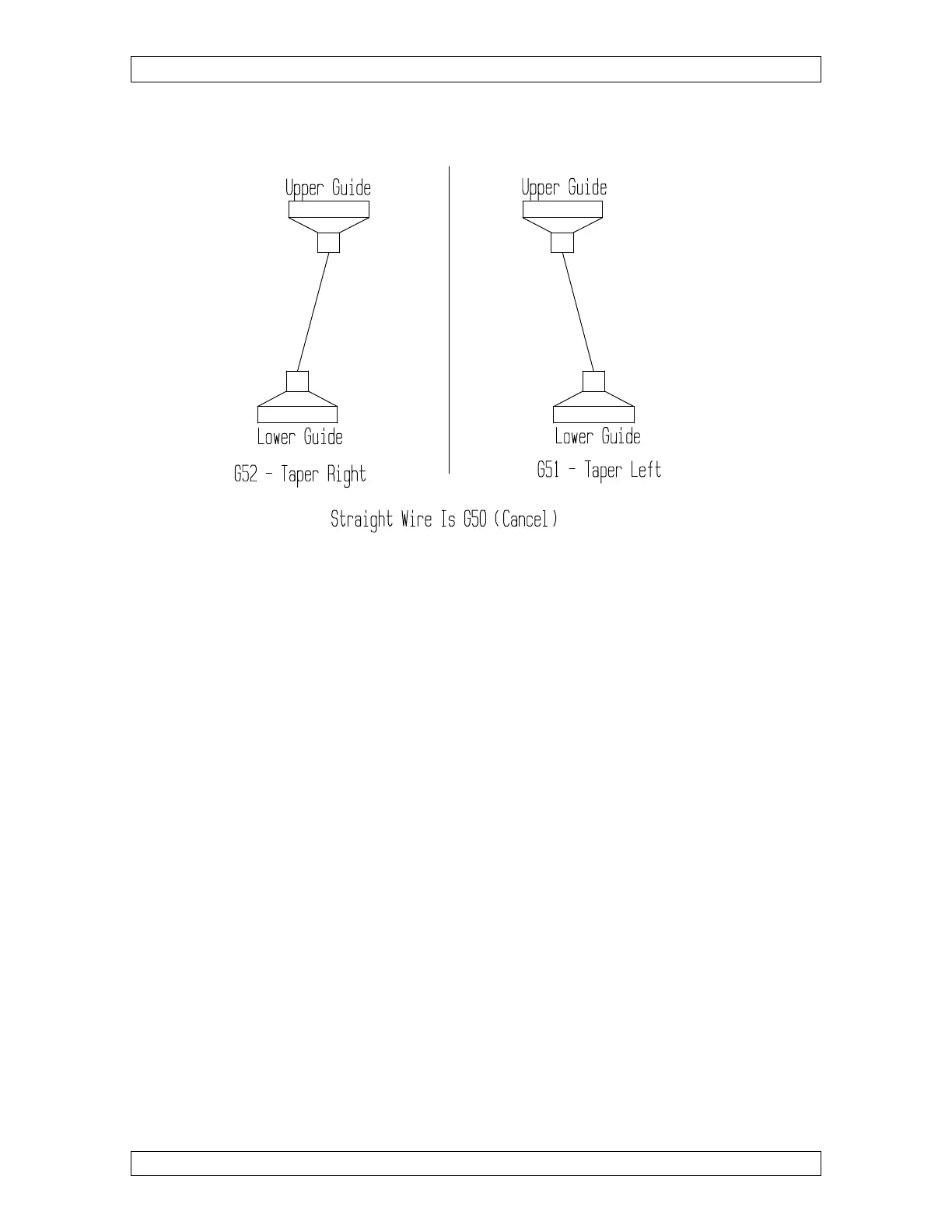
Figure 8-1
INITIALIZING TAPER
First let’s discuss initializing taper correctly. To initialize the taper cutting mode, you
must look in the direction the wire will be moving during the cut (rotate print if
necessary). Looking in this direction, ask yourself, “Which way does the UPPER GUIDE
have to move to generate the desired taper, left or right?” If the UPPER GUIDE has to
move to the left, you will use G51 to initialize taper. If the UPPER GUIDE has to move
to the right, you will use G52 to initialize taper.
As with wire radius compensation, it is wise to set yourself a general rule to help you
remember which direction you need. If you always cut dies with the top of the die UP,
you will use G51 (left) whenever making counterclockwise (general direction) passes
around the die and G52 (right) when making clockwise direction passes around the die.
Of course, if you cut with the top of the die down, the rule will change.
Figure 8-1 illustrates this.
Now that you can decide between right and left taper (G51 or G52), let’s discuss the
ANGLE you must also include in the initialization command. You will be using an “A”
to command the desired taper angle. If you want to machine a half-degree taper (per
side), the program needs A.5 in it. You also need to know that there is a limitation of the



 To Next Page