English
88
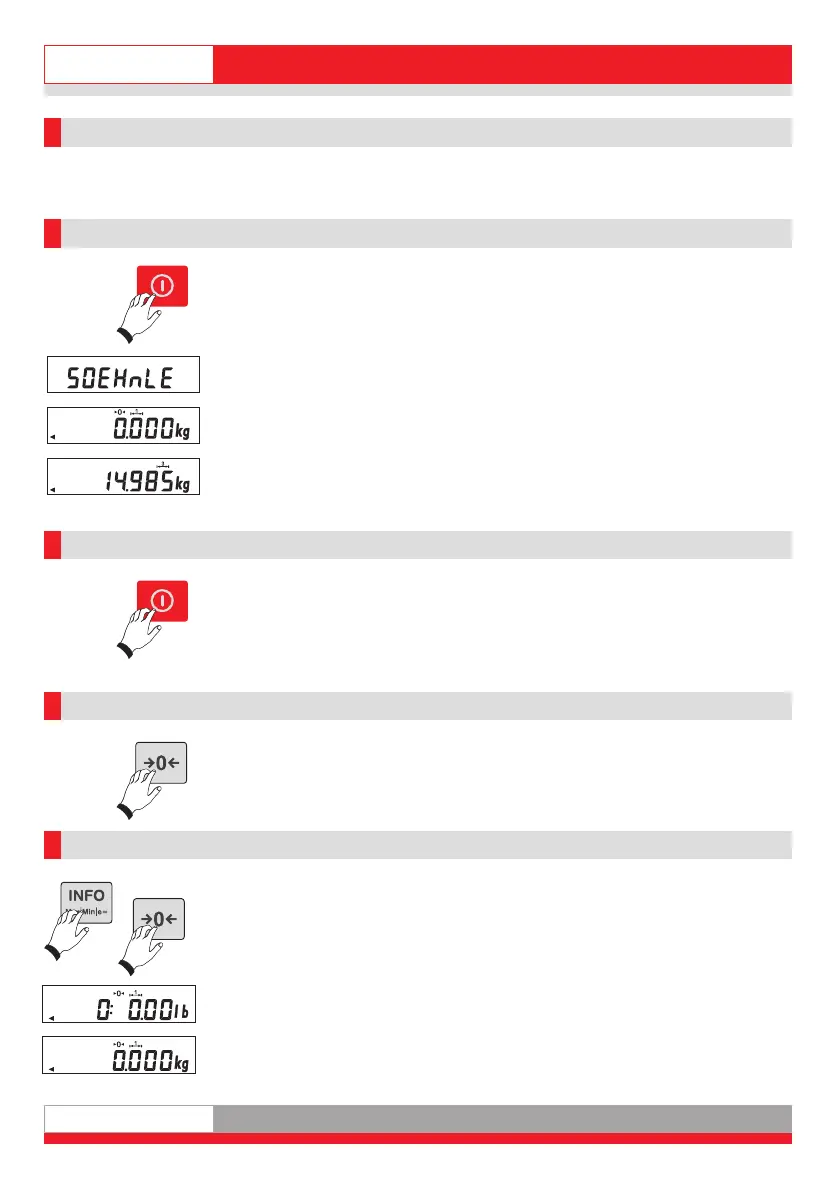
2. Basic functions
The basic functions are similar or identical for all application programs.
2.1 Power-on
Only when the scale is not loaded.
After the test routine, the display is set to zero.
The scale is ready for use.
Place the weighing product on the scale.
The display shows the gross weight.
2.2 Switching off
This is immediately possible when the display is "0".
Otherwise hold down the key for 3 seconds.
2.3 Zeroing
P
ress the Zeroing key to correct minor deviations from zero, e.g. caused by soiling
on the scale.
Zero range non-approved: -1% to +3% of the weighing range.
2.4 Switching over the weight unit kg <> lb
The option for switching over the weight units must be released in Calibration
mode.
Switch over by pressing the Info key and then the Zeroing key.
If weight unit switchover was also assigned to the F key in Setting mode, you can
also switch over the unit by pressing the F key.
Ba_3010_GB.qxd 03.04.2008 17:07 Seite 8



 To Next Page