SOFAR 1.1K~3.3KTL-G3 User manual
Copyright © Shenzhen SOFARSOLAR Co., Ltd
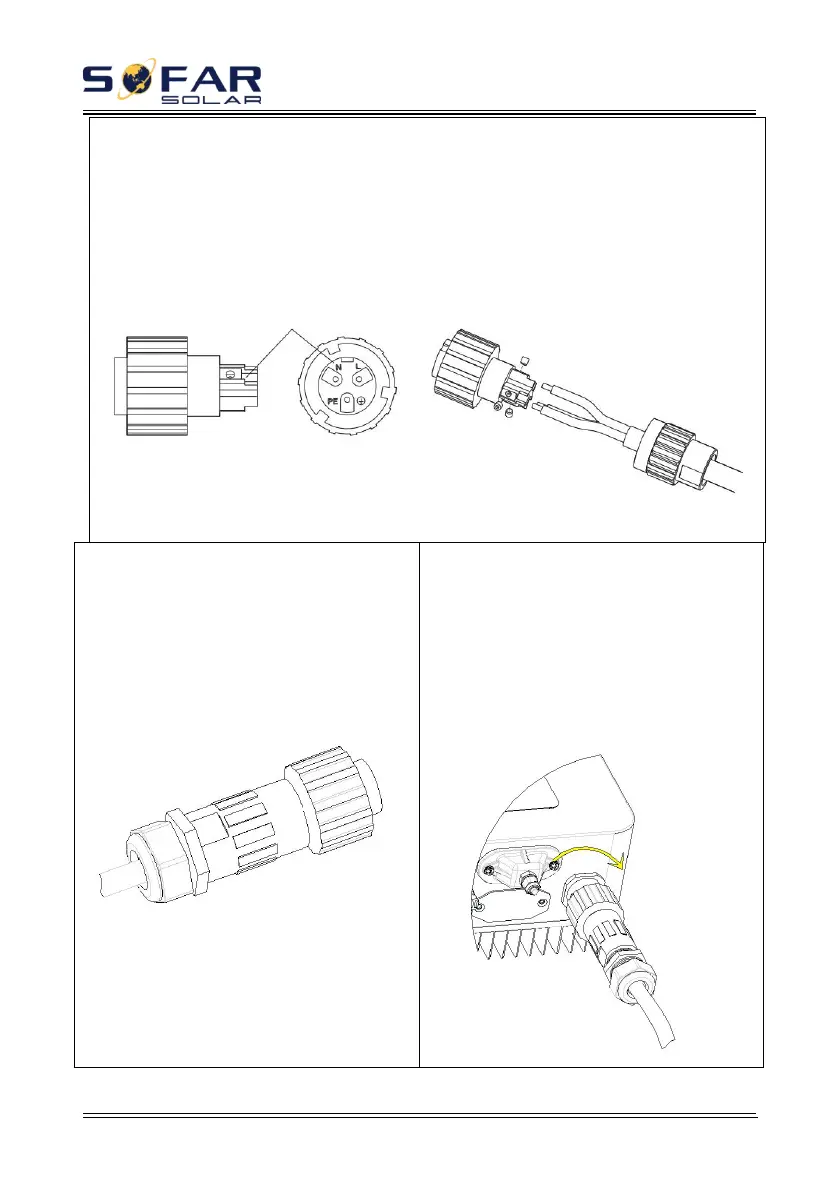
Step 3 Connect AC output cable as per the following requirements:
Connect the yellow-green wire to the hole labeled "PE", fasten the wire using an Allen
wrench;
Connect the brown wire to the hole labeled "L", fasten the wire using an Allen wrench;
Connect the blue wire to the hole labeled "N", fasten the wire using an Allen wrench;
Figure 4-14
L--Brown, N--Blue, PE--Yellow-green
Step 4 Secure the locking cable gland
clockwise, shown as below: make sure that
all the wires are securely connected.
Figure 4-15
Step 5 Connect the AC connector to the
output wiring connector of inverter, rotate
the AC connector clockwise until the
fastener reaches its designated position, as
shown below.
Figure 4-16








 To Next Page