9
6. OPERATING YOUR SO-65 AIR PURIFIER
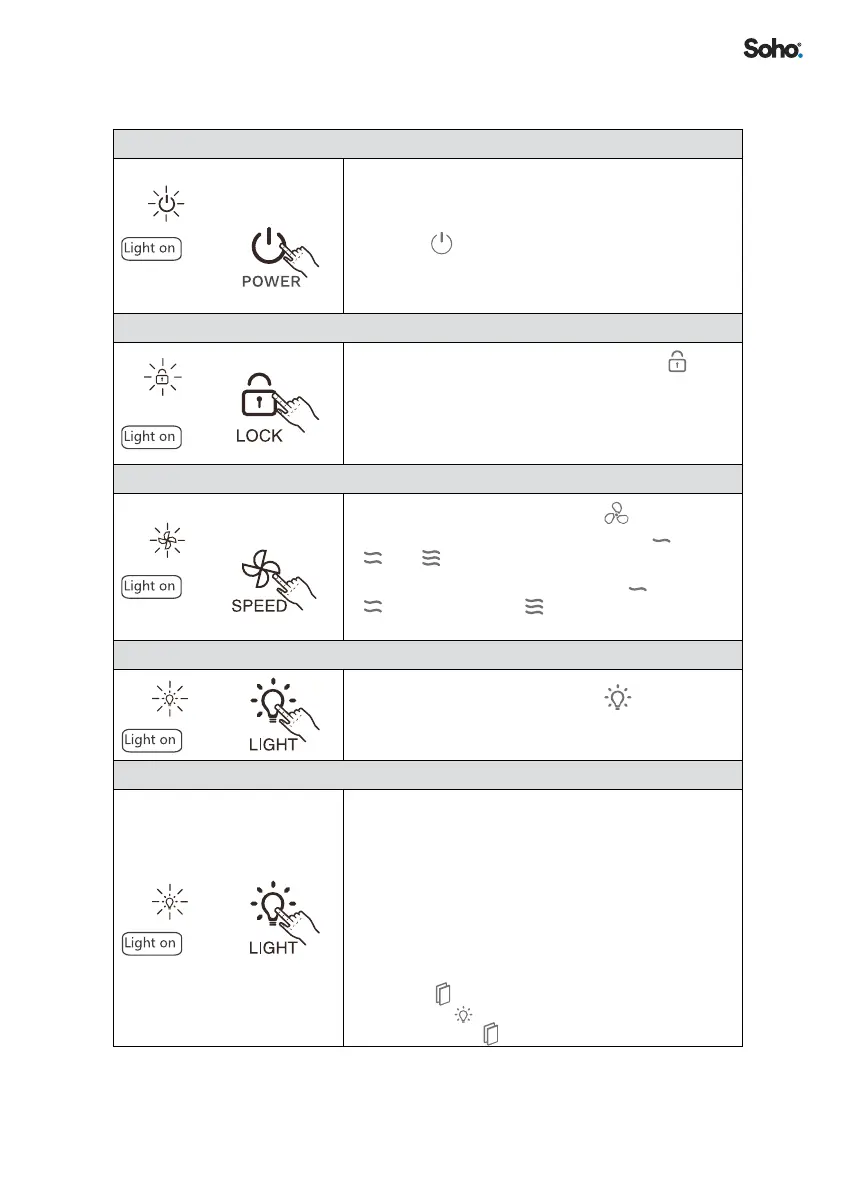
STARTING UP
• Plug the power plug into a power socket� Once
power is switched on, the control panel momentarily
lights up�
• Press the
button to switch the purier o or on�
OFF = Device in standby mode
ON = Device in working mode
LOCK
• Whilst in working mode, press and hold the
button for 3 seconds to toggle the (Child) Lock
function on or o� The button lights up when Lock
mode is turned on�
PURIFICATION SPEED
• Whilst in working mode, press the button to
change the fan speed in the order of Low Medium
High
• The speed indicator corresponding to
Low Speed,
Medium Speed and High Speed lights up
accordingly when each speed is activated�
LIGHT
• Whilst in working mode, press the button to turn
the night light o or on� Two brightness levels are
available when the light is on�
MULTIFUNCTIONAL FILTER RESETTING
• Once reset, an internal time counter keeps track of
the cumulative time the lter has been in use� The
timer reminds you when the useful life of the lter is
up and lter requires a replacement� The useful life
of the lter is calculated based on a simulation test
in the laboratory� The actual useful life of a lter may
vary depending on its operating environment� When
the purication strength becomes less eective,
please replace the lter in advance�
• When the
ashes, install a new lter then press
and hold the button for 5 seconds until you hear a
beep sound� The indicator stops ashing�


 To Next Page