INSTALLATION
GUIDE
MODEL
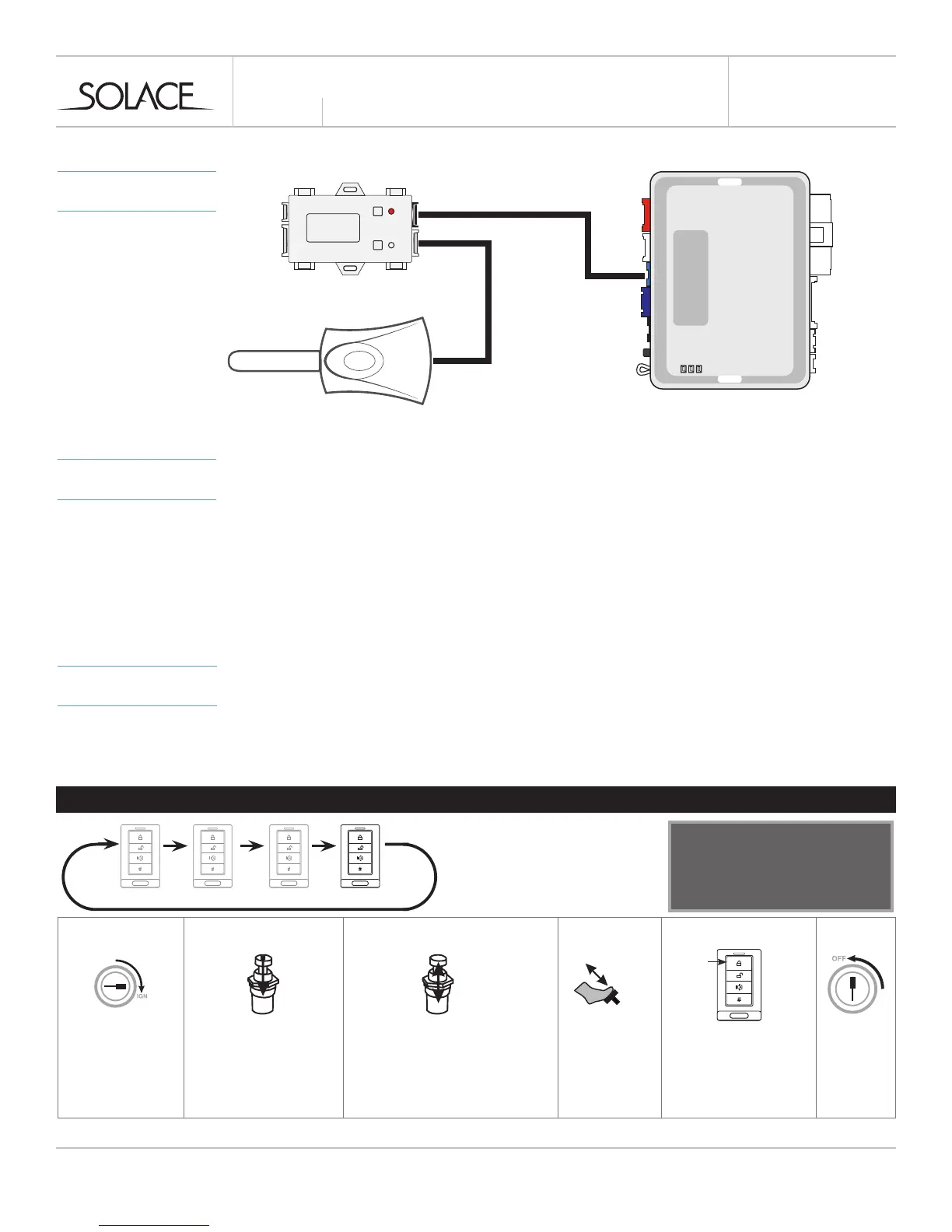
CONNECTIONS
solaceremotestarters.com
REV112316
SIC3-RFK & EVO-ONE
PROGRAMMING
MODULE
PROGRAM SIC3-RFK DATA PROTOCOL TO OPTION 4 - IDATA / FORTIN RF
1 Run FlashLink Manager, plug in EVO-ONE
2 Click Toggle to switch to Remote Starter Connection
3 Click Configuration, then select Options
4 Under RF Kits select Fortin 2
5 Click on “SAVE”
PROGRAMMING
PROGRAMMING REMOTES
1 Follow programming guide to program remotes to SIC3-RFK
2 Program remotes to EVO-ALL following instructions below
PROGRAMMING REMOTE TRANSMITTER(S)
STEP 1 STEP 2 STEP 3 STEP 4 STEP 5 STEP 6
x5
x1
1 32 4
Download the specic vehicle
installation guide, user guide or the
latest quick installation guide at:
WWW.FORTIN.CA
On each transmitter press
lock button. The LED will
stop ashing conrming
programming
Press and release the valet switch
ve times.
The parking lights will ash and the
horn/siren wil chirp each time to
conrm.
The system can learn up to a maximum
of 4 transmitters. When a 5th
transmitter is learned the the 1st
remote is erased (FIFO).
Press and hold the valet
switch until the parking
light turn ON, the horn/
siren will chirp once.
Press and release
the brake pedal
once
Turn the
Ignition ON.
Turn the
Igntion OFF
to exit
programming
*Ignition supported through data
x1



 To Next Page