PROGRAMMING
PROGRAMMING REMOTES
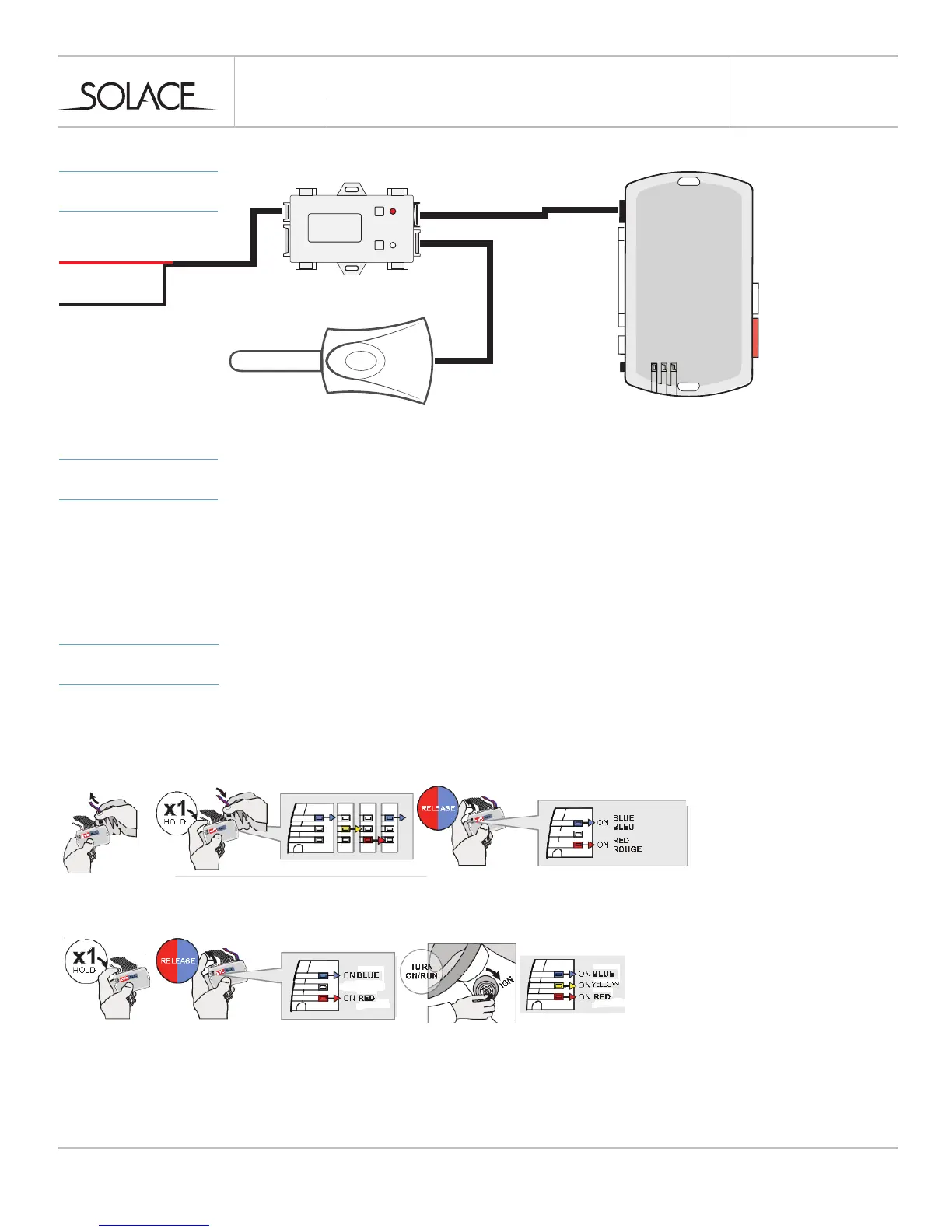
1 Follow programming guide to program remotes to SIC3-RFK
2 Program remotes to EVO-ALL following instructions below
INSTALLATION
GUIDE
MODEL
CONNECTIONS
solaceremotestarters.com
REV112316
SIC3-RFK & EVO-ALL (STANDALONE FW.)
PROGRAMMING
MODULE
PROGRAM SIC3-RFK DATA PROTOCOL TO OPTION 4 - IDATA / FORTIN RF
1 Run FlashLink Manager, plug in EVO-ALL
2 Click on “EVO-ALL OPTIONS” Tab
3 Activate “SUPPORTED RF KITS” and Option “H2”
4 Click on “SAVE OPTIONS”
5 Wait for “Options Saved” Message to appear.
RED - 12V+
BLACK - GROUND (-)
*Not required when using a T-Harness
(use datalink cable supplied with EVO)
1 To program remotes to the EVO-ALL, Press and hold the FORTIN programming button. Insert the 4‐Pin (Data‐Link)
connector. Release the programming button when the LED’s are BLUE AND RED.
2 Press and hold the FORTIN programming button again for 5 seconds (Blue and Red will go Off and back On after 5
seconds). Turn ignition On, the Yellow LED will turn On.
3 Press the LOCK button on remotes you wish to program one at a time. All remotes must be program at the same
time. The BLUE and RED LED’s will flash once to confirm each remote is coded.
4 Turn Ignition OFF
*Ignition supported through data



 To Next Page