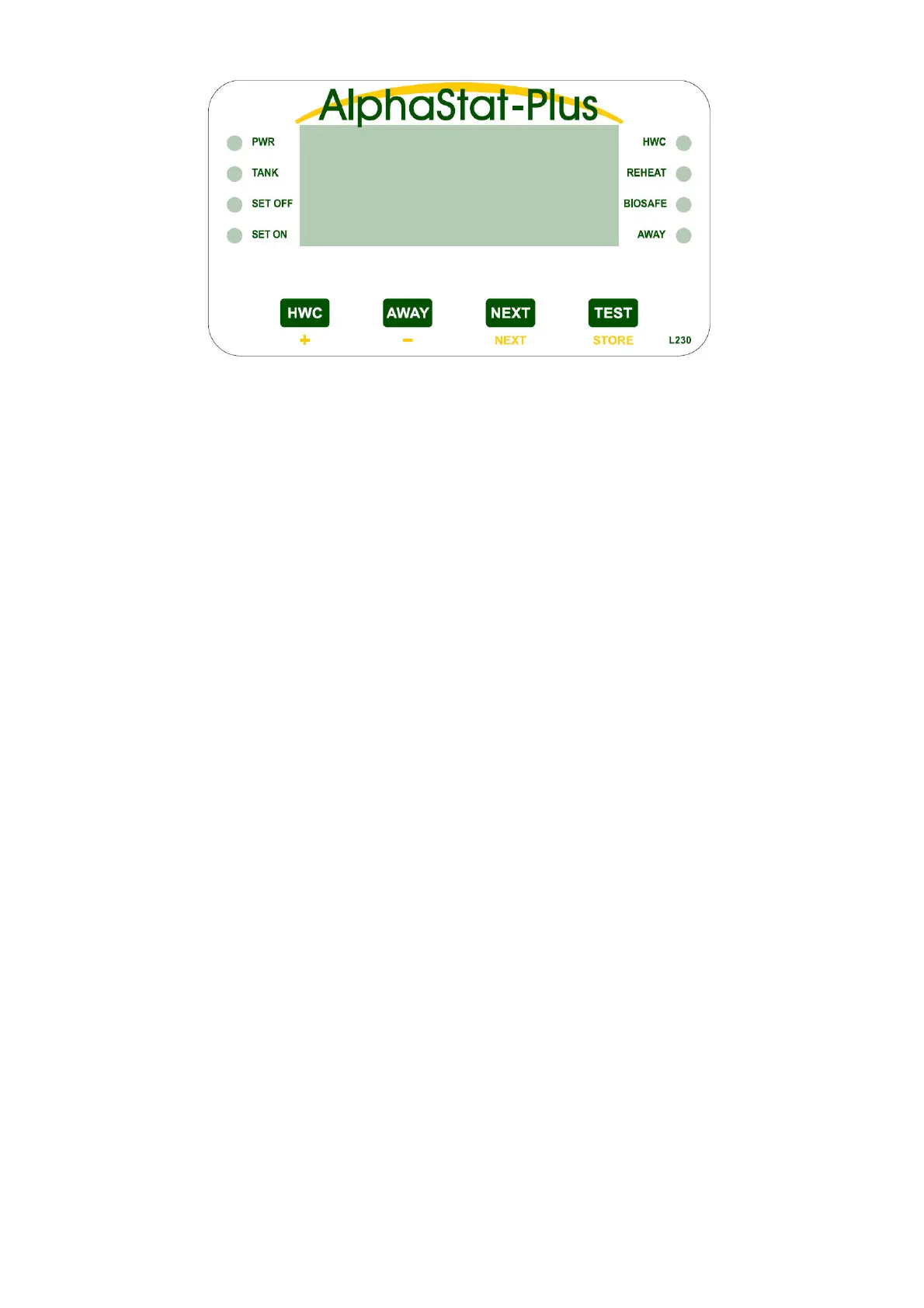
The ‘PWR’ light on indicates that power is being applied to the unit.
‘TANK’, ‘SET OFF’ and ‘SET ON’ lights will be on to indicate which temperature is being displayed.
Only 1 of the 3 can ever be on.
The ‘HWC’ light will be on when the HWC element is on.
The ‘REHEAT’ light on indicates that the cylinder has dropped below the ‘SET ON’ point and the
element has turned on. The controller will remain in this mode until the ‘SET OFF’ point is reached.
The ‘BIOSAFE’ light comes on, along with the HWC element, when 72 hours have passed without the
cylinder reaching a safe temperature. The light and element will turn off once a safe temperature has been
reached.
The ‘AWAY’ light flashes to indicate that the user has placed the controller in a suspended state. No
power will be applied to the HWC until the ‘AWAY’ button is pressed again to cancel it. The AlphaStat will
remember the ‘AWAY’ mode even if the power goes off and comes on again.
The ‘HWC’ button puts the controller into ‘Demand’ mode, initiating a manual reheat of the hot water
cylinder to a preset demand temperature. Only the HWC light will come on in this mode. To cancel
‘Demand mode early, press the HWC button again.
The ‘AWAY’ button puts the controller into ‘AWAY’ mode; to cancel press the ‘AWAY’ button again.
The ‘NEXT’ button will step from Tank to Set Off to Set On and the display will show the relevant
temperature in C. If the Tank sensor is below -20C the display reads ‘Lo’. If the Tank sensor is above 140C
the display reads ‘Hi’. If the sensor is outside the specified temperature range of -40C to 150C then the
Display will read ‘SSd’ and the ‘NEXT’ button is disabled.
‘SET OFF’ and ‘SET ON’ temperatures may be changed while they are displayed, by pressing the
buttons marked with ‘+’ and ‘-’ in yellow (‘HWC’ and ‘AWAY’). The limits are 20C and 75C, but note that the
‘SET OFF’ temperature will always be higher than the ‘SET ON’ temperature. If sixty seconds pass and no
buttons have been pressed, the display reverts to ‘TANK’.
The ‘TEST’ button will check the system (all lights flash) then display the number of times the element
has been on. This count will reset and start again after ‘999’.
Optional System Enhancements.
SolaStat-Rly An external Slave Relay Module for HWC control.
SolaData A data comms option that will send what the AlphaStat-Plus is doing to your PC and
visually present the information with graphs, logic states and status information.
AlphaStat-Plus Display Panel Description.
19.08-5


 To Next Page