Solax Mobie Owner’s Manual V1.0 Page 26
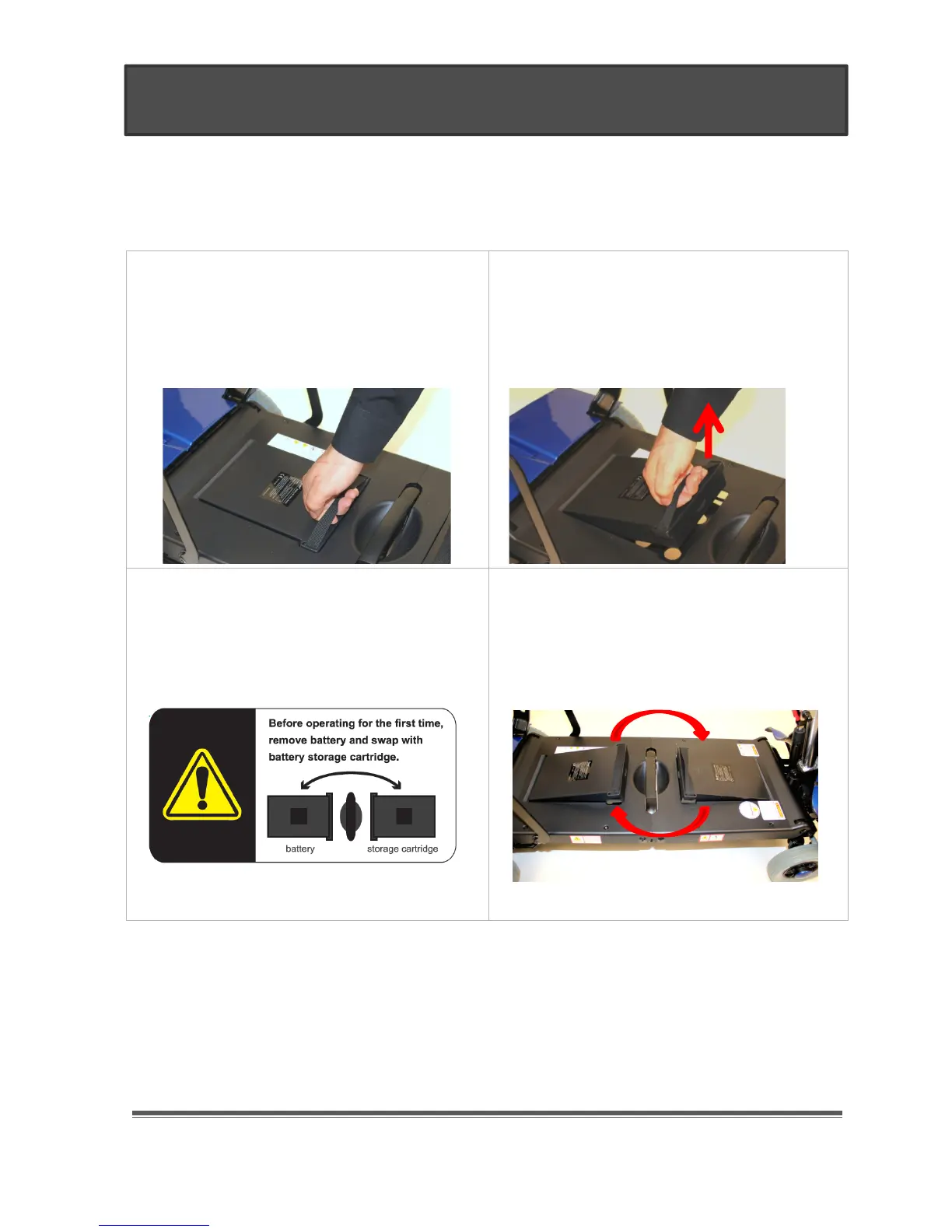
For safety reasons, the lithium battery does not shipped pre-installed. Instead it is shipped in
the battery backup storage compartment, while a “Dummy” battery cartridge is housed in the
battery compartment. You will need to swap these two to power-up your Mobile.
1. You can start by removing the
“Dummy” battery cartridge under the
seat. Grab the battery strap firmly.
2. Pull up until the cartridge is
dislodged. Be careful not to hit your
hand on the bottom seat metal bar
when pulling up. Repeat the same
steps for the battery.
3. Swap the battery with the “dummy”
battery cartridge as the label in the
middle of the floorboard illustrates.
4. Once you swap the units. Make sure
the battery is firmly locked in place.
You will need to “Fully” charge the
battery before operating the Mobie for
the first time,
IV. Installing the Battery


 To Next Page