Getting familiar with the control panel
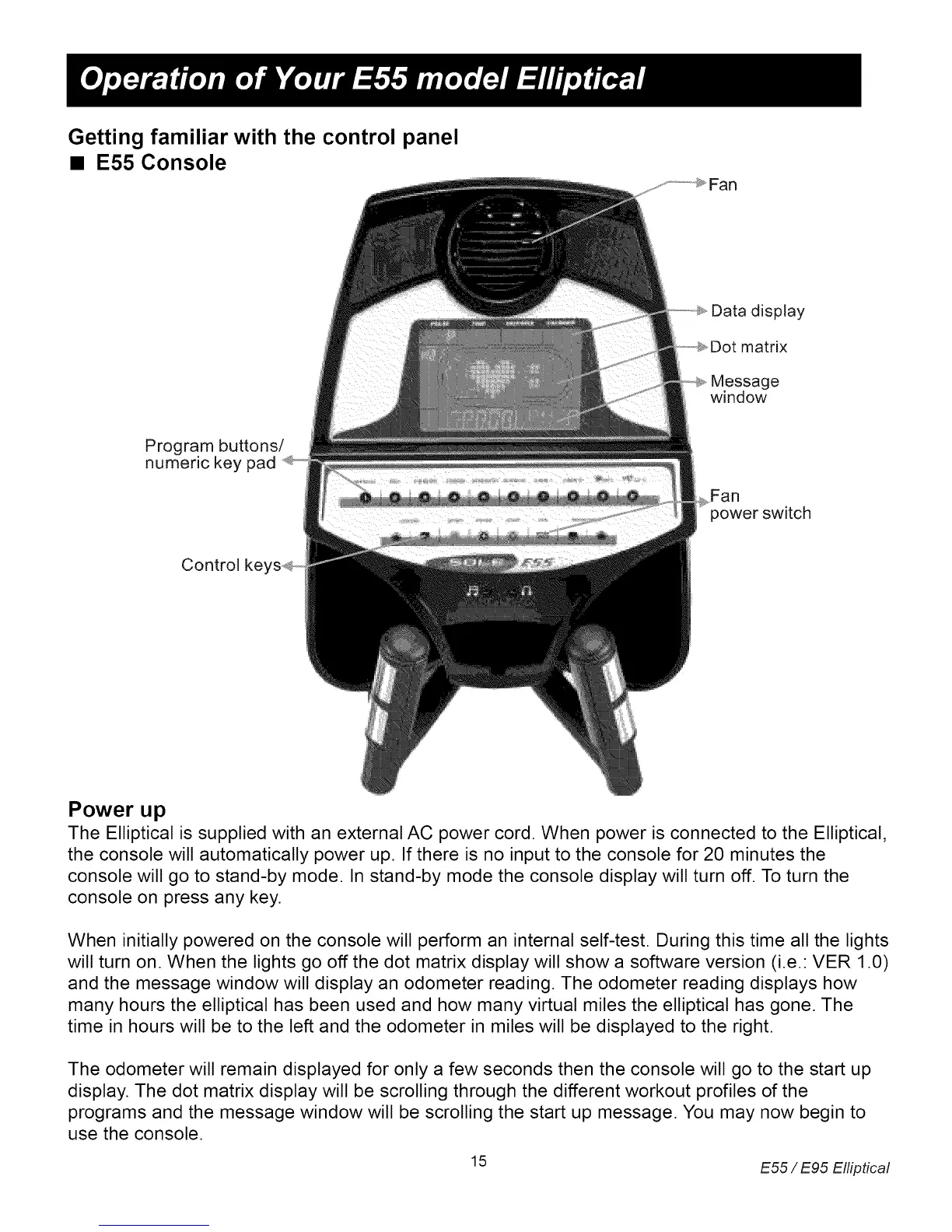
• E55 Console
Data display
matrix
Message
window
Program buttons/
numeric key pad
Fan
power switch
Control ke,
Power up
The Elliptical is supplied with an external AC power cord. When power is connected to the Elliptical,
the console will automatically power up. If there is no input to the console for 20 minutes the
console will go to stand-by mode. In stand-by mode the console display will turn off. To turn the
console on press any key.
When initially powered on the console will perform an internal self-test. During this time all the lights
will turn on. When the lights go off the dot matrix display will show a software version (i.e.: VER 1.0)
and the message window will display an odometer reading. The odometer reading displays how
many hours the elliptical has been used and how many virtual miles the elliptical has gone. The
time in hours will be to the left and the odometer in miles will be displayed to the right.
The odometer will remain displayed for only a few seconds then the console will go to the start up
display. The dot matrix display will be scrolling through the different workout profiles of the
programs and the message window will be scrolling the start up message. You may now begin to
use the console.
15 E55 / E95 Elliptical


 To Next Page