14
F80 / F83 / F85 CONSOLES
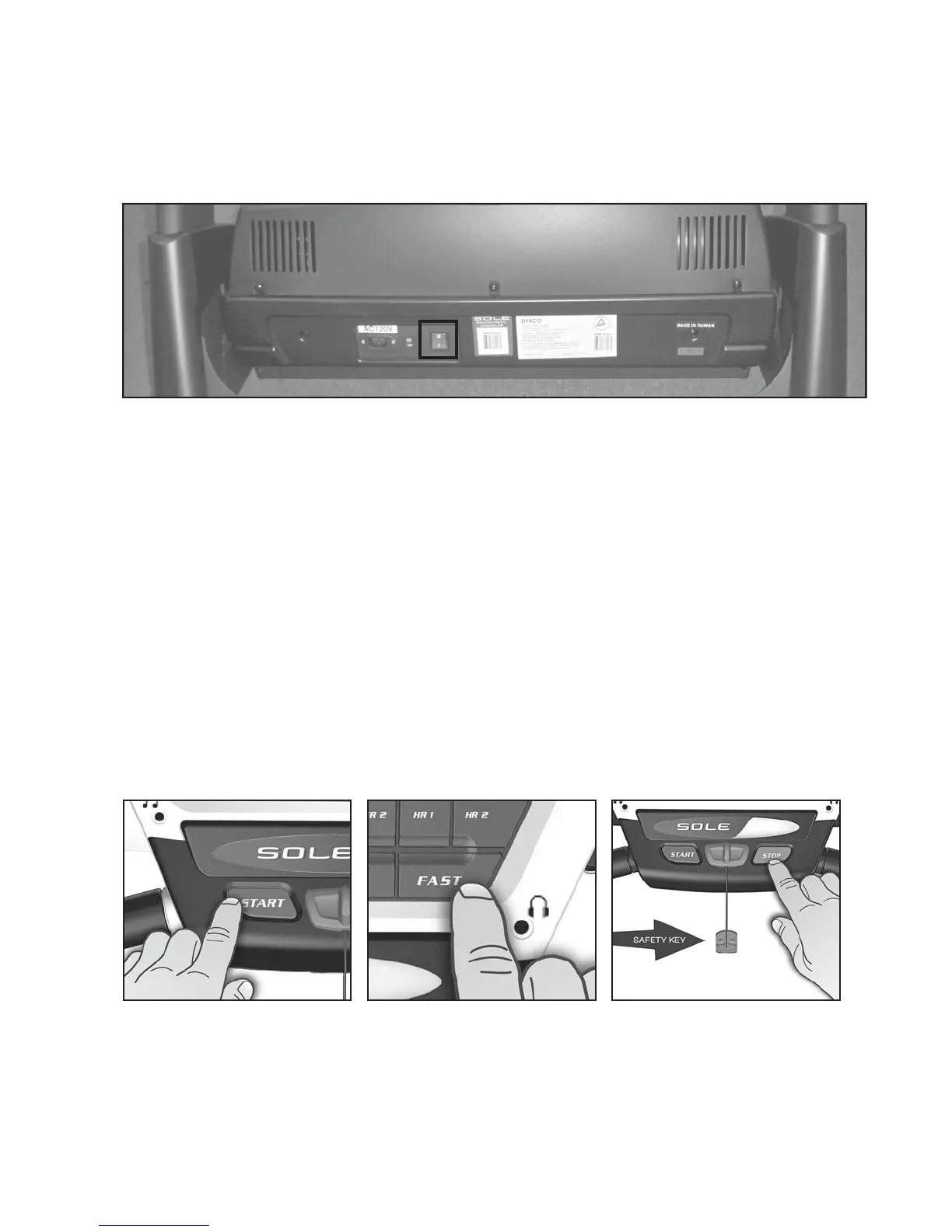
Power the treadmill on by plugging it into an appropriate wall outlet, then turn on the power
switch located at the front of the treadmill below the motor hood. Ensure that the Safety Key is
installed, as the treadmill will not power on without it (see assembly step 7 for reference).
When the power is turned on, a message will scroll across the dot matrix showing the current
software version. Then the Time and Distance windows will display Odometer readings for a
short time, Time window will show how many hours the treadmill has been in use and the
Distance window will show how many miles (or Kilometers if the treadmill is set to metric
readings) the treadmill has gone. The treadmill will then enter idle mode, which is the starting
point for operation.
GETTING STARTED
1. Attach the Safety Key to wake display up (if not already on).
2. Press the Start key to begin belt movement then adjust to the desired speed using the Fast
/ Slow keys (console or handgrip). You may also use the Quick speed keys 2, 4, 6, 8 or 12 to
adjust the speed.
3. To slow tread-belt press and hold the Slow key (console or handgrip) to the desired speed.
You may also press the Quick speed adjust keys, 2 through 12.
4. To stop the tread-belt press Stop key or pull away Safety Key.
QUICK-START OPERATION
F83 / F85 TREADMILL



 To Next Page