7
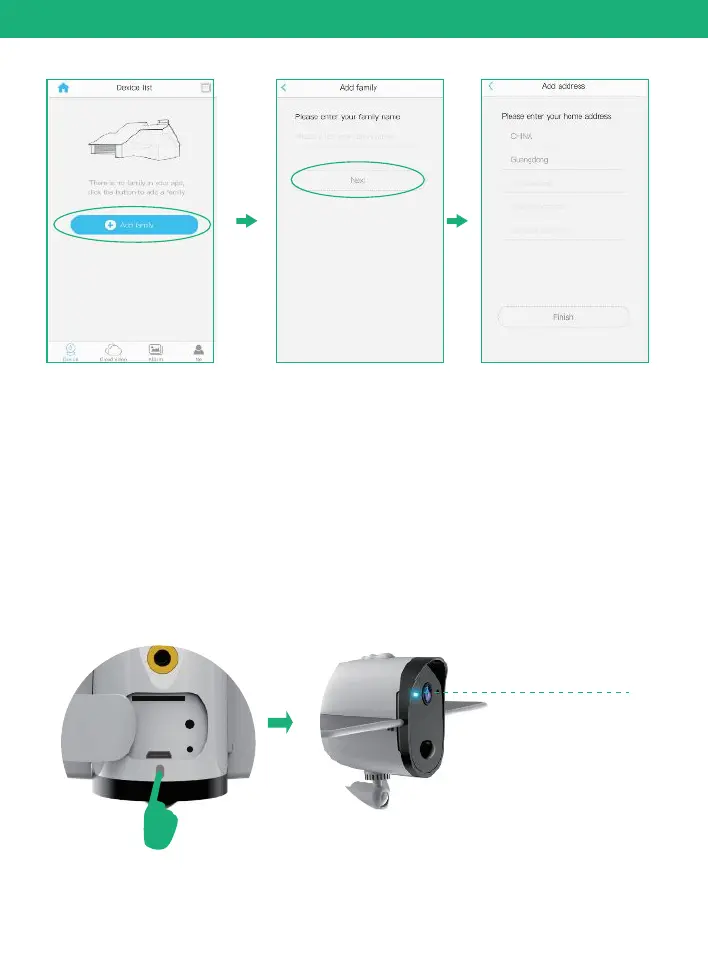
In-App Setup
Press the power button to turn on the camera, after 3
seconds, LED flashes blue. Then you will hear the following
voice “The camera is now ready to begin pairing”.
5. Turn on the camera
Flashes blue
4. Connect your phone to 2.4Ghz wifi first.
Soliom camera can only be paired up with 2.4g Wi-Fi network.
(It's ok to use Cell phone 4G data to live viewing it after the
camera was Paired up with 2.4g Wi-Fi network firstly.)


 To Next Page