FH 04 00
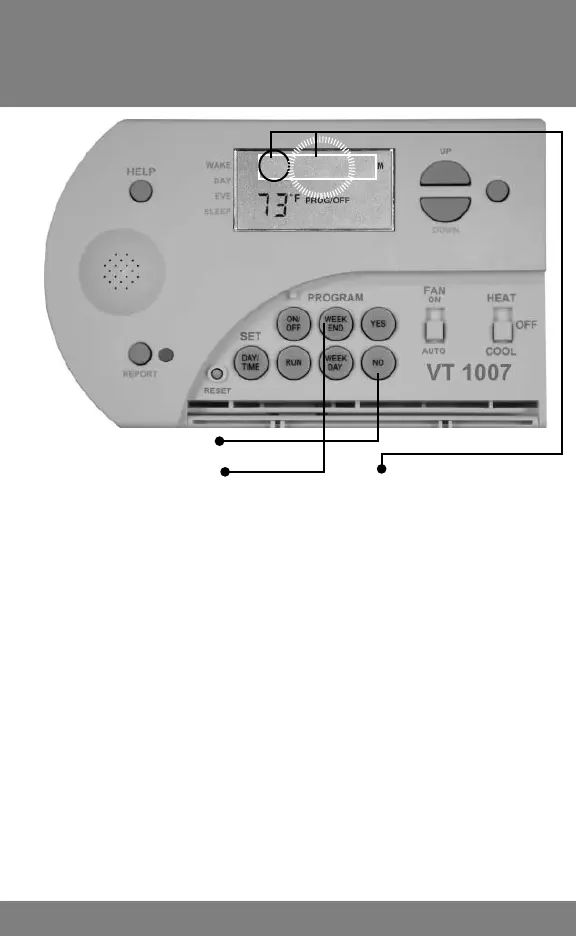
1. Press and HOLD NO, then
2. Press and HOLD WEEK END until SET POINT
TEMPERATURE displays FP (Filter Period) or FH (Filter
Hours). The number of months that has elapsed or hours the
system has been operating will be displayed.
3. Program will automatically advance to SP (Service Period) or
SH (Service Hours). The number of months that has elapsed
or hours the system has been operating will be displayed.
4. Program will automatically advance to ULP (UV Light Period)
or ULH (UV Light Hours). The number of months that has
elapsed or hours the system has been operating will be
displayed.
Quickly Review All Settings
(Filter, Service, UV Light, Cycle Rate & 2nd Stage
Differential)
To quickly review all settings for CHK Filter, CFS, ULV, Cycle Rate
and 2nd Stage Differential, press and hold NO then WEEKEND.
When FP or FH appears press YES to view all current settings.
Reviewing Filter and
Service Months (or Hours)
12



 To Next Page