The Somfy Connectivity Kit is a smart home device designed to integrate and control various Somfy products, offering users a centralized and convenient way to manage their home's automated systems. This kit acts as a bridge, connecting Somfy's range of motorized solutions, such as blinds, shutters, and curtains, to a user-friendly mobile application. The primary function of the Connectivity Kit is to enable remote control and automation of these devices, enhancing comfort, security, and energy efficiency within the home.
Function Description:
The Somfy Connectivity Kit serves as the central hub for a smart home ecosystem built around Somfy products. Its core function is to facilitate communication between Somfy's motorized devices and the user's smartphone or tablet via the TaHoma® app. This connectivity allows users to:
- Control Devices Remotely: Operate individual or groups of Somfy products from anywhere with an internet connection. For example, users can open or close their blinds while away from home, ensuring privacy or protecting interiors from excessive sun exposure.
- Schedule Automation: Create personalized schedules for their devices. This means blinds can automatically open at sunrise and close at sunset, or shutters can be programmed to close at specific times for enhanced security.
- Create Scenarios: Combine multiple actions into a single command or scenario. A "leaving home" scenario, for instance, could involve closing all shutters, turning off lights (if integrated with compatible smart lighting), and activating an alarm system.
- Voice Control Integration: The kit supports integration with popular voice assistants (availability depending on countries), allowing users to control their Somfy devices using simple voice commands, adding a layer of hands-free convenience.
- Monitor Device Status: Check the current status of their connected devices through the app, providing peace of mind and ensuring that everything is as it should be.
- Expandable System: The Connectivity Kit is designed to be scalable, allowing users to add more Somfy products over time and integrate them into their existing smart home setup.
The kit operates by connecting to the home's Wi-Fi network, specifically requiring a 2.4 GHz network secured with a password. It utilizes Bluetooth during the initial setup process to establish a connection with the user's mobile device for configuration. Once set up, it provides a robust and reliable connection for controlling all integrated Somfy devices.
Usage Features:
The Somfy Connectivity Kit is designed for ease of use, from installation to daily operation.
- Simple Installation Process: The setup begins with powering the Connectivity Kit, either by plugging it into a USB adapter (not included, requiring a DC 5V 0.5A output) or directly into an always-powered USB port. Once powered, the user downloads and installs the TaHoma® app on their smartphone or tablet. The app guides the user through the remaining steps, which include:
- Launching the TaHoma® app: The user opens the app on their device.
- Starting Connectivity Kit Installation: Within the app, the user initiates the setup process for the Connectivity Kit.
- Plugging in the power supply: As mentioned, ensuring the kit is powered.
- Connecting to the internet: The app prompts the user to accept Bluetooth access to facilitate the connection. The user then selects their home's 2.4 GHz Wi-Fi network and enters the password.
- Creating or Logging into a TaHoma® Account: Users either create a new account by entering their email address and password or log in to an existing one.
- Following On-Screen Instructions: The app guides the user through personalizing their account by entering their name and surname, accepting terms and conditions, and authorizing notifications for a better user experience.
- Intuitive Mobile Application (TaHoma® app): The TaHoma® app is the primary interface for interacting with the Connectivity Kit and connected devices. Its design focuses on simplicity and accessibility, allowing users to:
- Add Products: Easily discover and add new Somfy motorized products to the system. The app typically provides clear instructions for pairing each device.
- Individual and Group Control: Control individual devices or group them for simultaneous operation. For example, all living room blinds can be opened or closed with a single tap.
- Personalized Schedules: Set up recurring schedules for devices based on time of day, day of the week, or even sunrise/sunset times, adapting to seasonal changes.
- Scenario Creation: Design custom scenarios that trigger multiple actions across different devices. For instance, a "movie night" scenario could close the blinds, dim the lights, and lower a projection screen.
- Voice Control: Once integrated with a compatible voice assistant, users can issue commands like "Hey [Voice Assistant], open the kitchen blinds" for hands-free operation.
- Notifications: Receive alerts and notifications about device status or scheduled actions, keeping the user informed about their home's automation.
- Enhanced Home Comfort and Security: By automating and remotely controlling devices, the Connectivity Kit contributes to a more comfortable living environment and improved home security. Automated schedules can give the impression of an occupied home, deterring potential intruders.
Maintenance Features:
The Somfy Connectivity Kit is designed to be a low-maintenance device, focusing on reliable operation once installed.
- Software Updates: The TaHoma® app and the Connectivity Kit itself will likely receive periodic software updates. These updates are typically delivered over-the-air (OTA) and are crucial for:
- Improving Performance: Enhancing the speed and responsiveness of the system.
- Adding New Features: Introducing new functionalities or integrations with other smart home platforms.
- Enhancing Security: Patching vulnerabilities and ensuring the system remains secure against cyber threats.
- Bug Fixes: Resolving any software issues or glitches that may arise.
Users are usually notified through the TaHoma® app when updates are available and can initiate them with a few taps.
- Stable Power Supply: Ensuring the Connectivity Kit is connected to a stable and always-powered USB port is the primary "maintenance" aspect. Intermittent power can disrupt connectivity and device control.
- Network Stability: A stable 2.4 GHz Wi-Fi network connection is essential for the kit's optimal performance. Users should ensure their Wi-Fi router is functioning correctly and provides adequate coverage to the location of the Connectivity Kit.
- App Maintenance: Keeping the TaHoma® app updated on the user's smartphone or tablet is also important for compatibility and access to the latest features.
- Troubleshooting: In case of connectivity issues, the app often provides basic troubleshooting steps. Common solutions might include restarting the Connectivity Kit, checking the Wi-Fi connection, or re-pairing devices if necessary. The device itself has minimal physical interaction points (e.g., a "Prog" button, likely for pairing or reset), indicating that most maintenance and troubleshooting are handled through the software interface.
Overall, the Somfy Connectivity Kit is a robust and user-friendly solution for transforming a house into a smart home, offering extensive control and automation capabilities for Somfy's range of motorized products with minimal ongoing maintenance requirements.

 Need help?
 General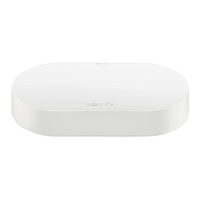

 To Next Page