84
CONTENTS
WELCOME 2
1. SAFETY 3
2. NINA TIMER IO REMOTE CONTROL 5
3. USING NINA TIMER IO 16
Control an item of equipment 16
My function 18
Natural Control function 22
Launch a scenario 27
Sunlight Function 28
Alarm function 32
Timer function 34
Create typical days 39
Program the week 57
View programmed actions 60
4. CUSTOMIZING NINA TIMER IO 68
Customize items of equipment 68
Customize groups 72
Customize scenarios 78
Define timer settings 83
Customize remote control 88
5. ADVANCED SETTINGS 94
6. TROUBLESHOOTING 107
7. ABOUT NINA TIMER IO 108
Copyright © 2017 - 2021 SOMFY ACTIVITÉS SA, Société Anonyme. All rights reserved.
Define timer settings
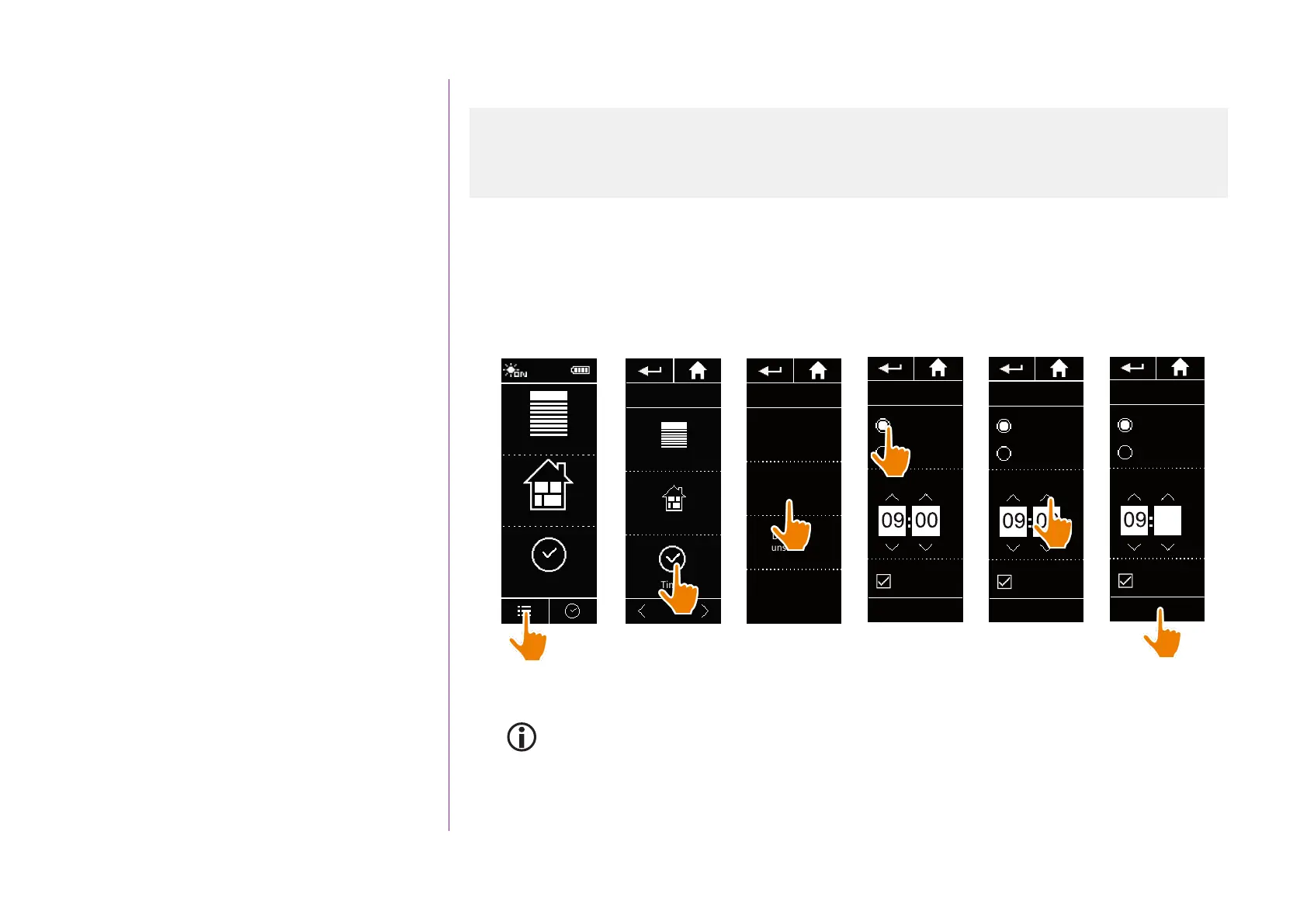
Set the time, the time format, automatic winter time/summer time change
In the Settings menu, select Timer settings and choose EDIT time.
Select the desired time format and set the time using the arrows.
By default, the automatic change between winter time and summer time is enabled. Untick the relevant tick box
to make this change manually:
Equipment
Groups
Timer
12:34
Equipment
Groups
Timer
1/2
SETTINGS TIMER
EDIT Date
EDIT
Sunset time
EDIT
Notification
of next actions
EDIT Time
Time format
Time adjustment
Winter time
Auto adjust
OK
am
0 - 12 h
0 - 24 h
Time format
Time adjustment
Winter time
Auto adjust
OK
am
0 - 12 h
0 - 24 h
Time format
Time adjustment
Winter time
Auto adjust
OK
am
0 - 12 h
0 - 24 h
10
The changeover to summer time takes place on the last Sunday of March and the changeover to winter
time on the last Sunday of October. If the Automatic summer/winter time setting tick box is ticked, the
change is made automatically.
1
2
3
4
5
6
Set the date 83
Set the time, the time format, automatic winter time/summer time change 84
Set the twilight 85
Set notifications for the next actions 87



 To Next Page