Operation
Safety instructions
• Keep children, disabled persons and animals away from the gate.
• Never reach into a moving gate or moving parts.
• Dot not drive through the gate until it has been fully opened.
• There is a risk of persons being crushed or cut by the mechanism or
sharp edges of the gate.
Opening the gate
1. Press the pulse transmitter (1) or handheld transmitter button once.
▫ If the button is pressed during the gate OPEN movement,
the gate stops. Depending on DIP switch 7.
▫ It closes when pressed again.
Closing the gate
1. Press button (1) or handheld transmitter button once.
▫ If the button is pressed during the gate CLOSE movement,
the gate stops. Depending on DIP switch 7.
▫ It opens when pressed again.
Emergency release
ATTENTION
Before emergency release always disconnect the power
supply to prevent unexpected movements of the gate.
Otherwise unexpected movements of the gate may cause
injury.
IMPORTANT INFORMATION!
It can be locked and released in any gate position.
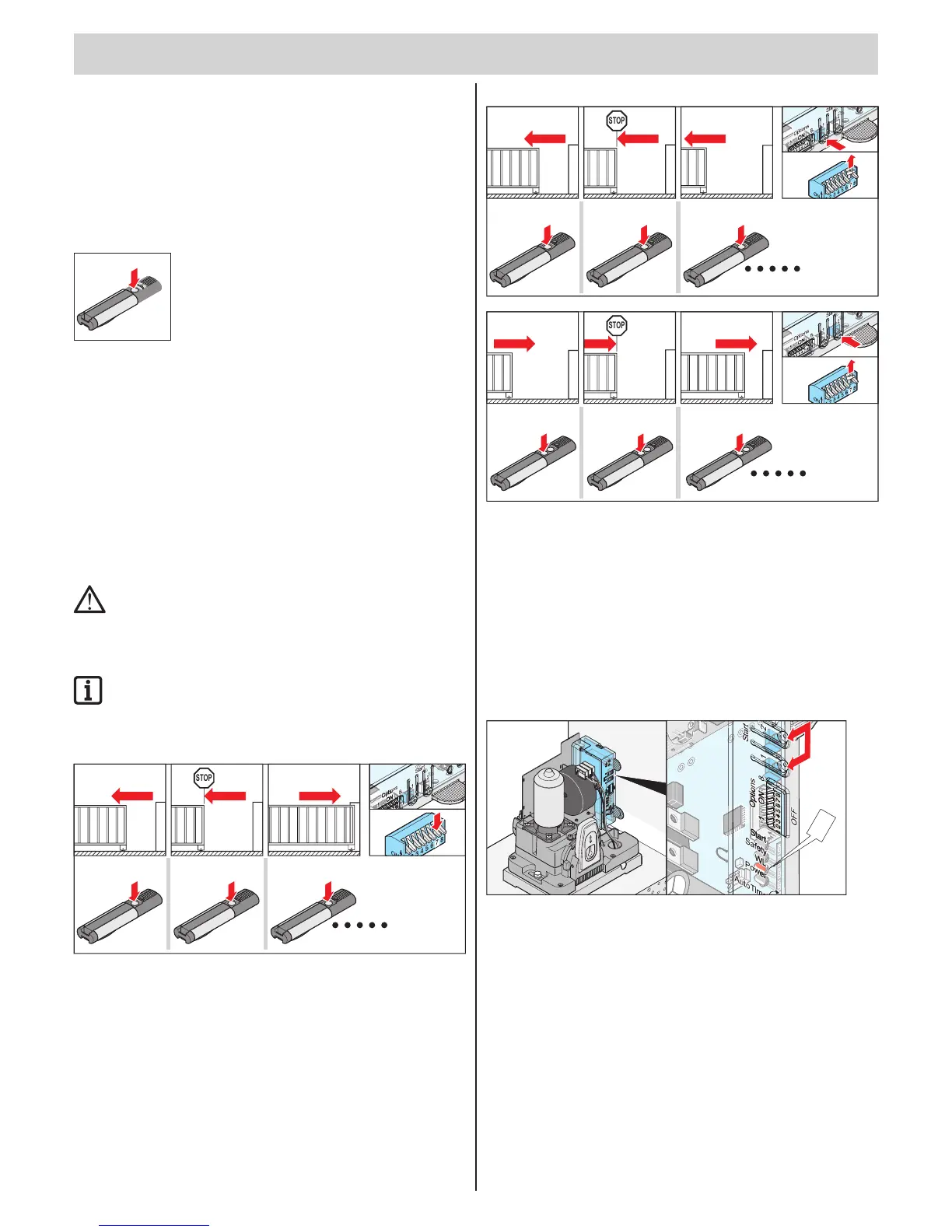
Pulse sequence of gate movement
5
4321
STOP
1x
1x
1x
Standard setting for all operators
• DIP 7 OFF:
OPEN - STOP - CLOSE - STOP - OPEN - etc.
Set pulse sequence with DIP switch 7.
STOP
1x
1x
1x
O
65
4321
• DIP 7 ON:
Button 1: OPEN - STOP - OPEN - STOP - etc.
Button 2: CLOSED - STOP - CLOSED - STOP - CLOSED - etc.
Control unit reset
All saved values (e.g. runtime, opening force) are deleted; the operator
learning process must be repeated.
Resetting the control unit
• see the TorMinal manual to change the maximum speed or shut-off force.
• if the operator learned incorrect values or the gate has been changed.
WL
1. Press button (1 + 2) until the "WL" LED is off.
⇒ "WL" LED off - force values deleted.
2. Release button (1+2).
Break-in protection due to
automatic lock
If an attempt is made to open the gate with force, the operator presses
automatically against it via its motor capacity.



 To Next Page