The Command15 Control Panel provides the
facility with a means of automatically locking
out, tagging, disabling, and resetting a group
of SonicAire fans in the event that there is a
fire alarm condition by using a signal from the
facility fire alarm panel.
An E-Stop button on the face of the panel can
be depressed by any employee that observes a
condition that requires immediate shut down of
the SonicAire fans. The panel is also equipped
with a two-position keyed switch which allows
the override of the Fire Alarm signal input for
system testing or maintenance.
The Command15 Control Panel contains a
fifteen (15) horsepower Variable Frequency
Drive (VFD) that can be operated at 30, 40, 50,
and 60 Hz, operated through an LCD panel.
Model: Command15
OWNER’S MANUAL
COMMAND15 CONTROL PANEL
Original Instructions
Please read and save these instructions.
NEMA Rating: Type 4
Table of Contents
Installation 1
LCD screen controls 1
EPIC Loop 6
Resetting time and date 8
Mechanical controls 9
Wiring Diagrams 10
SonicAire provides control panels as optional equipment for use
with SonicAire fans. These panels contain a variety of safety and
functional control features for operating your SonicAire fan safely
and efficiently.
2'-3 1/4"
[692 mm]
2'-1 3/4"
[654 mm]
1'-7"
[483 mm]
1'-9 1/4"
[539 mm]
11"
[279 mm]
WARNING
Installation and electrical wiring must be completed by qualified persons in accordance with all applicable codes and standards.
Before servicing or cleaning the unit, disconnect the fan from the power supply and follow proper lock-out-tag-out procedures for your
location. Any cover, guard, or safety device removed for repair must be replaced as originally installed.
Ensure installation securement does not penetrate walls or ceilings where electrical components or wiring could be potentially damaged.
Fan units are not designed or intended to be mounted to movable objects.
All overhead areas must be cleaned and free of dust buildup prior to powering on fan. If fan is not in service, any dust buildup must be
cleaned prior to restarting fan.
SonicAire fans are for the prevention of dust accumulation and are not to be used for declassifying areas with dust accumulation.
1.336.712.2437 partsandservice@sonicaire.com www.sonicaire.com 042821OI/Command15/H

 Need help?
 General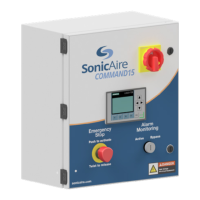

 To Next Page