Command15
Owner’s Manual
1
Installation
Mounting the enclosure
WARNING: Installation and electrical wiring must be completed by qualified person
and in accordance with applicable codes and standards.
When mounting the control panel, ensure that the enclosure is mounted to a flat, vertical
structure. There must be at least 36” of clearance directly in front of the enclosure. The
enclosure must be positioned so that the door can be fully opened. Use the 4x holes at
the corner of the mounting plate to locate and hang the panel.
Electrical installation
After installing the panel ensure the following are complete:
a. Power to the panel box (Line In)
b. Load conductors to fans
c. Fire Alarm signal wire to panel box (provide 120VAC, 12VDC, or 24VDC to panel
relay)
Note: Ice cube style fire alarm relays for 120VAC, 12VDC, and 24VDC are supplied with
the SonicCommand panel. Select the corresponding relay for the supplied fire alarm
signal voltage and insert it into the relay base (CR1 in Figure 6.4).
LCD screen controls
-VAR-OFF FANS ON-VAR-OFF FANS ON
FIRE ALARM ACTIVEFIRE ALARM ACTIVE
F1-OFF/ON CLEAN MAXF1-OFF/ON CLEAN MAX
F2-VAR SPEEDF2-VAR SPEED
F3-TIMER-OFF-F3-TIMER-OFF-
F3-CYCLE-ON-F3-CYCLE-ON-
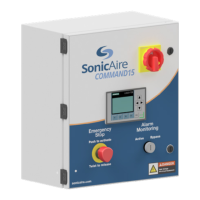
The Command control panel is equipped
with a keypad and LCD Screen Control
System for programming and operating
your SonicAire fan system. Use the
information in this section to understand
the functions and features associated
with the LCD Panel Control System.
Note: The time and date can be viewed
by pressing the down arrow while on the
default screens. If these settings aren’t
accurate, see “Resetting time and date” on page 8.


 To Next Page