PANEL INTRODUCTION
2
PANEL INTRODUCTION
Multi-Effects Processor
BT
VALUE/VOL
TUNER
1
2
3
1.
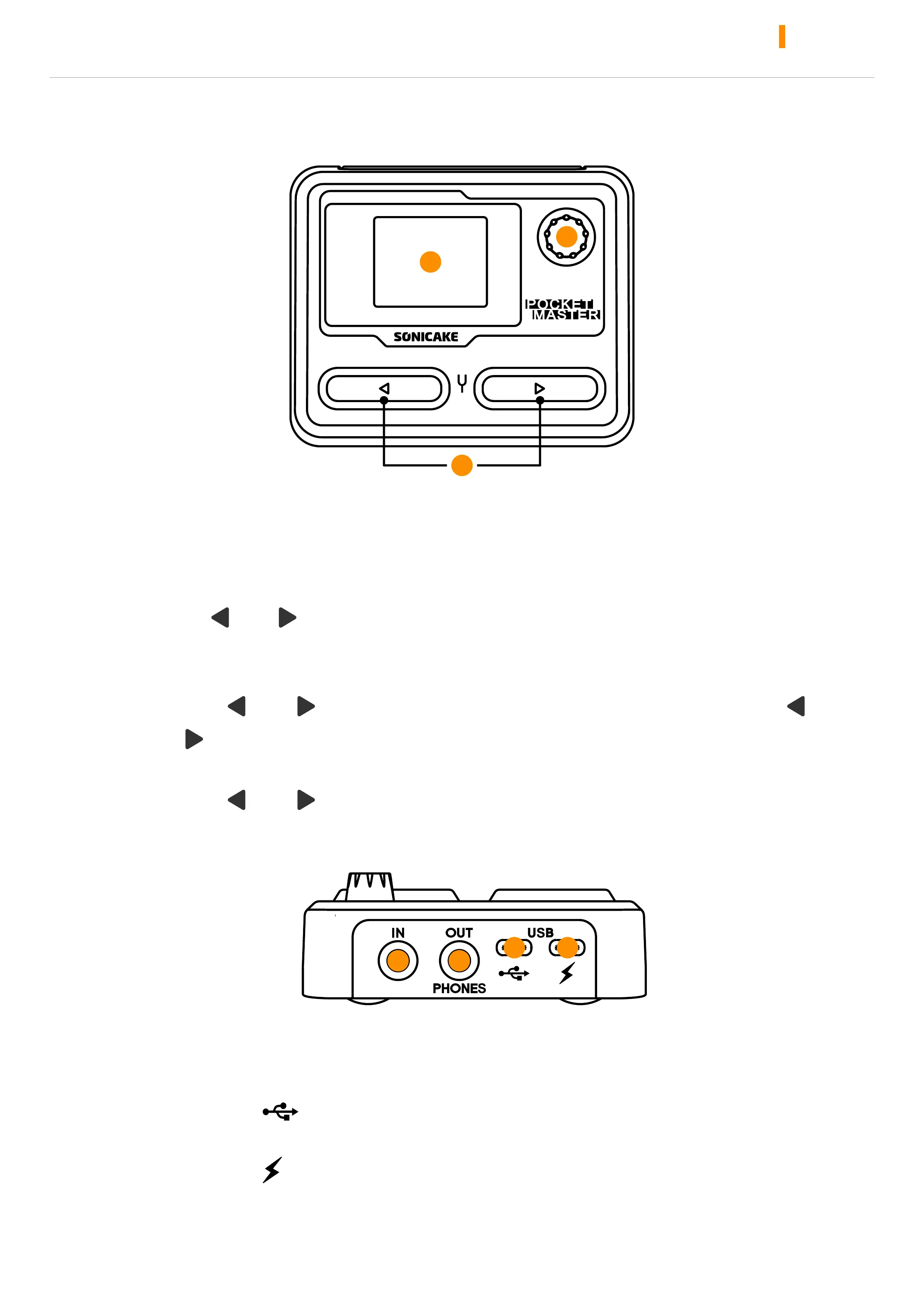
1.77" LCD color screen, to display preset information, battery level, BT
status, and other operational information
2.
Hold to turn on the device or enter the option menu; turn or press the
knob to select or adjusts parameters
3.
Press “ ” / “ ” to switch presets, switch effect modules and
various options
In the main menu:
Press “
” + “ ” at the same time to turn on the TUNER; hold “ ”
+ “
” at the same time to enter the loop menu
In a non-main menu:
Press “
” + “ ” at the same time to return main menu
4
5
7
6
4.
1/4" (6.35mm) TS mono input for plugging in your instrument
5.
1/4" (6.35mm) TRS stereo output for connect headphones, amps,
pedals, etc.
6.
USB Type-C to connect to a mobile phone or computer for
recording and firmware upgrade
7.
USB Type-C for device power supply and charging



 To Next Page