SonicWALL NSA 2400 Getting Started Guide Page 43
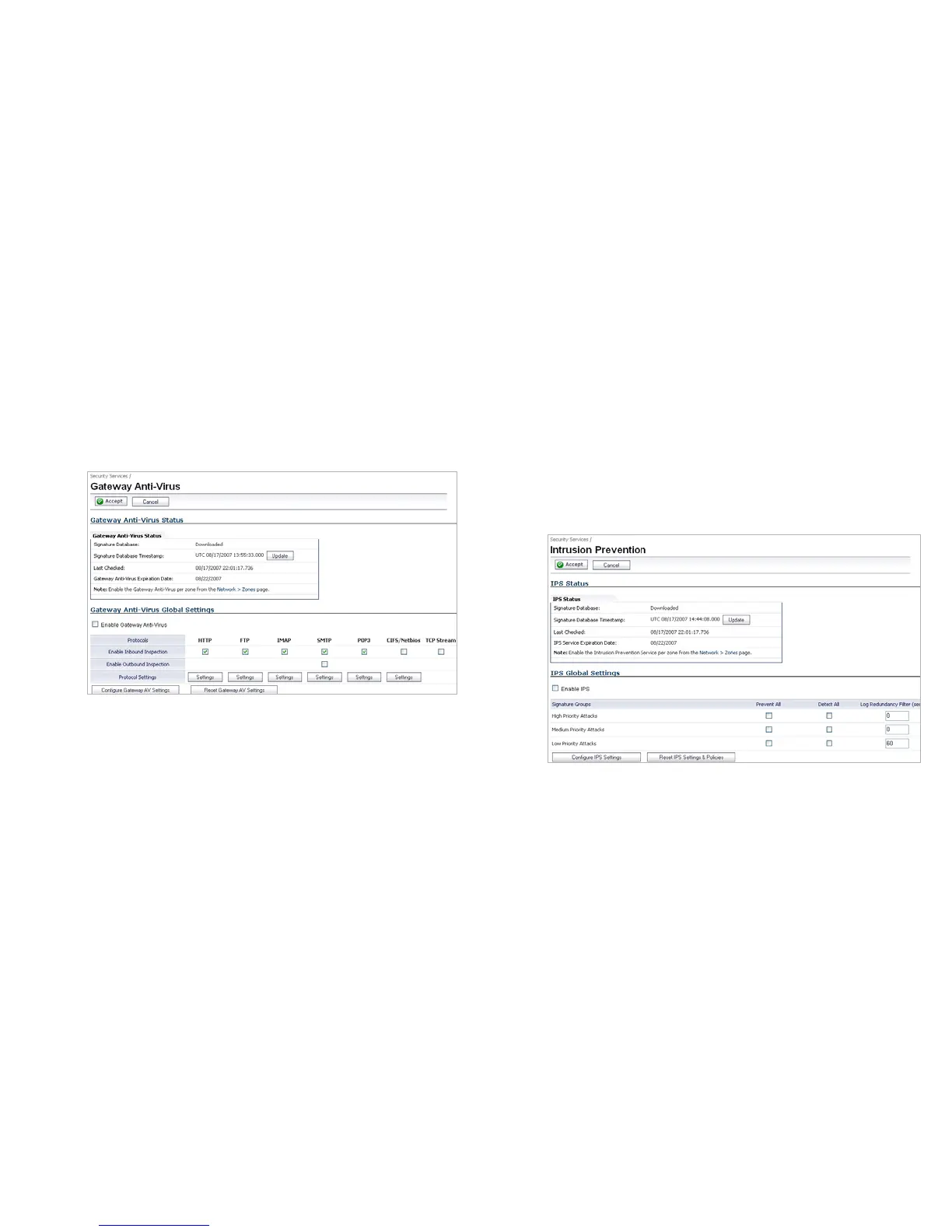
Enabling Gateway Anti-Virus
To enable Gateway Anti-Virus in SonicOS:
1. Navigate to Security Services > Gateway Anti-Virus.
2. Select the Enable Gateway Anti-Virus checkbox.
3. Choose to Enable Inbound Inspection and Enable
Outbound Inspection on the desired protocols.
4. Click the Accept button.
Enabling Intrusion Prevention Services
To enable Intrusion Prevention Services in SonicOS:
1. Navigate to Security Services > Intrusion Prevention.
2. Select the Enable Intrusion Prevention checkbox.
3. In the Signature Groups table, select the Prevent All and
Detect All checkboxes for each attack priority that you
want to prevent. Selecting the Prevent All and Detect All
check boxes for High Priority Attacks and Medium
Priority Attacks protects your network against the most
dangerous and disruptive attacks.
4. Click the Accept button.












 To Next Page