Page 6 The Front Panel
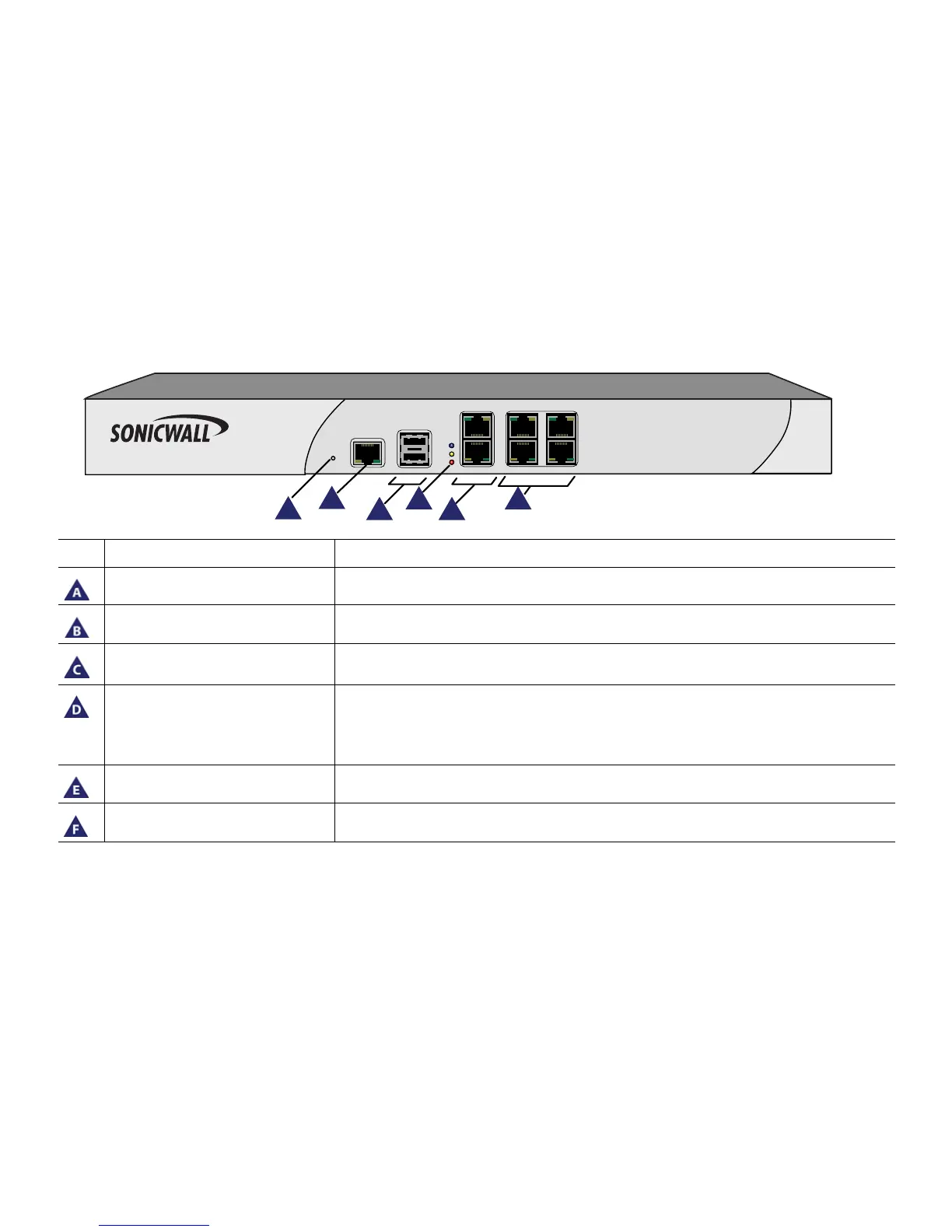
The Front Panel
Icon Feature Description
Reset Button Press and hold the button for a few seconds to manually reset the appliance using SafeMode.
Console Port Used to access the SonicOS Command Line Interface (CLI) via the DB9 -> RJ45 cable.
USB Ports (2) For future use.
LED (Top to Bottom) Power LED: Indicates the SonicWALL NSA appliance is powered on.
Test LED: Flickering: Indicates the appliance is initializing. Steady blinking: Indicates the
appliance is in SafeMode. Solid: Indicates that the appliance is in test mode.
Alarm LED: Indicates an alarm condition.
X0 (LAN), X1 (WAN) Gigabit Ethernet ports for LAN and WAN connections.
X2-X5 (LAN) Gigabit Ethernet ports for other configurable Ethernet connections.












 To Next Page