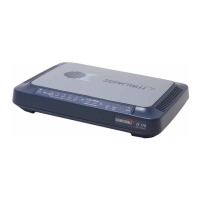
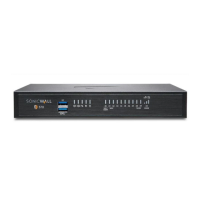
SRA 1600 Front Panel Features
Front Panel Feature Description
Console Port RJ-45 port, provides access to console messages with serial
connection (115200 Baud). Provides access to command line
interface (for future use).
USB Ports Provides access to USB interface (for future use).
Reset Button Provides access to SafeMode.
Power LED Indicates the SRA 1600 is powered on.
Test LED Indicates the SRA 1600 is in test mode.
Alarm LED Indicates a critical error or failure.
X1 Provides access to the X1 interface and to SRA resources.
X0 Default management port. Provides connectivity between the SRA
1600 and your gateway.
SRA 1600 Back Panel Features
Back Panel Feature Description
Exhaust fan Provides optimal cooling for the SRA 1600 appliance.
Power plug Provides power connection using supplied power cord.
Power switch Powers the SRA 1600 on and off.
SMA 500v Virtual Appliance
The SMA 500v Virtual Appliance is a virtual machine that runs the SMA software on a VMware platform. All software components, features, and
functionality described in this guide are supported by the SMA 500v Virtual Appliance, except High Availability and SSL Off-loading.
Deploying SMA as a virtual appliance allows leveraging of shared computing resources to optimize utilization, easy migration and reduced capital costs.
The SMA 500v Virtual Appliance provides the following benefits:
• Cost savings:
• Multiple virtual machines can run on a single server, reducing hardware costs, power consumption, and maintenance costs.
• Microsoft Windows Server is not required, eliminating the cost of the Windows license.
• Operational ease:
• In a virtual environment, it is easy to commission new servers or decommission old ones, or to bring servers up or down.
• Installation is accomplished by importing a file into the virtual environment, with no need to run an installer.
• Security:
• The SMA 500v Virtual Appliance provides the same hardened operating system that comes with the SMA/SRA hardware appliances.
The elements of basic VMware structure must be implemented prior to deploying the SMA 500v Virtual Appliance. For detailed information about
deploying the SMA 500v Virtual Appliance, see the SonicWall Inc. SMA 500v Virtual Appliance Getting Started Guide, available at: SMA
Documentation
Concepts for Secure Mobile Access
This section provides an overview of the following key concepts that the administrator should be familiar with when using the SMA/SRA appliance and
SMA web-based management interface:
• Encryption Overview
• SSL for Virtual Private Networking (VPN)
• SSL Handshake Procedure
• IPv6 Support Overview
• Portals Overview
• Domains Overview
• Application Offloading and HTTP(S) Bookmarks Overview
• Cross Domain Single Sign-On
• ActiveSync Authentication
• Network Resources Overview
• SNMP Overview
• DNS Overview
• Network Routes Overview
• NetExtender Overview
• Two-Factor Authentication Overview
• One Time Password Overview
• End Point Control Overview
• Secure Virtual Assist Overview
• Web Application Firewall Overview
Encryption Overview
Encryption enables users to encode data, making it secure from unauthorized viewers. Encryption provides a private and secure method of communication
over the Internet.












 To Next Page