SonicWallSonicPointACeGettingStartedGuide
13
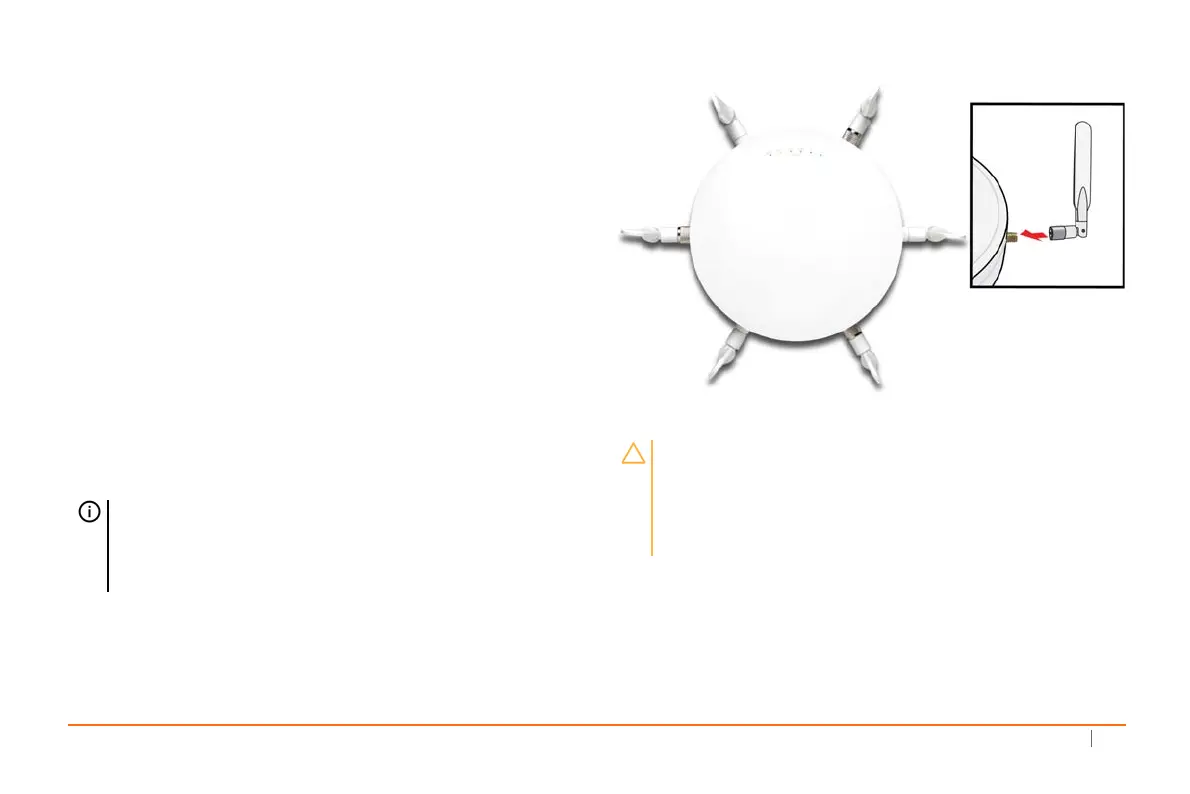
Installingantennas
ToinstalltheantennasonyourSonicPointACe
1 Removeallsixantennasfromtheirbagsandplaceone
oneachconnector.Matchthefittingswiththeantenna
style.Therearethre eofeachtype.
2Carefullyfinger‐tightenthefittings.
3Adjusttheantennasforoptimalreception.
Foroptimalwirelesscoverageinmostcases,theSonicPoint
ACeantennasshouldbeorientedvertically.
Thecirculardesign
oftheSonicPointaidesincreatingastrongmulti‐directional
wirelesssignalpattern.Inmostcases,leavingtheante nnas
straightup(asshownintheillustration)providesthebest
overallcoverage.
TIP:Theremaybea“dead”zonedirectlyunderneath
theSonicPointACewhenitismountedontheceiling
withtheantennasorientedvertically.Youcanmitigate
thisbyslightlyanglingtheantennas.
CAUTION:TheSonicPointACeusesdipoleantennas
with5.5dBiat5GHzand3.5dBiat2.4GHz.Only
antennasprovidedbySonicWallareauthorizedforuse
withtheSonicPointACe.Beawareoftheregulationsin
yourregionbeforeusingotherantennas.



 To Next Page