SonicWallSonicPointACeGettingStartedGuide
23
ConfiguringtheWLANzone
ToconfiguretheWLANzoneinSonicOS
1OntheNetwork>ZonespageintheWLANrow,click
theiconintheConfigurecolumn.
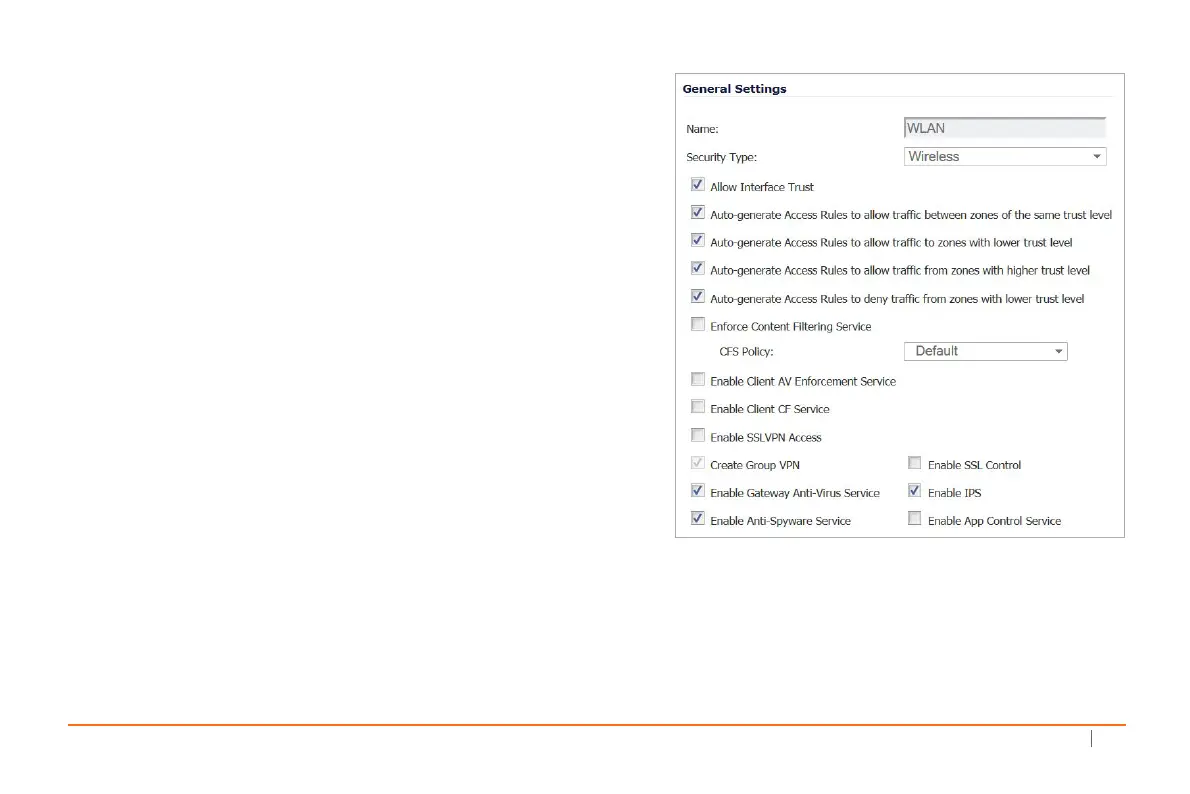
2OntheGeneraltab,selecttheAllowInterfaceTrust
settingtoautomatethecreationofAccessRulesto
allowtraffictoflowbetweentheinterfaceswithinthe
zone,regardlessoftheinterfacestowhich
thezoneis
applied.
Forex ample,iftheWLANzonehasboththeX2andX3
interfacesassignedtoit,selectingAllowInterfaceTrust
createsthenecessaryaccessrulestoallowhostson
theseinterfacestocommunicatewitheachother.
3Selectthecheckboxestoenablesecurityserviceson
thiszone.Minimally,you
wouldenableGatewayAnti‐
Virus,IPS,andAnti‐Spyware.Ifyourwirelessclients
areallrunningSonicWallClientAnti‐Virus,select
EnableClientAVEnforcementService.
4OntheGuestServicestab,optionallyconfigureguest
Internetaccess.ForinformationaboutGuestServices,
seetheSonicOS AdministrationGuide.
5OntheWireless
tab,selectOnlyallowtraffic
genera tedbyaSonicPoint/SonicPointNtoallowonly
trafficfromSonicPointstoentertheWLANzone
interfaces,providingmaximumsecurity.
6Whenfinished,clickOK.



 To Next Page